Twitter Profile Subscribed Lists
Export your subscribed Twitter lists with ease. Analyze list details, streamline engagement, and refine your content strategy with our powerful tool.
Last updated
Understanding your **Twitter audience** is a cornerstone of any successful digital strategy. **Twitter Subscriptions**, including **Twitter lists** and other **subscription features**, allow users to gain **exclusive access** to curated collections of accounts. These tools provide valuable insights
Understanding your Twitter audience is a cornerstone of any successful digital strategy. Twitter Subscriptions, including Twitter lists and other subscription features, allow users to gain exclusive access to curated collections of accounts. These tools provide valuable insights into audience preferences, competitor activity, and industry trends. However, manually tracking and analyzing these Twitter lists can be daunting, especially for businesses handling multiple individual accounts on the social media platform.
TexAu’s Twitter Profile Subscribed Lists automation transforms this challenge into a streamlined process, enabling users to efficiently gather, analyze, and act on data from these lists. By automating the collection and organization of data, TexAu provides a faster service for businesses and influencers looking to expand their subscriber base and uncover actionable insights.
In this guide, we delve into the importance of tracking Twitter Subscriptions, explore TexAu’s features, and illustrate its practical applications for businesses, influencers, and professionals. Whether you aim to refine your content strategy, monitor competitors, or discover networking opportunities, TexAu offers an automated solution that saves time and delivers results directly from your tweets tab.
Why Track Twitter Subscribed Lists?
Tracking Twitter lists is more than a data-gathering activity; it is a powerful strategy that drives audience engagement, refines content strategies, and uncovers new opportunities. This section delves into the specific benefits of monitoring Twitter Subscriptions and offers real-world scenarios to illustrate their impact.
Understanding Audience Interests
Twitter Subscriptions provide a window into what captivates your audience preferences. These lists can encompass relevant topics, from industry trends to niche interests, offering clues about the type of exclusive content your audience values. By analyzing these lists, businesses and influencers can tailor their messaging to ensure alignment with their subscriber base.
Example: A fitness brand discovers that a large segment of its audience subscribes to Twitter lists centered around plant-based nutrition and sustainable fitness practices. This insight helps the brand adjust its strategy by focusing on vegan recipes, eco-friendly workout gear, and sustainability tips. Over time, they see increased engagement from followers who identify with these values.
Scenario: A tech startup targeting millennials notices their audience subscribes to lists on personal finance and crypto investments. By incorporating content about financial tools and blockchain solutions into their strategy, they use this subscription feature to position themselves as a trusted voice in the space. For deeper engagement insights, businesses can combine Twitter list tracking with Twitter Inbox Scraper to monitor audience interactions and direct message trends.
Competitor Monitoring
Keeping tabs on competitors’ Twitter lists provides actionable insights into their strategies. By analyzing these lists, you can identify the influencers they engage with, the relevant topics they prioritize, and the trends they capitalize on. This knowledge can inform targeted campaigns and help you maintain a competitive edge.
Example: A SaaS company examines the subscribed lists of a rival business and identifies a pattern: their competitor follows lists curated by top industry influencers and trade publications. Armed with this insight, the SaaS company creates targeted campaigns to reach the same influencers, establishing their brand as a credible player.
Scenario: A boutique fashion brand tracks a larger competitor’s subscribed lists and discovers they follow lists curated by event organizers for fashion weeks. The boutique brand leverages this insight to build relationships with the same organizers, securing invites to exclusive industry events. To complement competitor analysis, marketers can use Twitter Inbox Scraper to track how competitors engage with leads via DMs.
Networking Opportunities
Twitter lists are also a treasure trove of networking possibilities. Shared interests and mutual lists can reveal collaborators, partners, or even clients who align with your goals. By identifying these shared connections, you can foster meaningful relationships that drive growth.
Example: A freelance designer notices that a marketing agency frequently subscribes to design-focused lists. Recognizing a potential alignment of interests, the designer reaches out and offers to collaborate on visual branding projects. This results in a long-term partnership.
Scenario: A career coach finds that HR professionals often subscribe to lists about workplace culture and leadership development. By engaging with these lists and contributing exclusive content, the coach gains credibility and builds connections with industry leaders.
Key Features of TexAu’s Twitter Profile Subscribed Lists Automation
TexAu revolutionizes the way subscribed lists are tracked and analyzed by offering a suite of powerful features designed for efficiency and precision.
Comprehensive Data Extraction
TexAu eliminates the need for manual tracking by providing an automated solution to extract all subscribed lists data from a Twitter profile. Users can export this data for in-depth analysis, saving time and ensuring no valuable information is overlooked.
Example: A digital marketing consultant uses TexAu to export subscribed lists from a competitor’s profile. They discover that the competitor frequently engages with lists about emerging technologies in digital advertising. Using this insight, the consultant adapts their strategy to stay ahead of trends.
Scenario: An environmental NGO exports subscribed lists data from a popular activist's profile. The lists include influential policymakers and green tech innovators, providing the NGO with new collaboration opportunities.
Filter-Based Data Scraping
TexAu’s advanced filter-based data scraping capabilities allow users to focus on the most relevant lists. Whether you’re interested in specific topics, industries, or account types, filters ensure that the extracted data aligns with your objectives.
Example: A sustainability brand applies filters to extract lists related to “Green Tech Innovators.” The brand discovers key stakeholders in renewable energy, helping them align their messaging with the industry’s major players.
Scenario: A food blogger uses filters to focus on lists about “Vegan Cooking” and finds influencers to collaborate with, increasing their reach within the plant-based community. For audience segmentation, businesses can pair list insights with Twitter Inbox Scraper to analyze private audience interactions.
Multi-Account Compatibility
For businesses or agencies managing multiple Twitter profiles, TexAu simplifies operations with multi-account compatibility. This feature allows users to extract and analyze subscribed lists across several accounts simultaneously.
Example: A social media agency managing five client accounts uses TexAu to monitor subscribed lists for each client. The insights help the agency refine individual strategies, resulting in tailored campaigns that resonate with each client’s audience.
Scenario: A multinational corporation tracks subscribed lists across regional Twitter accounts, enabling them to identify localized trends and adjust their marketing efforts accordingly.
Data Formats
TexAu supports both CSV exports and JSON exports, making it easy to integrate data with analytics platforms and visualization tools. This compatibility ensures that insights are not just gathered but also effectively utilized.
Example: An e-commerce brand exports subscribed lists data in CSV format and integrates it into their CRM. By mapping the interests of potential customers, the brand creates personalized email campaigns that drive higher conversion rates.
Scenario: A tech blogger exports list data in JSON format and uses a data visualization tool to uncover trends, such as emerging AI topics. They then create a blog series around these findings, boosting traffic.
Use Cases: Realizing Value with TexAu
TexAu’s subscribed list automation caters to a wide range of users, including businesses, influencers, and professionals. Here’s how different groups can leverage this tool for success:
For Businesses
Businesses can use TexAu to uncover growth opportunities, refine marketing strategies, and stay competitive. Analyzing competitors' subscribed lists reveals influencers, trending topics, and effective engagement strategies.
Example: A SaaS company identifies B2B marketing influencers from a competitor’s subscribed lists. By collaborating with these thought leaders, the company achieves a 25% increase in lead generation and significantly boosts brand visibility.
Scenario: An online retail brand tracks the subscribed lists of its competitors to uncover holiday shopping trends. Using these insights, they craft targeted campaigns for seasonal promotions, outperforming previous years’ results.
For Influencers
Influencers can use TexAu to understand their audience preferences and create content that resonates with their followers. By aligning with their audience’s interests, influencers can boost engagement and grow a loyal audience.
Example: A travel blogger discovers their audience subscribes to eco-tourism subscribed lists. The blogger creates content on sustainable travel and eco-friendly destinations, leading to a 40% increase in follower interaction.
Scenario: A fitness influencer finds lists about body positivity and mental health. They incorporate these themes into their posts, building a more loyal audience and increasing overall engagement.
For Professionals
Professionals seeking to stay relevant in their industry can use TexAu to track subscribed lists of thought leaders and companies. This ensures they remain updated on trending topics and make informed decisions.
Example: A digital marketer tracks subscribed lists of top social media strategists. By staying ahead of platform updates and algorithm changes, they maintain a competitive edge and offer better services to clients.
Scenario: A software engineer follows lists about emerging coding languages and technologies. This helps them upskill and stay relevant in a rapidly evolving field.
TexAu’s automation transforms the process of tracking Twitter subscribed lists, offering unparalleled efficiency, accuracy, and scalability.
Challenges Solved by TexAu: Overcoming Manual Tracking Limitations
Efficiently managing and analyzing subscribed lists can be daunting due to the manual effort and complexity involved. TexAu addresses these challenges with automation, scalable solutions, and data accuracy, empowering businesses, influencers, and professionals to unlock actionable insights without the hassle.
Time-Consuming Manual Tracking
Manually reviewing subscribed lists is a tedious, labor-intensive process prone to human error. Identifying patterns, trending topics, or actionable insights requires sifting through vast amounts of data, often leading to inefficiencies and missed opportunities. TexAu automates the entire process, extracting and organizing data quickly and accurately.
Example: A nonprofit organization wants to stay updated on trending topics related to social causes. Before TexAu, the team manually reviewed lists followed by activists, consuming significant time and effort. With automation, they now extract lists and identify trends like climate justice campaigns or youth empowerment movements. This allows them to adjust their messaging swiftly and launch campaigns that resonate with current user interests.
Scenario: A digital marketing agency tracking competitors’ subscribed lists struggled to keep up with changes manually. After adopting TexAu, the agency exports relevant data in minutes, identifying key influencers and emerging trends. This results in better campaign planning and more targeted audience engagement.
Inconsistent Data Insights
Manual tracking often leads to incomplete or outdated data, limiting the ability to make informed decisions. TexAu ensures comprehensive and up-to-date exports of subscribed lists, providing a complete picture of user interests and engagement strategies.
Example: A financial advisor uses TexAu to monitor lists followed by market analysts. By consistently analyzing these lists, they gain insights into trending topics like green bonds and cryptocurrencies, helping them offer more informed advice to clients.
Scenario: An e-commerce business relies on TexAu to track subscribed lists related to customer behavior and preferences. By ensuring consistent data accuracy, the business aligns its product offerings with trending demands, leading to higher conversion rates. For a more holistic strategy, use TexAu’s Twitter Inbox Scraper to track message interactions and refine engagement tactics.
Difficulty in Scalability
As businesses grow and manage multiple accounts, handling subscribed lists manually becomes increasingly unmanageable. TexAu’s scalable solutions make it easy to monitor and analyze lists across various profiles, catering to businesses of all sizes.
Example: A global retail brand manages regional Twitter accounts for North America, Europe, and Asia. Tracking subscribed lists manually was overwhelming, especially when analyzing regional trends. Using TexAu, the brand automates data exports from all accounts, uncovering insights like preferences for eco-friendly products in Europe or holiday shopping trends in North America. These insights enable targeted audience engagement and tailored campaigns for each market.
Scenario: A tech startup with multiple social media profiles uses TexAu to manage subscribed lists across all accounts. By centralizing data, they identify shared trends and influencers, leading to coordinated marketing strategies across regions.
Best Practices for Using TexAu Twitter Profile Subscribed Lists
To maximize the benefits of TexAu’s automation, it’s essential to adopt a strategic approach. These best practices ensure precision, efficiency, and actionable insights.
Define Your Objectives
Start with clear goals for analyzing subscribed lists. Whether you aim to understand audience preferences, monitor competitors, or identify networking opportunities, defining your objectives helps you focus on extracting relevant data.
Example: A content creator leverages TexAu to analyze lists featuring viral content. By identifying trending memes, hashtags, and topics, they tailor their next video series to reflect current online conversations, boosting engagement.
Scenario: A marketing agency uses TexAu to study subscribed lists for new product launches. They target lists with high engagement in their industry, ensuring their campaigns resonate with the right audience.
Filter for Precision
TexAu’s filtering capabilities enable users to focus on the most relevant lists, avoiding data overload and ensuring actionable insights. Filters based on topics, industries, or account types streamline the analysis process.
Example: A tech company filters for AI-related lists and discovers thought leaders actively discussing innovations in machine learning. By engaging with these lists, the company enhances its visibility and authority in the field.
Scenario: A wellness brand extracts data from lists about mindfulness and meditation. Filtering for lists with high subscriber counts, they identify influencers who can amplify their brand message effectively.
Schedule Regular Updates
Audience preferences and industry trends evolve rapidly. Scheduling periodic exports ensures you stay aligned with these changes and maintain relevance in your strategy.
Example: A fashion brand schedules monthly exports to track subscribed lists related to seasonal trends. By doing so, they identify upcoming styles and launch campaigns that reflect consumer interests during key shopping periods.
Scenario: A travel agency monitors subscribed lists related to emerging destinations. With regular updates, they stay ahead of competitors by offering packages to trending locations.
Analyze and Integrate Data
Raw data becomes actionable when integrated with analytics platforms and visualized effectively. Using tools like CRMs, dashboards, or visualization software helps identify patterns and turn insights into strategies.
Example: A marketing agency integrates subscribed list data into its analytics dashboard, uncovering cross-industry trends like the rise of video content. This insight informs their campaigns, leading to higher client satisfaction.
Scenario: A SaaS company uses visualization tools to map competitor-subscribed lists, identifying patterns in engagement with industry forums. This helps them refine their outreach and content strategies.
Case Studies: Success Stories with TexAu
These real-world examples highlight how TexAu’s automation drives measurable results for businesses, influencers, and professionals.
Business Use Case
A fintech company analyzed competitors’ subscribed lists to uncover influencers and trending topics in financial literacy. By aligning their messaging with these insights, the company launched a campaign emphasizing budgeting tools and investment education. This campaign saw a 20% increase in engagement and positioned the company as a trusted resource for financial advice.
Scenario: A regional airline tracked lists subscribed to by travel bloggers. Insights into trending destinations helped the airline tailor its promotions, leading to a surge in ticket sales for emerging routes.
Influencer Use Case
A fitness influencer explored audience-subscribed lists using TexAu and discovered a growing interest in personalized nutrition. They began creating content around meal planning apps, macro tracking, and tailored fitness regimens, leading to a 30% growth in follower interaction and higher engagement on sponsored posts.
Scenario: A beauty influencer analyzed lists related to skincare and clean beauty. By collaborating with brands aligned with these themes, they increased their sponsorship opportunities and follower loyalty.
Professional Use Case
A career coach monitored subscribed lists followed by HR professionals to identify hiring trends, such as remote work policies and upskilling initiatives. These insights allowed the coach to provide targeted advice, enhancing client satisfaction and helping professionals secure better opportunities.
Scenario: A freelance writer tracked subscribed lists about emerging tech trends. This helped them pitch relevant story ideas to industry publications, resulting in more bylines and higher income.
TexAu’s Twitter Profile Subscribed Lists automation not only addresses challenges but also unlocks opportunities across industries, making it an indispensable tool for modern digital strategies.
Conclusion: Revolutionizing Subscribed Lists Analysis with TexAu
TexAu’s Twitter Profile Subscribed Lists automation offers a game-changing solution for extracting and analyzing valuable data. By automating tedious processes, TexAu enables businesses, influencers, and professionals to uncover insights, save time, and drive data-driven strategies. Whether you’re tracking competitors, aligning with audience preferences, or identifying networking opportunities, TexAu provides the tools to succeed in a competitive digital landscape.
The Twitter Profile Subscribed Lists Export automation allows you to extract the Twitter lists a specific profile has subscribed to. This tool is ideal for marketers, sales managers, and growth hackers seeking to understand competitor strategies, track influencers, or identify key interests for targeted engagement. With scheduling, data export, and your own machine, this tool streamlines the process.
Step 1: Connect to Twitter with TexAu
Log in to your TexAu account at the TexAu V2 Desktop app. To enable TexAu to access the subscribed lists of Twitter profiles, connect your Twitter account. Click Add Account and select Twitter. Choose one of the following secure connection methods:
- Share via Magic Link: Authenticate using a secure email link for seamless integration.
- Add Account via Browser Extension: Use TexAu’s browser extension to directly link your Twitter account.
Tip: The Magic Link method is quick and eliminates the need for manual cookie handling.

Step 2: Run it on your machine
Select your preferred execution mode for the automation:
- Run the automation on your local device using your IP address to simulate manual posting.
Tip: Running locally uses your own IP and browser session, which is the safest way to automate an account you care about.
Step 3: Locate the Automation
Navigate to the Automation Store, search for Twitter Profile Subscribed Lists Export, and click the automation to open its configuration page
Step 4: Select Your Input Source
TexAu provides an effective way to extract Twitter profile subscribed lists, enabling you to understand and analyze the Twitter lists a particular account has subscribed to. Follow the steps below to set up the automation:
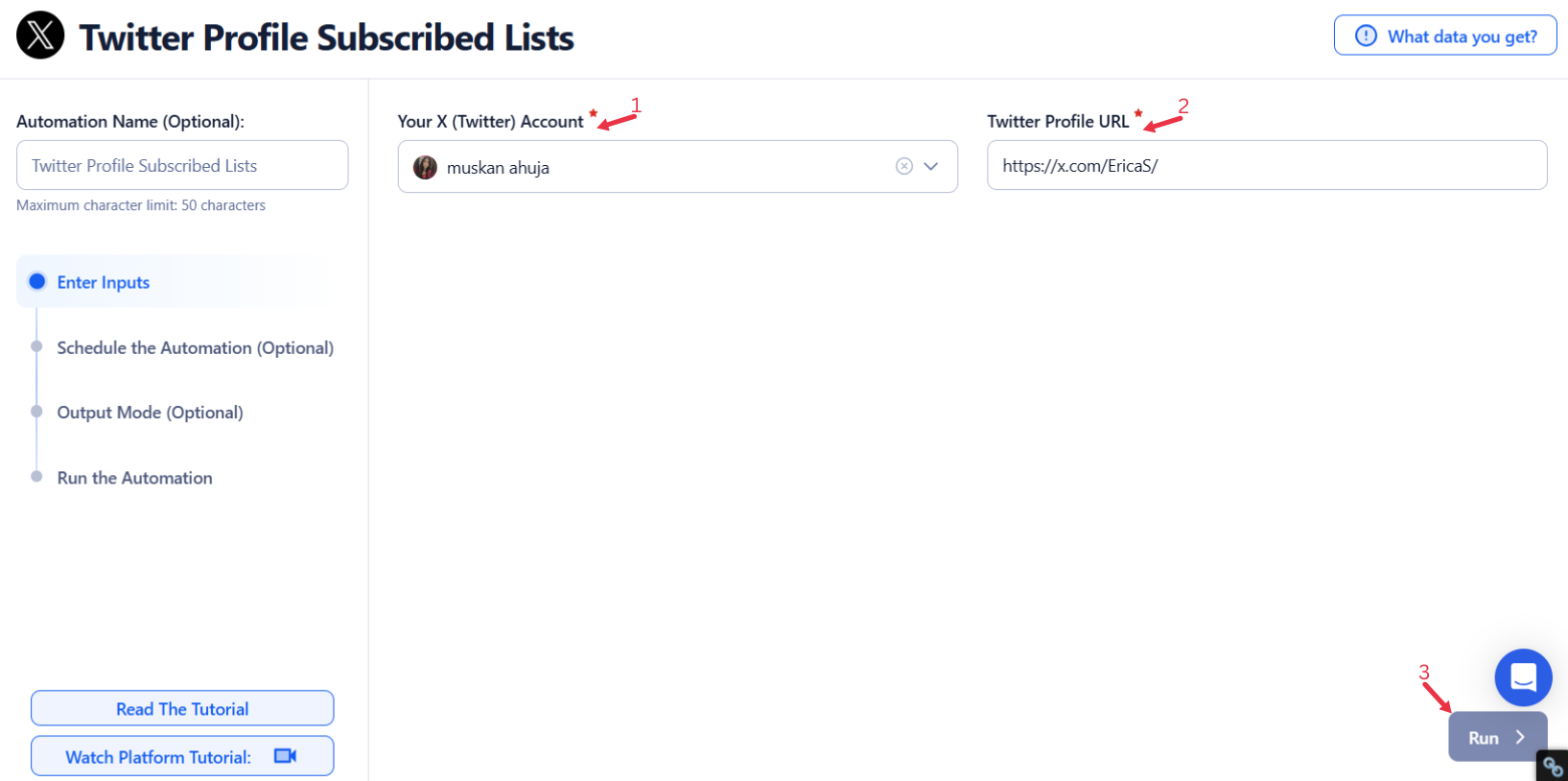
Single Input
Use this option to extract subscribed lists for a single Twitter profile.
- Account: Select the Twitter account you want to use for the extraction.
- Twitter Profile: Enter the URL of the Twitter profile whose subscribed lists you want to extract.
Google Sheets
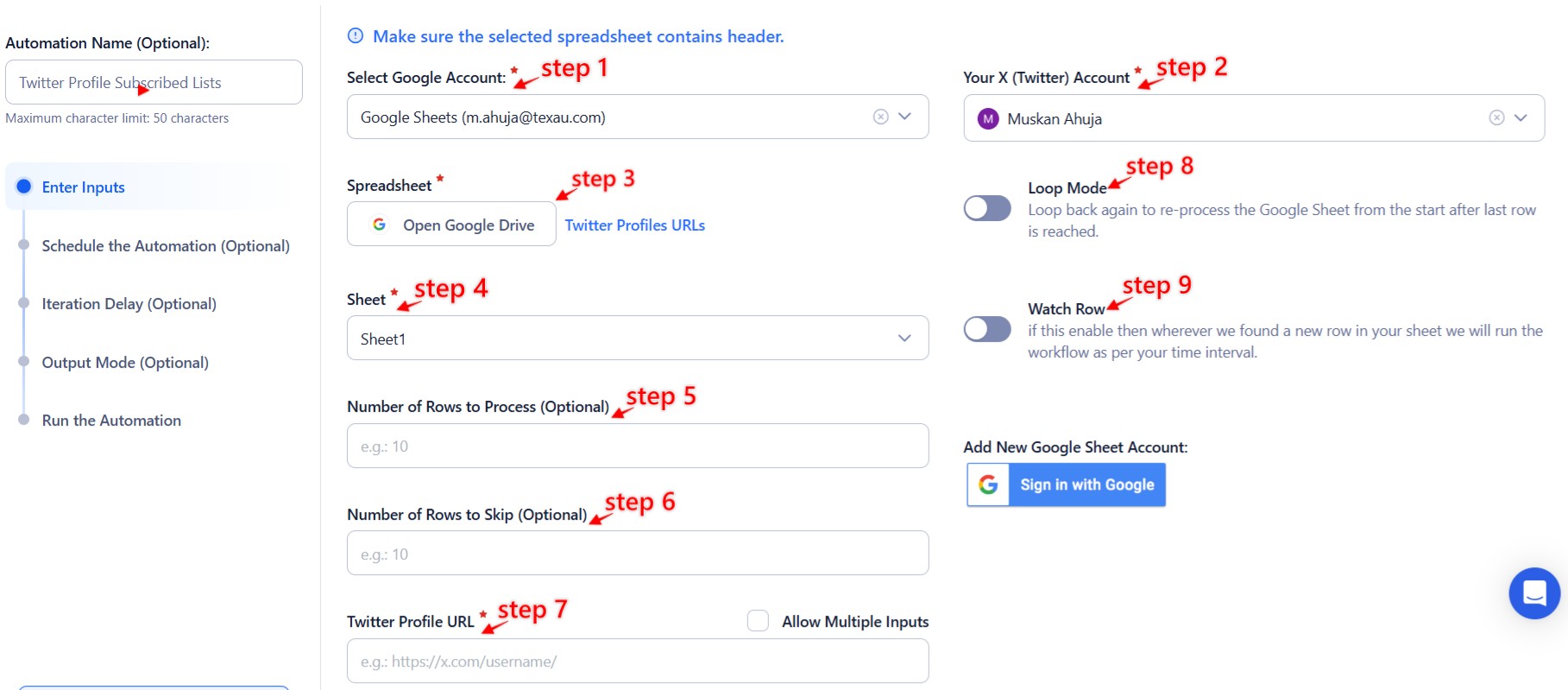
This option is ideal for extracting subscribed lists for multiple Twitter profiles stored in a Google Sheet.
- Connect: Connect your’s Google account
- Click Select Google Account to choose your connected account or add a new one using Add New Google Sheet Account.
- Select your spreadsheet
- Click Open Google Drive to locate the Google Sheet containing Twitter profile URLs.
- Choose the spreadsheet and the specific sheet where your data is stored.
- Adjust processing options
- Number of Rows to Process (Optional): Define the number of rows of data to process.
- Number of Rows to Skip (Optional): Specify rows to skip if necessary.
- Provide input details
- Twitter Profile: Ensure the column in the sheet contains valid Twitter profile URLs.
Loop Mode (Optional)
- Turn on Loop Mode to reprocess the Google Sheet from the start once all rows are completed.
Watch Row (Optional)
The Watch Row function enables automated execution by tracking new entries in a Google Sheet at predefined intervals.
To enable it, specify the interval and set an end date for monitoring.
Watch Row Schedule:
- None
- At Regular Intervals (e.g., every 15 minutes or every hour)
- Once
- Every Day
- On Specific Days of the Week (e.g., every Wednesday and Sunday)
- On Specific Days of the Month (e.g., the 8th and 23rd)
- On Specific Dates (e.g., April 10)
By default, the system scans every 15 minutes and stops checking after five days, unless modified.
Process a CSV File
This option allows extracting subscribed lists for profiles listed in a static CSV file.
- Upload the file
- Click Upload CSV File and select the file containing Twitter profile URLs.
- TexAu will preview its content for verification.
- Adjust processing settings
- Number of Rows to Process (Optional): Define the number of rows to process.
- Number of Rows to Skip (Optional): Specify rows to skip if necessary.
- Provide input details
- Twitter Profile: Ensure the correct column contains valid Twitter profile URLs.
Tip: Use Google Sheets for dynamic or frequently updated lists and CSV files for static data.

Step 5: Schedule the Automation (Optional)
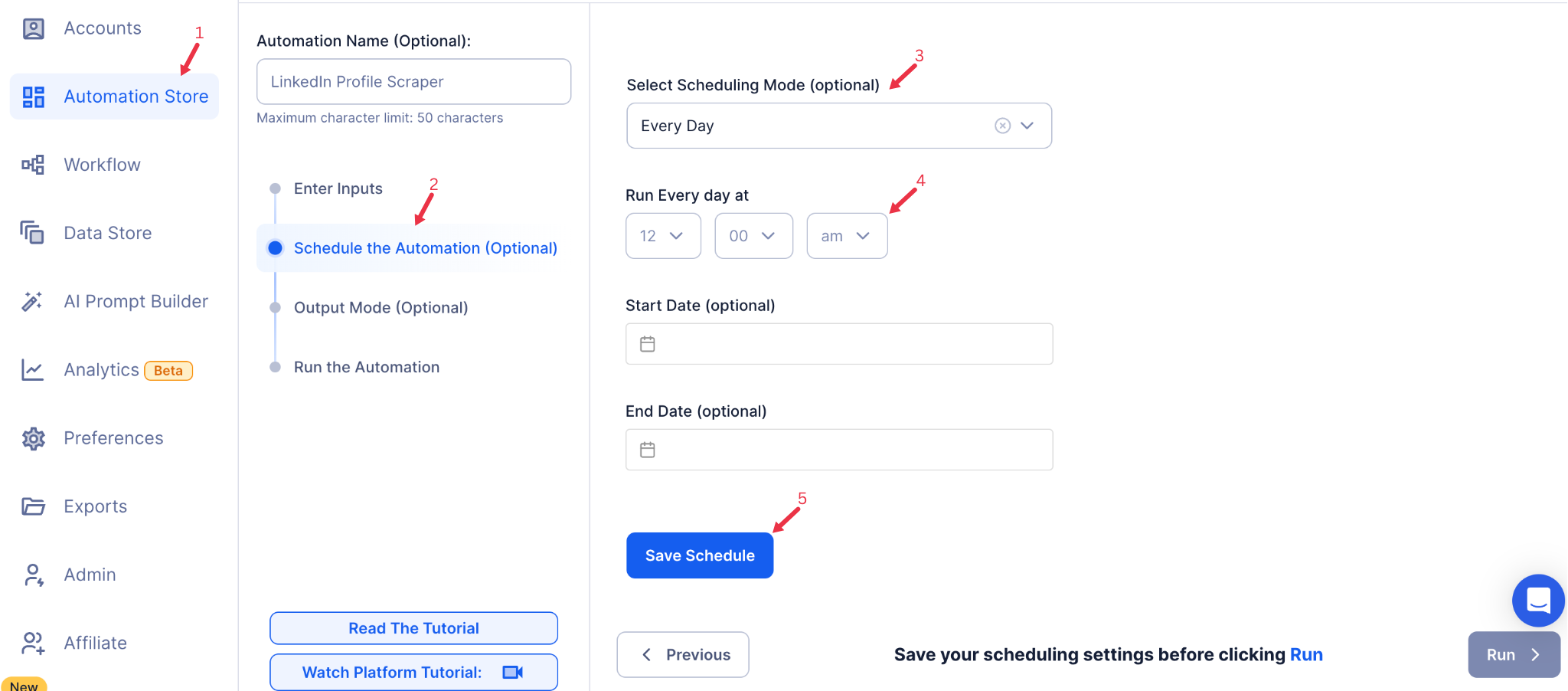
Use TexAu’s Schedule feature to run the automation at specific times for continuous updates. Click Schedule to configure the timing. Options include:
- None: Run the automation immediately without scheduling.
- At Regular Intervals: Set recurring runs, such as daily or weekly.
- Once: Schedule a one-time run for a specific date and time.
- Every Day: Automate daily exports for consistent tracking.
- On Specific Days of the Week: Run the automation on particular days like Mondays or Fridays.
- On Specific Days of the Month: Schedule runs for specific dates, such as the 1st or 15th.
- On Specific Dates: Extract subscribed lists on significant dates or campaign deadlines.
Tip: Scheduling ensures you regularly track changes to subscribed lists for relevant insights.
Step 6: Set an Iteration Delay (Optional)
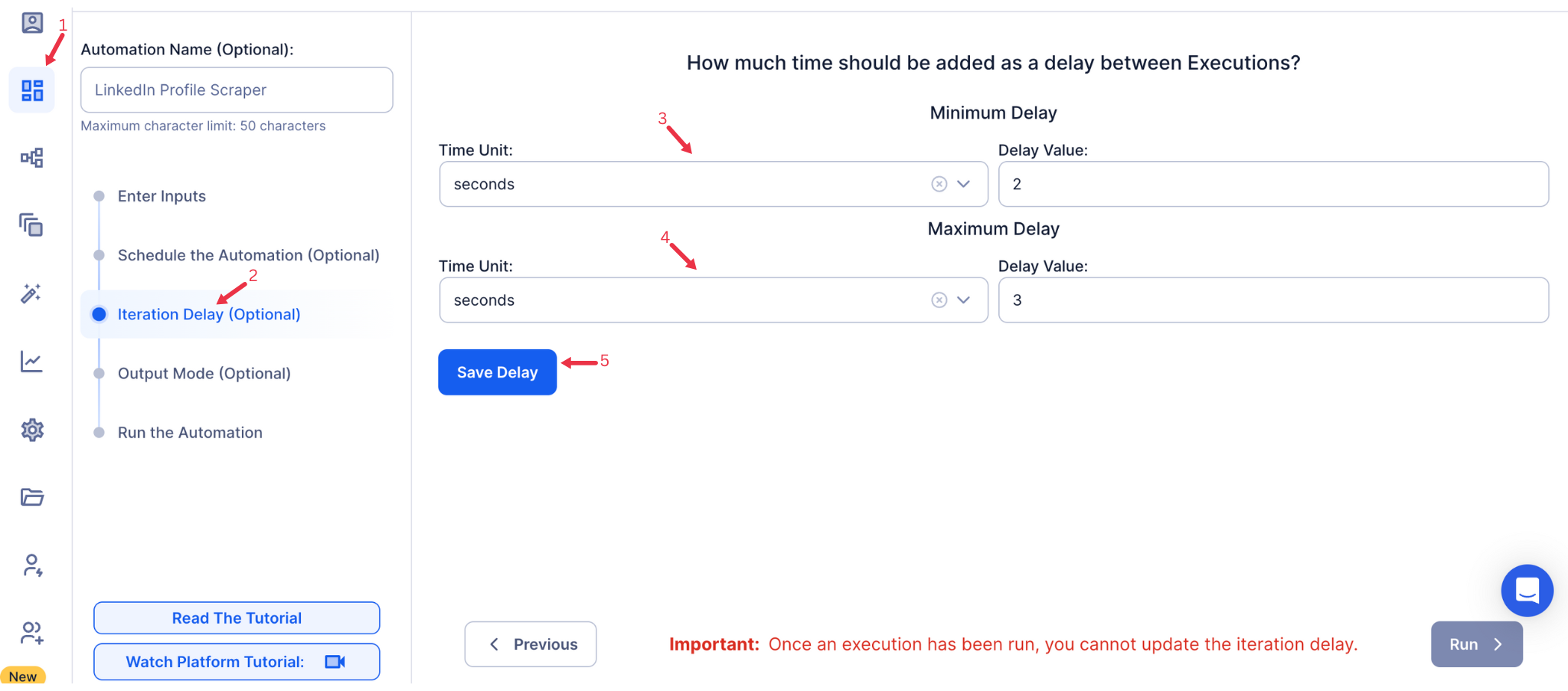
Avoid detection and simulate human-like activity by setting an iteration delay. Choose minimum and maximum time intervals to add randomness between actions. This makes your activity look natural and reduces the chance of being flagged.
- Minimum Delay: Enter the shortest interval (e.g., 10 seconds).
- Maximum Delay: Enter the longest interval (e.g., 20 seconds).
Tip: Random delays keep your automation safe and reliable.
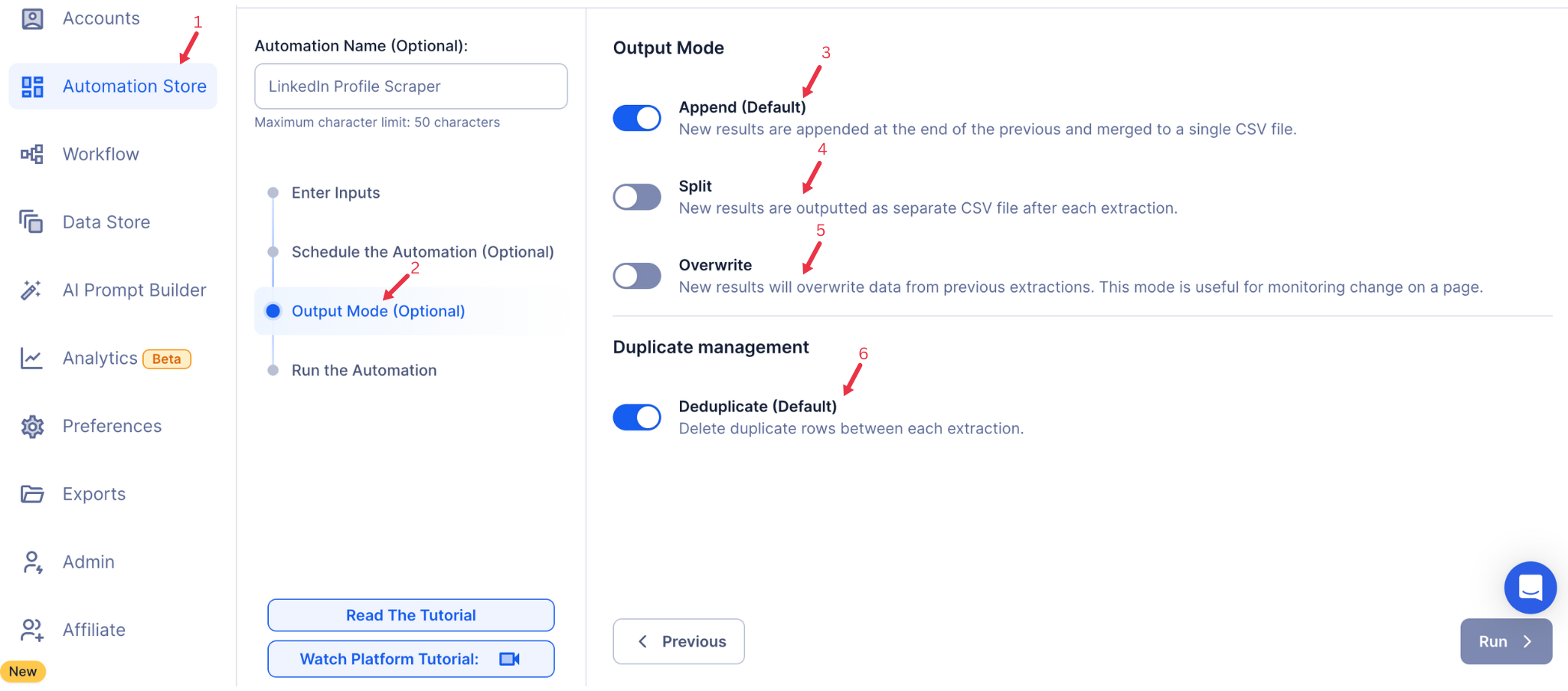
Step 7: Choose Your Output Mode (Optional)
Choose how to save and manage the extracted alumni data. TexAu provides the following options:
- Append (Default): Adds new results to the end of existing data, merging them into a single CSV file.
- Split: Saves new results as separate CSV files for each automation run.
- Overwrite: Replaces previous data with the latest results.
- Duplicate Management: Enable Deduplicate (Default) to remove duplicate rows.
Tip: Google Sheets is ideal for teams working collaboratively and needing real-time data access.
Step 8: Access the Data from the Data Store
Once the automation completes, go to the Data Store section in TexAu to view or download the extracted subscribed lists. Locate the Twitter Profile Subscribed Lists Export automation and click See Data to access your results.

The Twitter Profile Subscribed Lists Export automation enables marketers and growth hackers to analyze competitor strategies and track influencer connections efficiently. With flexible scheduling, customizable input options, and seamless export to Google Sheets or CSV, this tool simplifies the process of extracting and organizing subscribed lists for actionable insights.
Run this automation on your own machine.
TexAu V2 Desktop runs every automation locally — your real session, your real IP, unlimited hours, no proxies. One-time $1,999, no subscription, 5 years of updates.