LinkedIn Company Insights
Get access to LinkedIn Company Insights using TexAu. Track company trends, hiring data, and page performance to make smarter business decisions.
Last updated
LinkedIn is more than a professional networking platform—it’s a treasure trove of **valuable insights** about companies, industries, and market trends. For businesses, having access to **LinkedIn Company Insights** is essential for making informed decisions. LinkedIn provides a **unique lens** into
LinkedIn is more than a professional networking platform—it’s a treasure trove of valuable insights about companies, industries, and market trends. For businesses, having access to LinkedIn Company Insights is essential for making informed decisions. LinkedIn provides a unique lens into the corporate world, enabling businesses to monitor company size, analyze audience demographics, and identify emerging opportunities in the market.
Gathering LinkedIn Talent Insights and real-time data about companies is crucial for purposes such as market research, competitor analysis, and strategic planning. Tracking job titles, understanding seniority levels, or examining LinkedIn Company Post Organic Engagements can provide businesses with a significant competitive edge. Additionally, analyzing audience segments and monitoring trends in LinkedIn Company Post Reach or LinkedIn Company Post Comments helps in tailoring marketing strategies effectively.
However, manually collecting LinkedIn analytics is time-intensive and impractical, particularly when dealing with large datasets or tracking multiple companies. TexAu’s LinkedIn Company Insights feature automates this process, providing businesses with a powerful tool for extracting audience growth data, audience size statistics, and LinkedIn Company Post Organic Comments Trends efficiently.
This automation not only saves time but also reduces manual errors, offering businesses actionable insights that improve target audience alignment and help them stay ahead of the curve. By leveraging TexAu, professionals can seamlessly integrate LinkedIn Company Employee data, monitor audience count, and analyze LinkedIn Company Post Organic Likes and Reactions Trends to drive impactful decisions. Let’s dive into the key features, benefits, and use cases that make TexAu a must-have for professionals and organizations.
Key Features: Harnessing the Full Potential of LinkedIn Data
1. Comprehensive Company Data Extraction
TexAu simplifies the process of extracting detailed LinkedIn Company Insights with ease. With just a few clicks, you can gather data such as company names, industries, locations, employee counts, LinkedIn URLs, and even company updates. This comprehensive dataset is invaluable for conducting competitor analysis, understanding audience demographics, or planning marketing efforts.
Example Scenario: Imagine you’re a marketer working for a B2B software company. To create a competitive pricing strategy, you use TexAu to extract data on 20 competitors. The insights reveal trends in company sizes, industry focuses, and recent activities, allowing you to position your product competitively in the market.How It Helps:
- Provides detailed and structured data to inform strategies.
- Reduces the time spent on manual tasks like research and data collection.
2. Customizable Filters for Targeted Insights
Not all companies are relevant to your goals. TexAu allows you to filter insights based on specific criteria such as company size, location, industry, or recent LinkedIn Company Post Organic Engagements. This ensures that you’re focusing on the most relevant data and optimizing your efforts.
Example Scenario: A recruitment agency specializing in tech hires filters LinkedIn company data to focus on organizations with over 500 employees in Silicon Valley. By targeting these companies, the agency identifies firms that are actively growing and likely to require talent acquisition support.How It Helps:
- Targets LinkedIn Insights extraction to align with specific business objectives.
- Ensures data is relevant, actionable, and tailored to the target audience.
3. Bulk Data Export for Streamlined Research
TexAu enables users to extract LinkedIn analytics for multiple companies simultaneously, significantly speeding up the research process. Bulk exports are especially useful for audience growth analysis, market research, or competitor benchmarking.
Example Scenario: A business consultant tasked with advising a client on entering a new market uses TexAu to export data on 50 potential competitors. Within minutes, they have a comprehensive list of company details, which they use to analyze audience segments and market risks.How It Helps:
- Saves time by automating large-scale data collection.
- Facilitates in-depth research and LinkedIn Company Post Reach Trend analysis.
4. Export Formats for Seamless Integration
Extracted data can be downloaded in user-friendly formats like CSV or Excel, making it easy to integrate with CRMs, analytics platforms, or other tools.
Example Scenario: A sales team imports LinkedIn Company Post insights into their CRM to enhance lead segmentation. By analyzing the data, they identify high-priority prospects and tailor their outreach campaigns accordingly.How It Helps:
- Simplifies data integration with existing workflows.
- Enhances collaboration across teams using the extracted data.
5. Activity Tracking for Competitive Monitoring
TexAu lets you monitor recent updates, posts, and engagement metrics of target companies. This feature is invaluable for understanding a competitor’s content engagement strategy or keeping track of LinkedIn Company Post Organic Comments Trends.
Example Scenario: A social media manager monitors the LinkedIn posts of a competing brand to identify which post types drive the most engagement rate. By mimicking successful formats, they improve their own company’s social media presence.How It Helps:
- Provides real-time data on competitors’ activities.
- Enables proactive adjustments to content strategies and audience segments.
Challenges Addressed by TexAu
1. Manual Data Collection
Gathering LinkedIn Company Insights manually is both tedious and prone to errors. TexAu automates this task, ensuring efficient data extraction and reducing the risk of inaccuracies.
Example Scenario: A market researcher who previously spent hours collecting data on competitors from LinkedIn now uses TexAu to automate the process. They complete the task in minutes, freeing up valuable time for detailed competitor analysis and audience insights.
2. Scattered Data Sources
Consolidating data from various social media platforms or manual research can be overwhelming. TexAu organizes all extracted information into a single, structured format, simplifying analysis and enabling actionable insights.
Example Scenario: A business analyst uses TexAu to gather data on industry leaders, including company size, LinkedIn Company Post Engagement Trends, and audience demographics. Instead of juggling multiple spreadsheets, they receive a consolidated report, which allows for faster and more informed decision-making.
3. Missed Opportunities
Timely insights are crucial for staying ahead of the competition and capitalizing on emerging market trends. TexAu ensures you have access to real-time data, helping you identify and seize opportunities proactively.
Example Scenario: A recruiter uses TexAu to monitor LinkedIn Talent Insights and identifies a surge in hiring activity at a competitor’s company. By leveraging this timely data, they proactively reach out to potential candidates, securing top talent before others.
Benefits of Using TexAu’s LinkedIn Company Insights
1. Competitor Analysis: Stay Ahead of the Game
Understanding your competitors’ strategies is essential for maintaining a competitive edge. TexAu offers valuable insights into competitors’ employee trends, LinkedIn engagement metrics, and recent updates, allowing you to adjust your strategies and proactively respond to market changes.
Example Scenario: An HR team at a logistics company notices through TexAu that a major competitor is increasing its employee count in a specific region. This indicates potential market expansion, prompting the team to focus recruitment efforts in the same area. They also tailor marketing efforts to highlight their strengths in that region, securing their position.
Why It Matters:
- Offers early indicators of competitors’ growth or strategic shifts.
- Refines recruitment, marketing, and operational approaches.
- Keeps your company relevant and agile in competitive landscapes.
2. Market Research: Identify Industry Trends
Analyzing patterns across companies reveals industry trends, emerging sectors, and growth opportunities. TexAu’s LinkedIn Company Insights help businesses stay informed about market dynamics, enabling them to seize new opportunities.
Example Scenario: A SaaS startup analyzes data from TexAu, extracting insights about hiring trends and LinkedIn content engagement in AI, cybersecurity, and cloud computing. Discovering rapid growth in AI-driven applications, the startup tailors its product offerings for this sector, securing early partnerships and driving revenue growth.
Why It Matters:
- Identifies underserved markets and emerging opportunities.
- Adapts offerings to align with market demands.
- Provides a proactive approach to industry shifts.
3. Recruitment Insights: Optimize Hiring Strategies
TexAu delivers recruitment-focused data on hiring trends, downsizing activities, and employee distributions, enabling recruiters to effectively target talent pools.
Example Scenario: A recruitment firm uses TexAu to track companies experiencing downsizing in the investment banking sector. They identify professionals seeking new roles and connect them with relevant opportunities. Additionally, they monitor expanding companies to pitch tailored recruitment solutions.
Why It Matters:
- Quickly identifies talent from downsizing companies.
- Highlights roles and skills in demand across industries.
- Optimizes sourcing strategies based on market trends.
4. Content Strategy Development: Mimic Success
Crafting engaging content on LinkedIn requires understanding what resonates with your audience. TexAu analyzes competitors’ high-performing posts, offering insights into likes, shares, and comments for creating impactful content strategies.
Example Scenario: A content creator in the renewable energy sector monitors the LinkedIn posts of industry leaders using TexAu. They find that case studies and real-world impact stories drive the highest engagement. Mimicking this strategy, they achieve a 40% increase in content engagement.
Why It Matters:
- Enables data-driven content strategies that drive engagement.
- Ensures posts reflect proven trends and audience preferences.
- Establishes thought leadership within the industry.
5. Partnership Opportunities: Foster Collaborations
Finding the right collaborators can unlock new revenue streams and strengthen brand visibility. TexAu identifies companies with complementary services, shared goals, or strong LinkedIn presences to simplify the process of fostering partnerships.
Example Scenario: A digital marketing agency uses TexAu to find tech startups with active LinkedIn profiles and high engagement levels. They propose joint campaigns, emphasizing shared audiences and mutual visibility benefits. This approach secures partnerships with three startups, resulting in a 25% revenue increase.
Why It Matters:
- Streamlines identifying high-potential collaborators.
- Aligns partnerships with business goals for mutual growth.
- Supports long-term expansion through strategic collaborations.
Use Cases: Who Can Benefit?
1. Marketers: Refine Audience Targeting for Campaigns
Marketers are instrumental in ensuring that campaigns and outreach efforts resonate with the target audience. By leveraging LinkedIn analytics and audience insights from company data, marketers can identify businesses with an active LinkedIn presence and align their campaigns accordingly. Companies with regular posts and high engagement rates are more likely to respond positively to tailored marketing strategies.
Example Scenario: A digital marketing agency specializing in B2B services uses TexAu to extract LinkedIn data on company page followers and LinkedIn Company Post Engagements in the SaaS industry. By analyzing LinkedIn Company Post Reach Trends, they identify businesses with strong LinkedIn activity and focus their campaigns on these companies, resulting in a 25% increase in response rates compared to targeting businesses with minimal online activity.How TexAu Helps Marketers:
- Identifies businesses with high LinkedIn engagement metrics, improving the effectiveness of campaigns.
- Provides valuable insights for refining audience targeting.
- Ensures marketing efforts focus on companies with LinkedIn unique activity for higher success rates.
2. Sales Teams: Identify Potential Clients and Upsell Opportunities
Sales teams rely on real-time data and LinkedIn Talent Insights to discover new leads and strengthen client relationships. TexAu enables sales professionals to extract data on companies experiencing growth, such as increases in company size or hiring activity, which often signals the need for new tools or partnerships.
Example Scenario: A software sales team targets companies with audience growth and LinkedIn Company Post Organic Engagements, as these indicators suggest scaling operations. By analyzing LinkedIn Company Employee Counts and company updates, they identify five high-growth businesses and successfully close three deals within a month.How TexAu Helps Sales Teams:
- Pinpoints companies with increasing audience segments, making them prime leads.
- Tracks LinkedIn Company Post Reach Trends to identify active companies.
- Supports personalized outreach campaigns with data-driven insights.
3. Recruiters: Analyze Hiring Trends to Source Talent
Recruiters can use TexAu to track job titles, seniority levels, and hiring trends from LinkedIn to identify growing industries and source top talent. Monitoring companies actively hiring enables recruiters to target talent pools effectively and adapt to industry shifts.
Example Scenario: A recruitment agency specializing in engineering roles extracts LinkedIn data on companies growing their tech teams and identifies active listings for LinkedIn Seniority and in-demand skills. By focusing on these hiring companies, they successfully place 10 candidates in just two months.How TexAu Helps Recruiters:
- Tracks LinkedIn Talent Insights to locate active hiring companies.
- Provides data on LinkedIn Company Post Organic Comments to monitor talent attraction.
- Identifies LinkedIn industry trends, helping recruiters stay ahead of demand.
4. Business Owners: Monitor Competitors and Identify Growth Opportunities
Business owners need to stay ahead of competitors and seize growth opportunities. TexAu’s LinkedIn insights allow tracking of company page metrics, employee trends, and competitors’ activities to support strategic decision-making.
Example Scenario: A retail business owner monitors competitors’ LinkedIn Company Post Comments and notices a competitor launching a new product. By identifying this through LinkedIn Page Organic Impressions, the owner adjusts their marketing strategy to highlight their product’s unique features, countering the competitor’s campaign effectively.How TexAu Helps Business Owners:
- Monitors LinkedIn analytics for competitor activities and updates.
- Tracks audience demographics and LinkedIn Company Post Reach Trends for strategic growth.
- Highlights LinkedIn Company Post Shares Trends for competitive analysis.
TexAu’s features empower marketers, sales teams, recruiters, and business owners to harness LinkedIn data for effective strategies, ensuring success in their respective domains.
Best Practices for Using TexAu: Maximizing Efficiency and Results
1. Set Clear Objectives
Before extracting data, define your primary goal to ensure the insights you gather align with your business needs. Whether you aim to analyze LinkedIn analytics, optimize marketing efforts, or track hiring trends, having a clear purpose will help you focus on extracting relevant data.Example: A marketing manager defines their objective as analyzing LinkedIn Company Post Organic Engagements to improve their company’s social media presence. With this clarity, they extract data specifically on LinkedIn Company Post Likes and Reactions Trends and comments on content from competitor posts.Why It Matters:
- Ensures LinkedIn Insights collection efforts are goal-oriented.
- Helps focus on actionable insights rather than unnecessary information.
2. Focus on Relevance
TexAu’s filters allow you to target LinkedIn Company Employee data that align with your objectives, such as specific industries, company sizes, or geographic locations. Narrowing your focus ensures the data you gather is meaningful and applicable to your goals.Example: A SaaS company looking to expand in Europe filters LinkedIn Company Post Organic Engagements to extract insights only from companies based in Germany, France, and the UK. This targeted approach helps them prioritize efforts in regions with high audience growth potential.Why It Matters:
- Improves the accuracy and relevance of your audience insights.
- Saves time by avoiding irrelevant data and focusing on target audience segments.
3. Leverage Data Strategically
Once you’ve gathered valuable insights, apply them strategically to optimize your outreach campaigns, sales, or recruitment strategies. Combine the extracted data with your existing knowledge to develop more informed and impactful approaches.Example: A sales team uses LinkedIn Company Post Organic Comments Trends to identify companies with increasing employee engagement. They integrate this data into their CRM, segmenting companies based on their LinkedIn Function activity and crafting personalized outreach messages for each segment.Why It Matters:
- Turns LinkedIn unique data into actionable strategies.
- Enhances conversion rates and decision-making across departments.
Metrics and Tracking: Measuring the Success of TexAu Insights
1. Engagement Metrics
Tracking likes, shares, and comments on competitors’ LinkedIn posts helps you identify the type of content that resonates most with your target audience.
Example: A content marketing team extracts engagement metrics from a competitor’s posts and notices that educational content receives the most interaction. They adjust their strategy to prioritize creating similar posts, resulting in a 20% boost in their own engagement rates.
Why It Matters:
- Provides benchmarks for improving your content strategy.
- Highlights trends in audience preferences.
2. Growth Trends
Monitoring changes in employee count or follower growth offers valuable insights into which companies are scaling quickly.
Example: A partnership manager identifies startups with rapid employee growth and reaches out to propose collaborations. This leads to successful partnerships with two high-potential companies.
Why It Matters:
- Helps identify companies poised for growth and expansion.
- Provides early indicators of market shifts or opportunities.
3. Activity Frequency
Analyzing how often companies post updates gives you a sense of their engagement and activity levels. Companies with consistent activity are more likely to respond to outreach or partnerships.
Example: A marketer prioritizes reaching out to companies that post frequently, as their active presence suggests they are open to collaborations. This strategy leads to higher response rates compared to targeting inactive companies.
Why It Matters:
- Helps focus efforts on companies with active engagement.
- Provides a measure of a company’s involvement in industry discussions.
Tips for Maximizing Results: Best Ways to Use TexAu Effectively
1. Pair with Other Tools
Combine TexAu’s LinkedIn Company Insights with its Profile Scraper to gather individual-level data alongside company-level insights. This dual approach provides a comprehensive understanding of both companies and their key decision-makers.
Example: A sales team uses the Profile Scraper to identify LinkedIn profiles of key decision-makers in high-growth companies identified using Company Insights. This integrated strategy improves lead conversion rates.
2. Regularly Update Data
Market dynamics and company activities change frequently. Schedule periodic extractions to ensure your data remains accurate and up-to-date.
Example: A recruiter schedules monthly data extractions to track hiring trends in the tech industry, ensuring they always have the latest insights to source candidates effectively.
3. Target Key Players
Focus on extracting insights from industry leaders, competitors, or companies with significant influence in your sector. These insights can help you refine your strategies and stay ahead of the competition.
Example: A marketing team targets insights from top competitors in their niche to identify trends in content strategy and engagement levels, using this data to craft campaigns that outperform the competition.
TexAu’s LinkedIn Company Insights tool is a game-changer for marketers, sales professionals, recruiters, and business owners. By following these best practices and tracking the right metrics, you can unlock valuable insights and maximize the impact of your strategies
Conclusion: Leverage the Power of TexAu
TexAu’s LinkedIn Company Insights feature empowers professionals to make data-driven decisions with ease. Whether you’re conducting competitor analysis, refining marketing strategies, or exploring recruitment opportunities, TexAu streamlines the data collection process for maximum impact.
Start leveraging TexAu today to unlock the full potential of LinkedIn data and stay ahead of the competition.
The LinkedIn Company Insights automation helps founders, marketers, sales managers, and growth hackers analyze LinkedIn company profiles by extracting detailed insights like company size, industry, and employee count. With TexAu’s flexible scheduling, input source options, and export features, this tool simplifies lead generation, market research, and competitive analysis for businesses of all sizes.
Step 1: Log in to the TexAu App and Locate the Automation
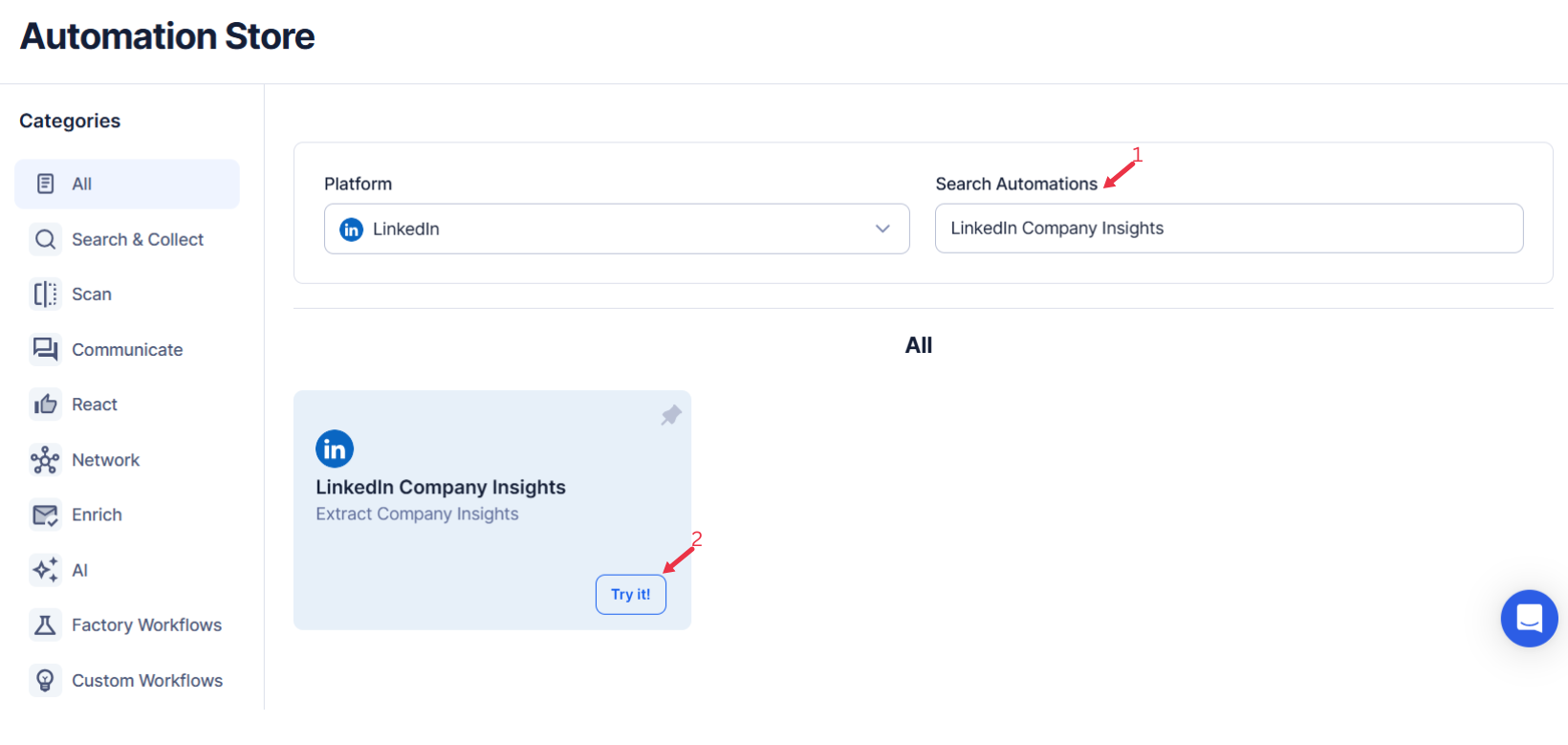
Log in to your TexAu account at the TexAu V2 Desktop app. Navigate to the Automation Store and enter LinkedIn Company Insights in the search bar to locate this automation.
Step 2: Connect to LinkedIn with TexAu
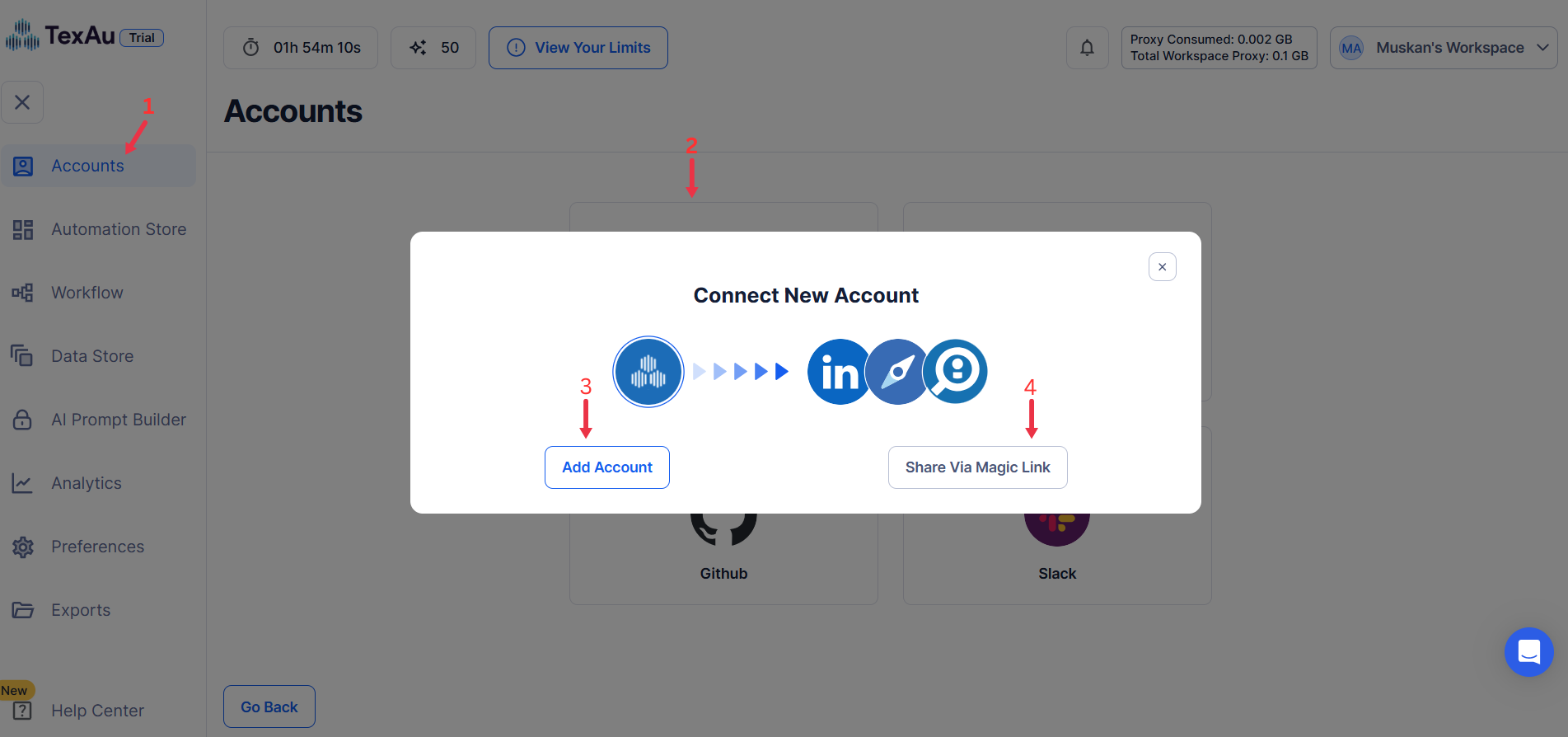
Connect your LinkedIn account to TexAu. Click Accounts to select LinkedIn as the platform and authorize your account using one of these methods:
- Share Via Magic Link: Click Share Via Magic Link, copy the URL, and paste it into your browser to access the Connect New Account page. Install the extension to complete account integration.
- Add Account: Helps you easily sync cookies and other information from your browser to the TexAu platform.
Tip: Use the Share via Magic Link method for a secure and straightforward connection.
Step 3: Run it on your machine
Select your preferred execution mode for the automation:
- Run the automation on your local device using your IP address to simulate manual posting.
Tip: Running locally uses your own IP and browser session, which is the safest way to automate an account you care about.
Step 4: Select Your Input Source
Manually Enter a Single Input
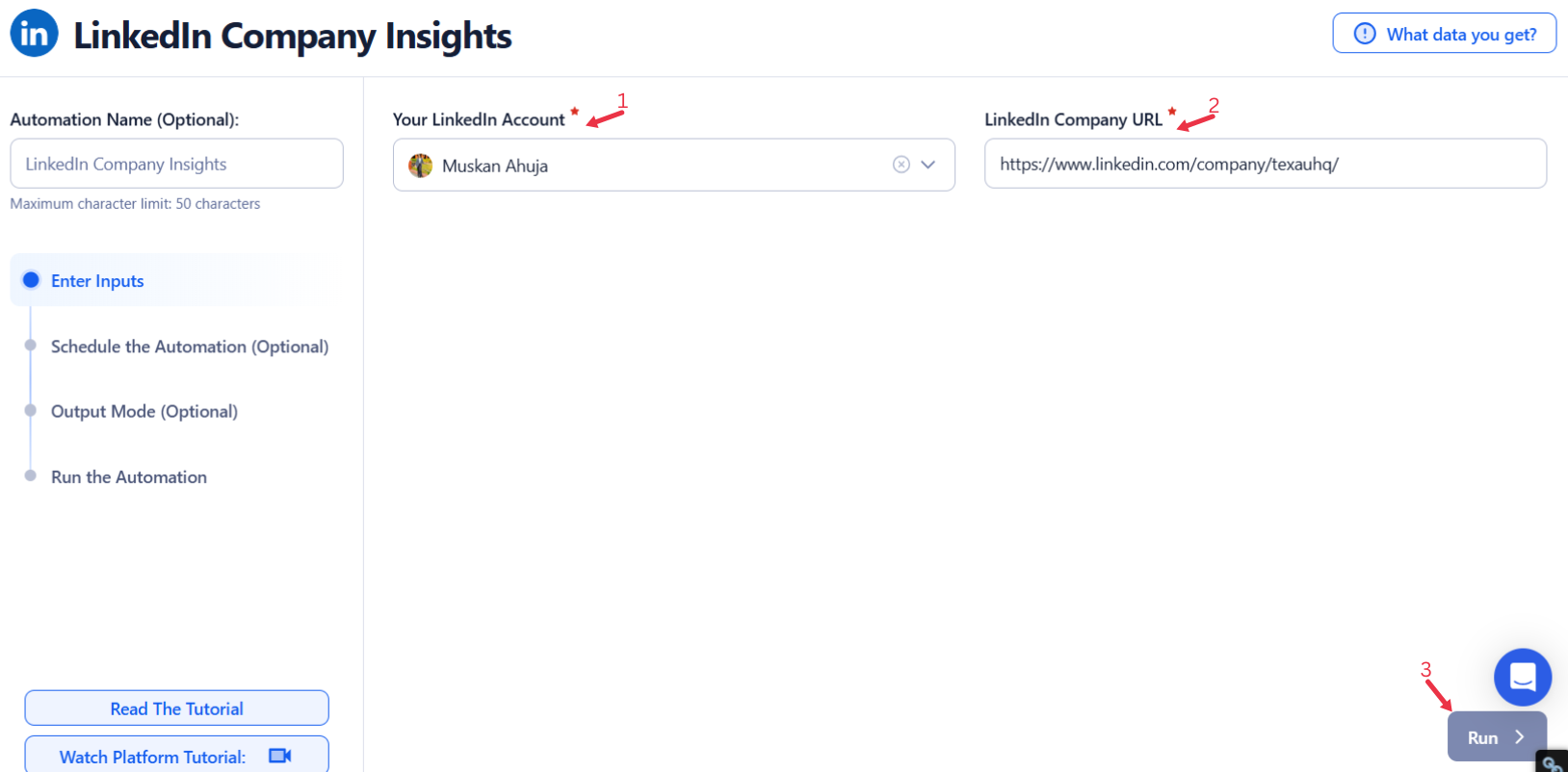
This option is perfect for gathering insights from a specific LinkedIn company profile. Here’s how to use it:
- Input Field: Enter the LinkedIn company profile URL of the organization you want to analyze.
- Once the URL is entered, click Run in the lower-right corner to start the process.
This method is best suited for targeted, one-off data collection.
Use Google Sheets for Bulk Input
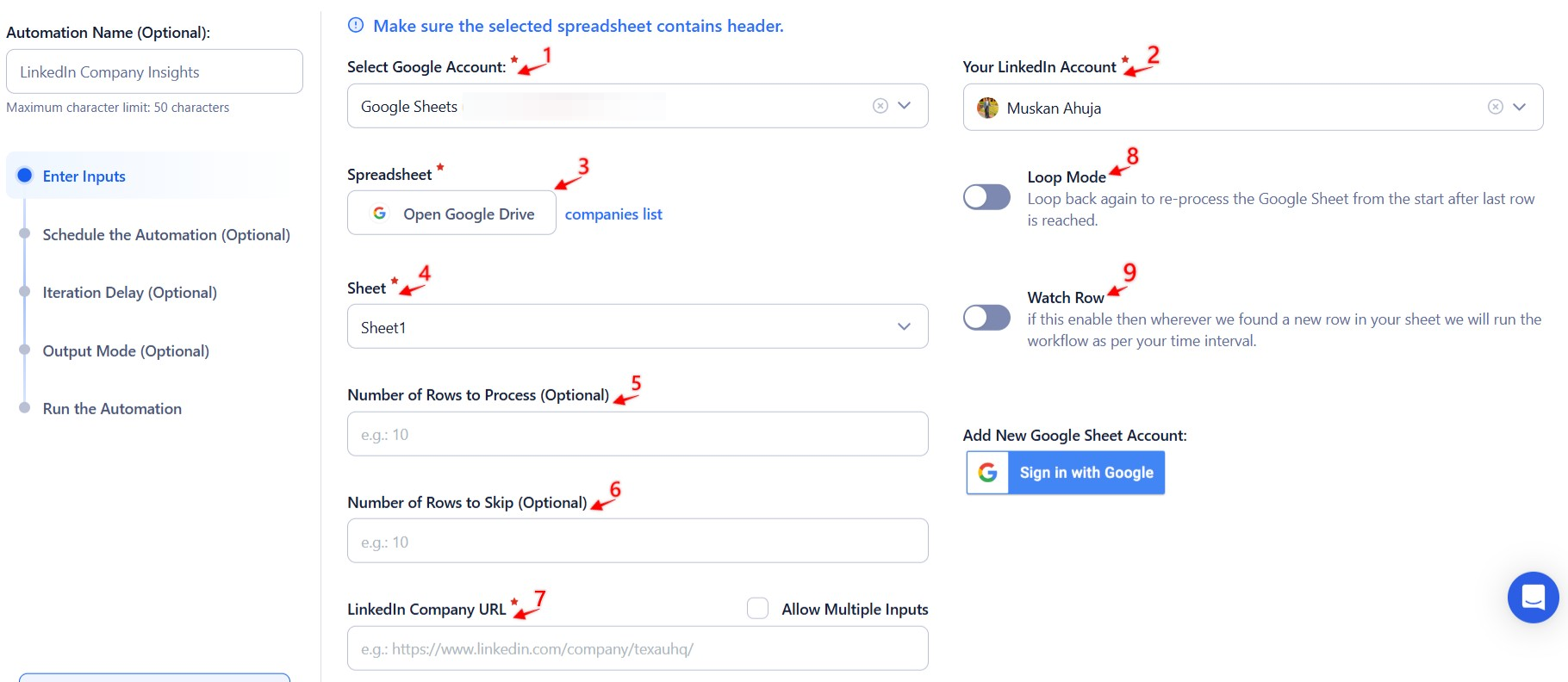
If you want to process multiple LinkedIn company profiles, integrating Google Sheets is a highly efficient choice. Follow these steps:
- Connect Your Google Account
- Click Select Google Account and choose an existing account.
- If you haven’t connected your account yet, click Add New Google Sheet Account to link a new one.
- Select the Spreadsheet
- Once your Google account is connected, click Open Google Drive to browse and select the spreadsheet containing LinkedIn company profile URLs.
- Choose the specific sheet where the URLs are stored.
- Adjust Processing Options
- Number of Rows to Process (Optional): Specify how many rows of data you want to process.
- Number of Rows to Skip (Optional): If you need to skip initial rows, define the number here.
- Ensure the Data is Correct
- Verify that the selected column contains valid LinkedIn company profile URLs.
- Click Run to initiate the automation.
Process a CSV File
For those who prefer working with a static file, TexAu supports CSV uploads. Here’s how to use this option:
- Upload the File
- Click Upload CSV File and select the file containing LinkedIn company profile URLs from your computer.
- After uploading, TexAu will display the file name and provide a content preview.
- Configure Processing Settings
- Number of Rows to Process (Optional): Define how many rows you want to process.
- Number of Rows to Skip (Optional): Specify rows to skip if needed.
- Verify the Data
- Ensure the correct column contains LinkedIn company profile URLs.
- Click Run to begin the extraction.
Optional: Advanced Feature - Loop Mode
For tasks that require regular updates, enable Loop Mode. This feature reprocesses the Google Sheet from the beginning once all rows are completed, making it ideal for ongoing insights collection.
Screenshot Suggestion:
- Show the manual input field for "Company Profile URL" with an example URL.
- Display the Google Sheets selection screen, emphasizing the setup for company profile URLs.
- Include a preview of a CSV upload, highlighting the file name and column for LinkedIn company profile URLs.
This approach ensures efficient LinkedIn company insights extraction, whether for targeted profiles or bulk processing.
Step 5: Schedule the Automation (Optional)
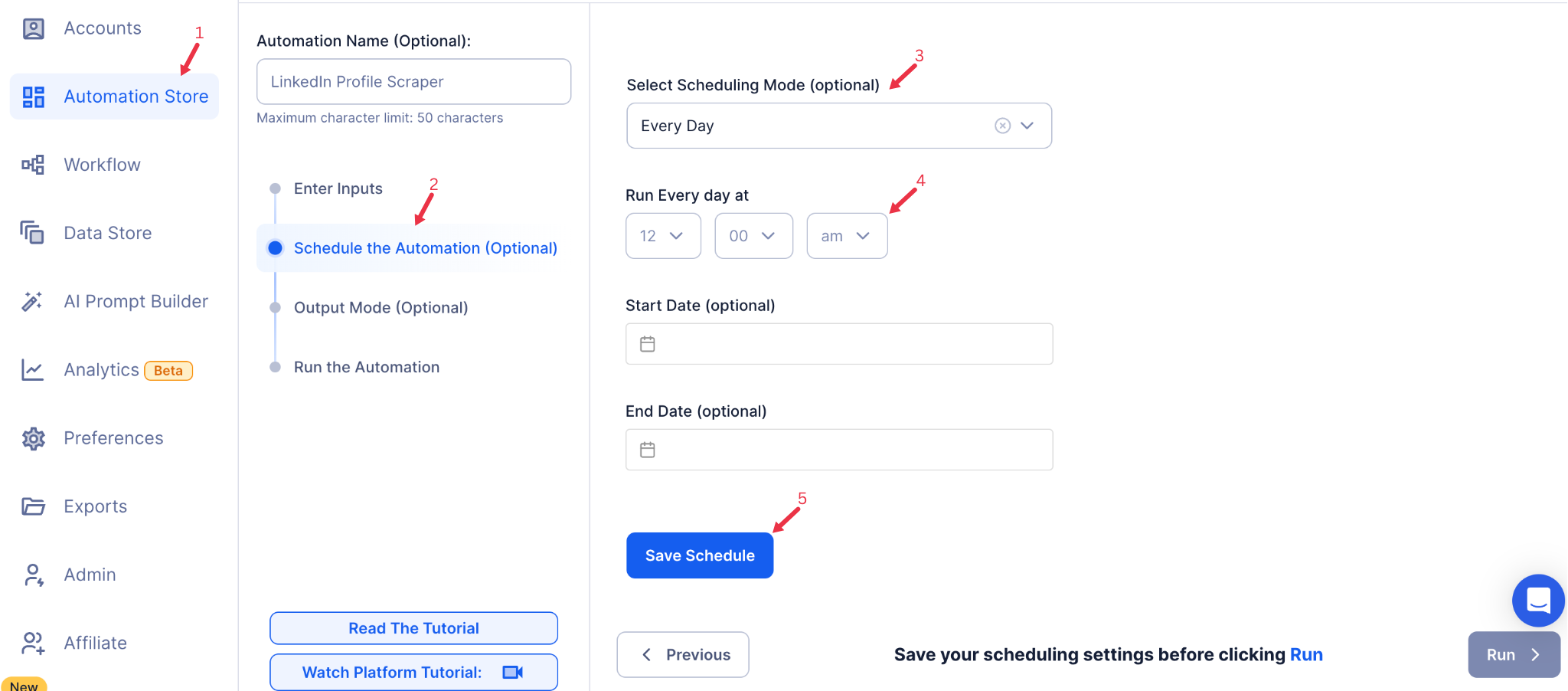
To automate data collection at specific intervals, configure the schedule settings. Click Schedule to set a start date and time or select a recurrence frequency:
- None
- At Regular Intervals (e.g., every 12 hours or daily)
- Once
- Every Day
- On Specific Days of the Week (e.g., every Monday)
- On Specific Dates (e.g., January 15)
Scheduling ensures you can regularly update insights for ongoing research or reports.
Step 6: Set an Iteration Delay (Optional)
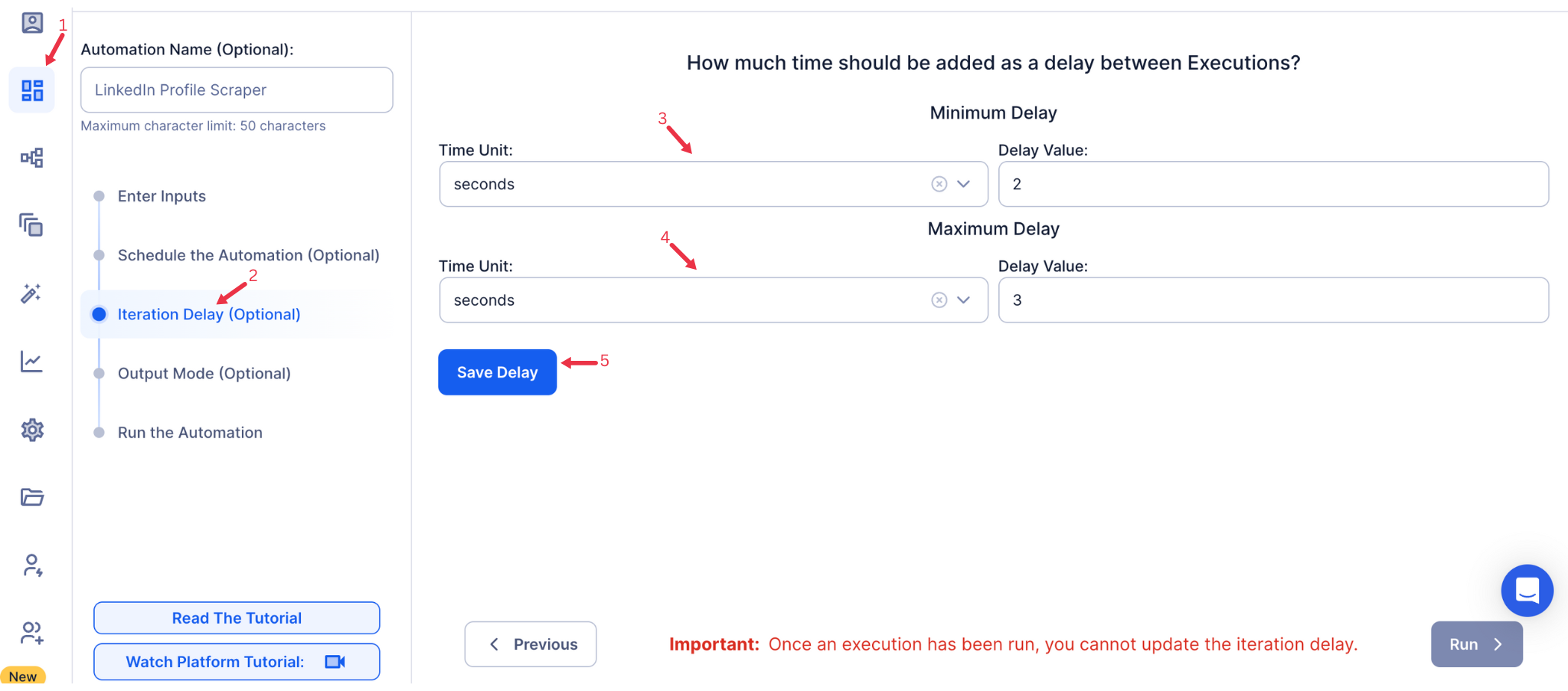
Avoid detection and simulate human-like activity by setting an iteration delay. Configure the minimum and maximum time intervals between actions to introduce randomness.
- Minimum Delay: Enter the shortest allowable interval (e.g., 10 seconds).
- Maximum Delay: Enter the longest allowable interval (e.g., 20 seconds).
Tip: Randomized delays minimize the risk of account flags while maintaining safe automation.
Step 7: Choose Your Output Mode (Optional)
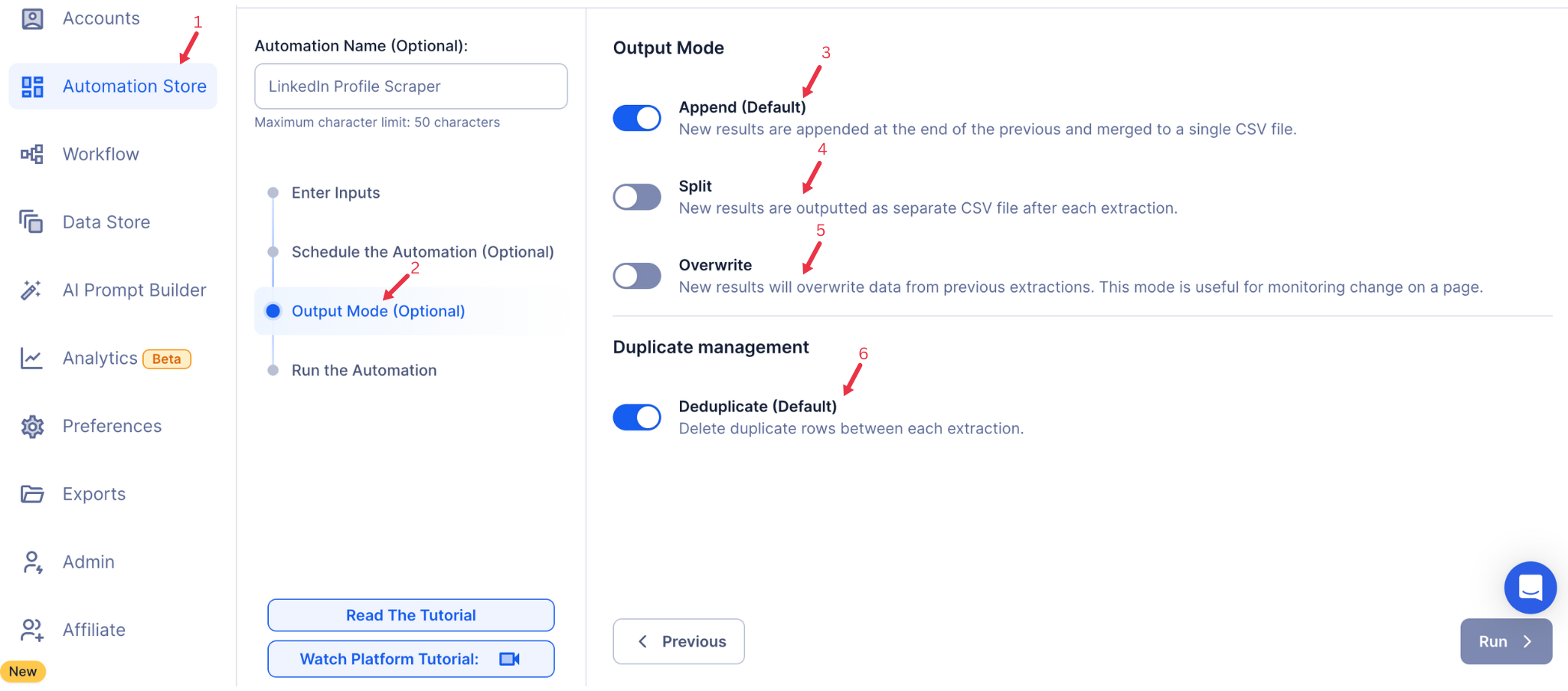
Choose how to save and manage the extracted company insights. TexAu offers the following options:
- Append (Default): Adds new results to the end of existing data, merging them into a single CSV file.
- Split: Saves new results as separate CSV files for each automation run.
- Overwrite: Replaces previous data with the latest results, ideal for tracking changes over time.
- Duplicate Management: Enable Deduplicate (Default) to remove duplicate rows for clean, organized data.
Step 8: Access the Data from the Data Store
After the automation completes, go to the Data Store section in TexAu to access your results. Find the LinkedIn Company Insights automation or the name you entered, click See Data, and choose either Download CSV to export the data or Open to Google Sheet for quick access.
Screenshot Suggestion: Display the Data Store screen with the See Data, Download CSV, and Open to Google Sheet options highlighted.
The LinkedIn Company Insights automation streamlines the extraction of key data points from LinkedIn company profiles. With scheduling, iteration delays, and export options to Google Sheets or CSV, it is ideal for founders, marketers, and sales managers conducting market research, generating leads, or analyzing competitors. Save time and optimize your business strategies with TexAu.
Run this automation on your own machine.
TexAu V2 Desktop runs every automation locally — your real session, your real IP, unlimited hours, no proxies. One-time $1,999, no subscription, 5 years of updates.