LinkedIn Profile Posts Export
Move LinkedIn posts to CSV or Excel in seconds. Simple, fast, and reliable method to work with post data.
Last updated
LinkedIn has evolved beyond being a mere professional networking site to becoming a powerful tool for personal branding, content marketing, and building relationships. One of the most effective ways to engage with your professional network on LinkedIn is by sharing posts that inform, inspire, and in
LinkedIn has evolved beyond being a mere professional networking site to becoming a powerful tool for personal branding, content marketing, and building relationships. One of the most effective ways to engage with your professional network on LinkedIn is by sharing posts that inform, inspire, and invite conversation. Posts on LinkedIn can take many forms, including text-based updates, images, videos, polls, and shared articles. These posts allow professionals to showcase their expertise, share industry insights, and engage with their network on topics that matter to them.
Through regular posting, LinkedIn users can position themselves as thought leaders, foster meaningful connections, and grow their professional influence. However, with the high volume of content being shared across the platform, tracking and analyzing engagement metrics, trends, and content strategies can quickly become overwhelming.
This is where TexAu’s LinkedIn Profile Posts Export tool comes into play. TexAu automates the process of extracting data from LinkedIn posts, providing users with actionable insights that can refine their content strategies, optimize outreach efforts, and track key trends. By using this tool, professionals can save time, enhance the effectiveness of their LinkedIn activities, and make data-driven decisions about their content and engagement strategies.
Key Features
Comprehensive Post Data Extraction
TexAu's LinkedIn Profile Posts Export tool extracts a wide range of data points related to posts, making it easier for professionals to analyze trends, engagement metrics, and content types. The data extracted includes:
- Post Content: The actual text or media shared in the post.
- Post Type: Whether the post is text-based, an image, a video, a link, or a poll.
- Timestamps: The date and time the post was published, allowing users to track trends over time.
- Engagement Metrics: Likes, comments, and shares, which indicate how well the content is resonating with the audience.
- Post URLs: The direct links to posts for easy access and further analysis.
Example Scenario: A business owner wants to understand the content strategy of a competitor in the technology sector. Using TexAu, they export all posts from the competitor’s LinkedIn profile and analyze the post types and engagement metrics. The analysis reveals that their competitor’s video posts on “cloud computing innovations” receive 50% more shares than their text-based posts, leading the business owner to consider creating more video content. For additional competitive insights, users can also track LinkedIn Following Export to see who competitors are engaging with.
Customizable Filters
TexAu provides customizable filters to refine data extraction based on specific criteria such as keywords, publication dates, engagement levels, or post types. These filters allow users to focus on the most relevant posts, ensuring that the data collected is meaningful and actionable.
Example Scenario: A recruiter wants to focus on posts related to “leadership skills” and filter out posts about other topics. Using TexAu, they filter posts by keywords such as "leadership" and "management" and also specify that the posts should have a minimum number of likes to ensure they are engaging. This allows the recruiter to focus on high-quality content relevant to their hiring needs.
Bulk Profile Export
One of the standout features of TexAu is its ability to extract post data from multiple LinkedIn profiles simultaneously. This is especially valuable for professionals who need to analyze content across various industry leaders, competitors, or prospects. The bulk export feature allows for efficient data gathering across many profiles, saving hours of manual effort.
Example Scenario: A market researcher wants to analyze posts shared by 50+ top influencers in the e-commerce industry to identify emerging trends. Instead of manually reviewing each profile, they use TexAu’s bulk profile export feature to collect and analyze posts from all 50 profiles in one go.
Export Formats
TexAu allows users to export post data in structured formats like CSV or Excel, making it easy to integrate the data into analytics platforms, CRMs, or other business tools. This enables seamless analysis and reporting, allowing users to combine LinkedIn insights with other business data for a comprehensive view.
Example Scenario: A social media manager exports LinkedIn post data into an Excel spreadsheet, including engagement metrics for each post. The manager uses this data to track performance over time and incorporate the insights into the broader social media strategy.
Real-Time Updates
TexAu ensures that users can always access the latest data by exporting real-time updates. This allows users to stay on top of new posts shared by key individuals, competitors, or prospects. Keeping up-to-date with the latest content is crucial for staying relevant and timely in your outreach or strategy.
Example Scenario: A business development professional tracks posts shared by a list of key prospects using TexAu. The tool provides real-time updates whenever a prospect shares new content, ensuring the sales team can promptly engage with fresh insights and adjust their pitch accordingly.
Challenges Addressed
Manual Post Tracking
Tracking posts manually is an inefficient and time-consuming task. Professionals may need to comb through hundreds of profiles, reviewing each post individually to collect engagement metrics and content themes.
How TexAu Helps: TexAu automates the tracking of posts, enabling professionals to gather data quickly and efficiently. This eliminates the need for manual tracking, saving valuable time and ensuring accuracy in data collection.
Scattered Information
LinkedIn posts are spread across different profiles, making it difficult to gather insights on trends, content strategies, and engagement patterns. Without a unified data collection process, professionals risk missing out on valuable insights.
How TexAu Helps: TexAu consolidates scattered information into a centralized format, allowing professionals to analyze trends, engagement patterns, and content strategies across multiple profiles. This streamlined approach saves time and ensures no valuable insights are missed.
Missed Opportunities
If post data isn’t collected and analyzed systematically, it’s easy to overlook valuable content that could inform strategies or improve outreach efforts.
How TexAu Helps: By automating the collection of LinkedIn post data, TexAu ensures comprehensive coverage, preventing missed opportunities. The tool guarantees that no valuable insights are overlooked, whether they’re about content performance, trends, or engagement patterns. Combine post tracking with LinkedIn Profile Views Export to monitor engagement and identify new networking opportunities.
Benefits
Content Strategy Refinement
Exported LinkedIn post data allows users to identify high-performing topics, formats, and engagement strategies. This insight helps refine content strategies, ensuring that future posts align with audience preferences and drive higher engagement.
Example Scenario: A content strategist working in the healthcare sector observes that posts with polls about "patient care trends" generate more engagement than traditional text-only posts. This insight leads them to incorporate more interactive content, such as polls and questions, into their future posts.
Enhanced Personalization
By analyzing LinkedIn posts, professionals can gain insights into their target audience’s interests and preferences. These insights can be used to craft highly personalized outreach messages or connection requests that resonate with the audience.
Example Scenario: A salesperson targeting prospects in the logistics industry notices that several of their prospects recently shared posts about "supply chain automation." In their outreach, the salesperson references these posts and discusses how their product can help address the pain points highlighted in the shared content. This personalized approach increases the likelihood of a positive response.
Thought Leadership Analysis
Studying the posts of industry leaders offers valuable insights into their content strategies, tone, and the themes they focus on. By analyzing these posts, professionals can better understand how thought leaders engage their audience and position themselves as experts.
Example Scenario: A marketing team tracks posts shared by top CEOs in the tech industry. They notice a consistent theme around “innovative leadership in tech.” This insight allows the team to adjust their content strategy and adopt similar themes to position themselves as thought leaders in the industry.
Efficient Research
TexAu automates the collection and analysis of LinkedIn post data, saving time and effort. Instead of spending hours or days manually reviewing posts, professionals can quickly access valuable insights and focus on strategic tasks.
Example Scenario: A marketing agency tasked with reviewing 500 posts from top influencers completes the task in minutes using TexAu. This allows the agency to rapidly identify trends and adjust their content strategy without wasting time on data collection.
Data-Driven Insights
Post engagement metrics, such as likes, comments, and shares, provide valuable insights into what content resonates with audiences. By analyzing these metrics, professionals can assess the effectiveness of their content and optimize their future posts.
Example Scenario: A business owner tracks engagement metrics for posts shared by competitors. They notice that posts with infographics receive significantly higher engagement than text-based posts. Using this data, they decide to incorporate more visuals into their own LinkedIn strategy, improving their engagement rate.
Use Cases
Marketers
Marketers can greatly benefit from analyzing competitor posts using TexAu’s LinkedIn Profile Posts Export tool. By exporting posts from competitors, marketers can gain deep insights into content strategies, identify gaps in their own approach, and stay on top of industry trends. This data helps them understand what types of content perform best within their niche, what topics are resonating with their target audience, and how competitors are engaging their followers.
Example Scenario: A digital marketer working for a startup in the AI industry wants to enhance their company's content marketing strategy. They export posts from several competitors in the AI space and analyze the data. Upon reviewing the posts, they identify a significant gap: none of the competitors are addressing the growing conversation around “AI ethics.” Recognizing the opportunity, the marketer develops a series of thought-provoking posts discussing AI ethics, positioning their startup as a forward-thinking and authoritative voice on the subject. The posts gain traction, increasing engagement with both industry professionals and potential customers. To gain a competitive edge, marketers can track influencer activity using LinkedIn Following Export.
Sales Teams
Sales teams can use insights gained from analyzing LinkedIn posts to better understand the needs, pain points, and interests of their prospects. This allows them to craft highly personalized outreach messages that are tailored to each prospect’s unique situation. By referencing specific posts that prospects have shared, sales teams can show that they are paying attention to the prospect’s business challenges, thereby building trust and credibility.
Example Scenario: A sales executive working for an inventory management software company notices that a key prospect recently shared a post discussing challenges with “inventory management inefficiencies” and the need for better automation in their processes. Using this insight, the sales executive crafts a follow-up email referencing the prospect's post, explaining how their software addresses these very challenges by streamlining inventory management through automation. By showing they understand the prospect’s needs, the sales executive not only piques their interest but also increases the likelihood of securing a meeting.
Recruiters
Recruiters can use LinkedIn posts to assess candidates' expertise, communication skills, and thought leadership. By analyzing the content shared by candidates, recruiters can gain insights into their professional focus, interests, and the types of discussions they are participating in. This can help recruiters identify candidates who are aligned with the company’s culture and values or who demonstrate the expertise required for a specific role.
Example Scenario: A recruiter working for a large marketing agency is looking to fill a senior marketing manager role. Instead of simply reviewing resumes, they decide to export and analyze posts shared by candidates in the marketing field. They identify several candidates who regularly share valuable industry insights, comment on trends, and participate in discussions on leadership and innovation in marketing. One candidate, in particular, has shared a post discussing new strategies for leveraging social media analytics in campaigns, showcasing their deep knowledge of the industry. Based on this, the recruiter moves the candidate forward in the interview process, confident that their expertise matches the agency's needs.
Business Owners
Business owners can track LinkedIn posts shared by competitors, industry leaders, and partners to stay informed about market updates, emerging trends, and shifting consumer needs. This information can be used to adjust business strategies, refine product offerings, and ensure the company remains competitive in the market. Additionally, tracking industry-specific discussions can help business owners identify new opportunities for partnerships, collaborations, and growth.
Example Scenario: A business owner in the healthcare technology sector is concerned that their product offering is becoming outdated in light of new trends in telemedicine. They use TexAu to track posts shared by competitors and industry influencers. Through the export of post data, they discover that several competitors are focusing heavily on telemedicine solutions, with particular emphasis on data security and patient confidentiality. This insight helps the business owner realize that they need to expand their offering to include more robust telemedicine solutions, ensuring they stay competitive and meet the growing demand in the market. Pairing post tracking with LinkedIn Following Export helps sales teams see who competitors and industry leaders are engaging with.
Best Practices for Using LinkedIn Profile Posts Export
Filter Strategically
To make the most out of exported LinkedIn post data, it's crucial to use filters strategically. Filtering by specific post types, keywords, publication dates, or engagement levels ensures that the data collected is relevant and aligned with your goals. For example, if you are a content strategist focusing on thought leadership, filter for posts from industry leaders that discuss leadership trends, innovation, or future predictions. This way, you can focus on high-quality, relevant content.
Example: A recruiter filters posts based on keywords such as “leadership,” “team management,” and “marketing strategy” to only gather posts relevant to senior-level roles. They also set a filter for posts that have received a certain number of likes and comments to ensure they are analyzing high-impact content.
Analyze Engagement Metrics
Engagement metrics such as likes, shares, and comments offer valuable insights into how well a post resonates with the audience. Posts with higher engagement levels indicate that the content is hitting the mark and sparking interest. Prioritizing these posts for analysis can provide you with valuable clues about what topics, formats, or themes are most effective in driving audience interaction.
Example: A content manager in the fintech industry notices that posts featuring infographics about “cryptocurrency regulations” receive a lot of engagement, while simple text posts receive much lower interaction. They use this insight to adjust their content strategy, incorporating more visuals in their upcoming posts to increase engagement.
Leverage Insights
After analyzing exported post data, use the insights to refine your content strategy, outreach efforts, or even hiring decisions. For example, if you notice that your competitors are consistently posting content about a particular trend or challenge, you can tailor your strategy to either address the same issues or offer a unique perspective. Similarly, by analyzing posts from prospects, you can personalize your outreach messages to demonstrate that you understand their needs or challenges.
Example: A sales manager reads a post shared by a prospect about the challenges of scaling customer service operations. They respond by offering a personalized message that highlights how their service can help solve this exact issue. This approach makes the prospect feel understood and valued, leading to more meaningful engagement.
Metrics and Tracking
Post Engagement Trends
Monitoring engagement trends over time is a powerful way to identify which topics, formats, and post types consistently generate the most interaction. This helps you understand what resonates most with your audience, allowing you to refine your content strategy accordingly.
Example: A marketer tracks the performance of posts over the past three months and finds that posts on “sustainable business practices” have consistently generated more likes, shares, and comments than other types of content. Armed with this knowledge, they decide to produce more content related to sustainability, positioning their brand as an advocate for environmental responsibility.
Content Volume
Measuring the frequency of posts shared by individuals in your target industry or niche helps you gauge their content strategy. Are they posting frequently, or is there a notable drop in activity? This information can provide insights into their focus areas and how actively they are engaging with their network.
Example: A business owner tracks how often key competitors are posting. They find that while one competitor is posting daily, another is less active. This data prompts the business owner to increase their own content output to stay competitive and remain visible to their audience.
Tips for Maximizing Results
Prioritize High-Impact Posts
When analyzing exported post data, focus on posts that have high engagement levels. These posts are more likely to offer valuable insights into what topics, formats, and messaging strategies resonate with your target audience.
Example: A content creator prioritizes posts with over 100 likes and 50 comments for deeper analysis, ensuring they focus on the most impactful content.
Incorporate Post Insights in Outreach
Incorporate the themes and ideas from posts into your outreach efforts to demonstrate that you are paying attention to your prospects’ needs and interests. Referencing a recent post shows that you are engaged and aware of what matters to your audience.
Example: A recruiter targeting senior executives references a post shared by a candidate on “leadership in the digital age.” By acknowledging the candidate's perspective, the recruiter establishes a connection and demonstrates that they are aligned with the candidate’s values.
Use Data to Refine Content
Use the insights gained from exported post data to optimize your own content. For example, if you notice that infographics, polls, or videos are generating higher engagement, consider incorporating more of these formats into your content strategy.
Example: A digital marketer analyzes posts related to their industry and finds that “how-to” guides are receiving the highest engagement. They adjust their content calendar to include more “how-to” guides, ultimately driving more traffic to their website.
TexAu’s LinkedIn Profile Posts Export tool provides valuable insights into content trends, audience engagement, and post-performance. By automating the process of data collection and allowing for easy analysis, TexAu empowers professionals to refine their strategies, personalize their outreach, and stay ahead of industry trends. Whether you're a marketer, sales professional, recruiter, or business owner, TexAu helps you make data-driven decisions that optimize your LinkedIn activities for success.
Conclusion
TexAu’s LinkedIn Profile Posts Export tool empowers users to automate data collection, analyze trends, and refine their LinkedIn strategies based on real-time, actionable insights. Whether you're a marketer, sales professional, recruiter, or business owner, leveraging this tool can significantly improve your content creation and outreach strategies.
The LinkedIn Profile Posts Export automation allows you to collect recent posts from specified LinkedIn profiles, including post content, engagement metrics, and post dates. This tool is ideal for marketers, social media managers, and sales teams who want to analyze thought leadership, engagement patterns, or content trends. Follow this guide to set up the automation, with options to export data to Google Sheets or CSV for easy analysis and tracking.
Step 1: Log in to TexAu and Connect LinkedIn
Log in to your TexAu account at the TexAu V2 Desktop app.
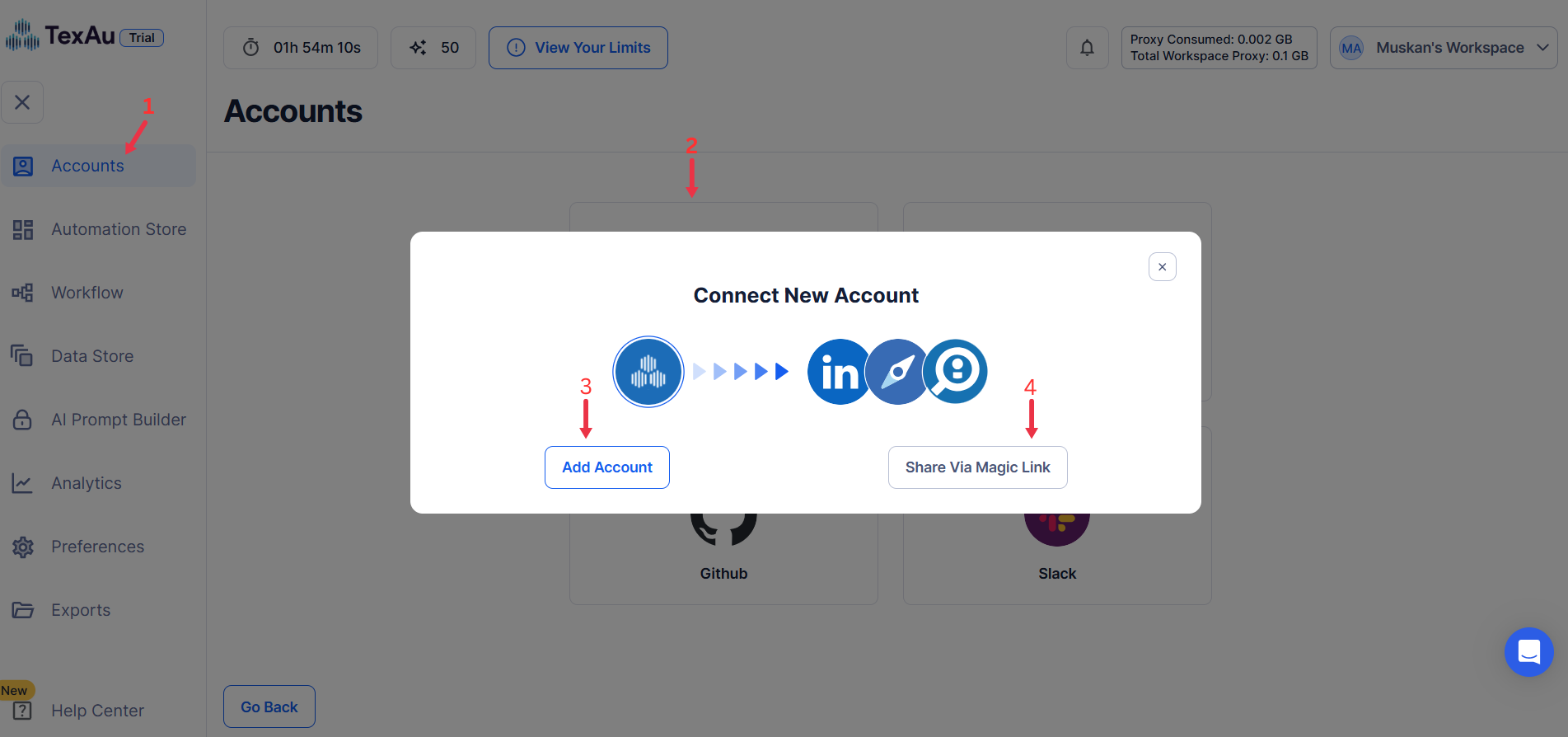
Go to Accounts and connect your LinkedIn account. You can choose one of these methods:
- Share via Magic Link: Share the link, copy it to your browser, and follow the steps to integrate your LinkedIn account securely.
- Add Account: Sync cookies and browser data with TexAu for seamless integration.
Tip: Use Magic Link for an easy and secure connection.
Step 2: Run it on your machine
Decide how you want to run the automation:
- Runs automation on your local device using your IP address.
Tip: Running locally uses your own IP and browser session, which is the safest way to automate an account you care about.
Step 3: Search for the Particular LinkedIn Automation
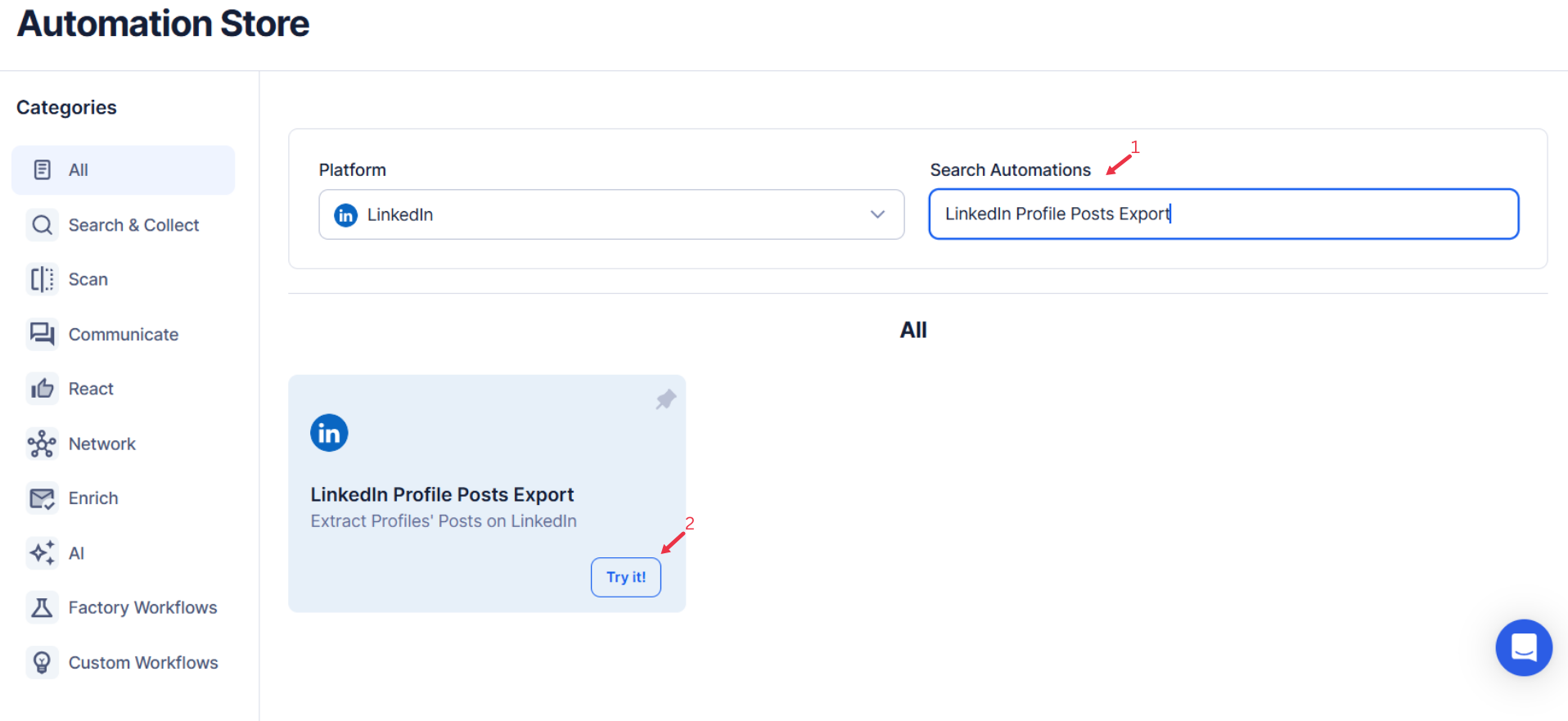
- Navigate to the Automation Store on TexAu.
- Use the search bar to find LinkedIn Profile Posts Export automation.
Step 4: Select Your Input Source
The LinkedIn Profile Posts Export automation allows you to extract recent posts from LinkedIn profiles efficiently. This tool is perfect for marketers, researchers, or professionals who need to gather insights or analyze content strategies from LinkedIn profiles. You can process a single profile or multiple profiles using Google Sheets or a CSV file.
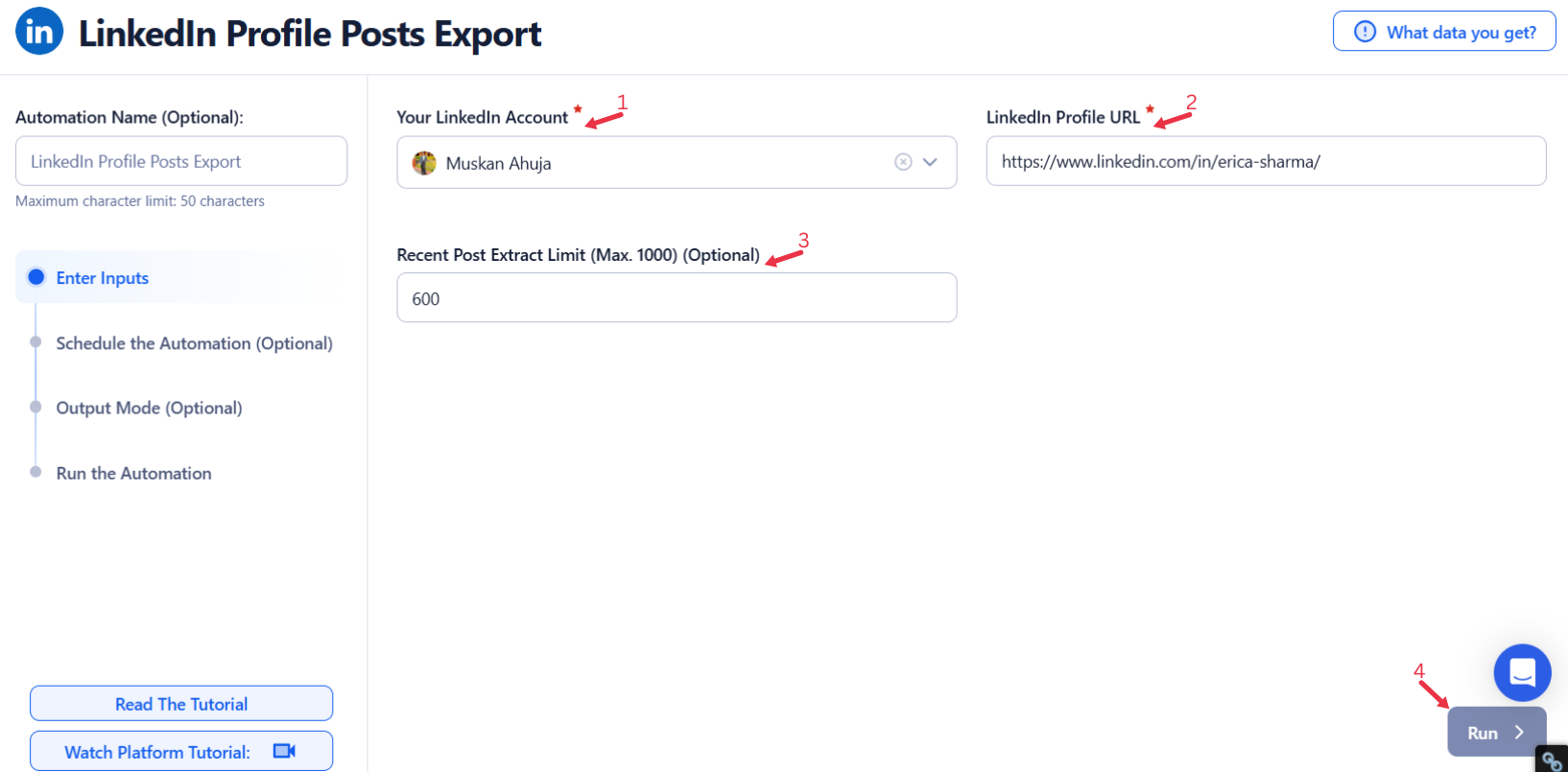
Manually Enter a Single Input
- Profile URL: Enter the LinkedIn profile URL to extract recent posts.
- Extract Limit (Optional): Define the maximum number of posts to extract (up to 1,000).
- Once the details are entered, click Run in the lower-right corner to start the automation.
Google Sheets
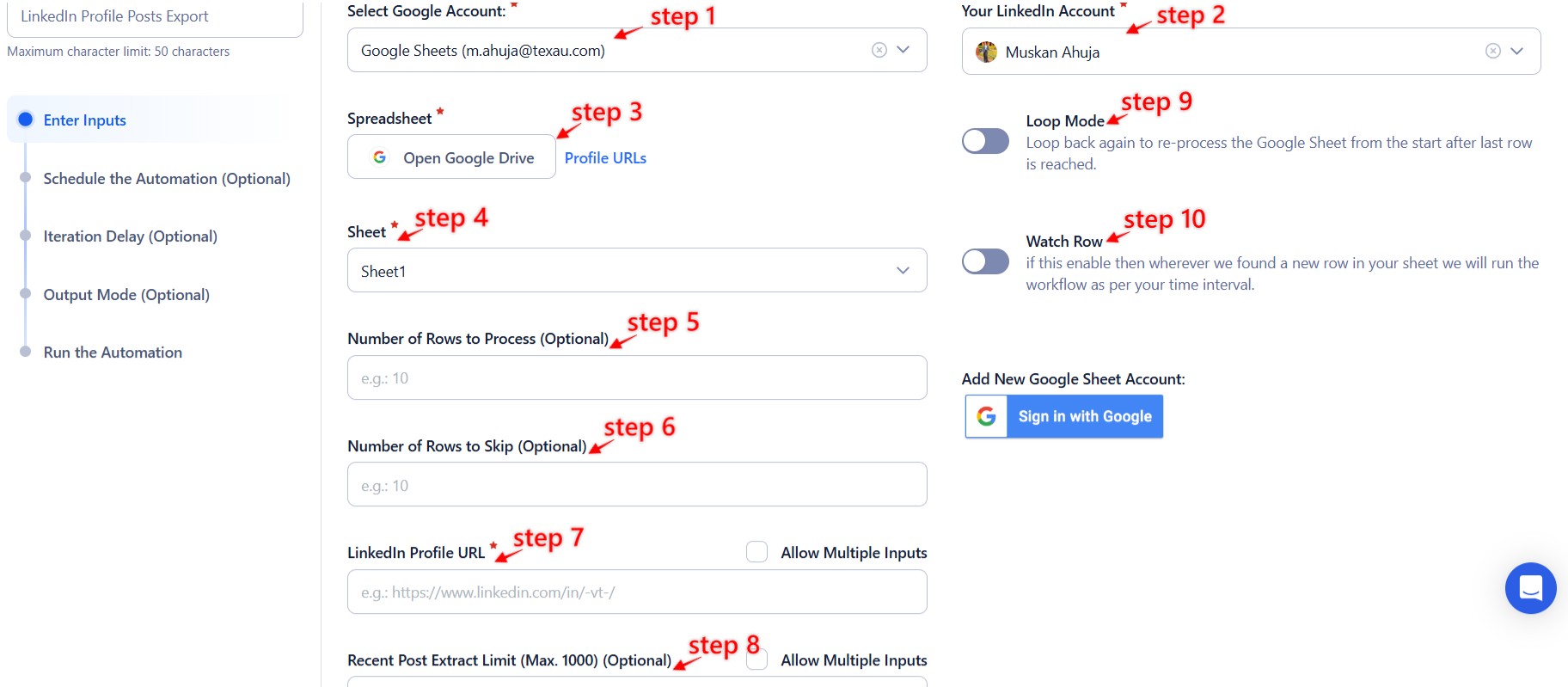
This option is ideal for exporting posts from multiple LinkedIn profiles efficiently. Follow these steps to use Google Sheets:
- Click Select Google Account to choose your Google account or click Add New Google Sheet Account to connect another account.
- Click Accounts to select LinkedIn as the platform.
- Click Open Google Drive to locate the Google Sheet containing LinkedIn profile URLs. A pop-up will display your Google Drive files.
- Select the spreadsheet and the specific sheet containing LinkedIn profile URLs. Confirm the correct sheet selection to ensure the data is accurate.
- Configure additional options:
- Number of Rows to Process (Optional): Specify how many rows to process from the sheet.
- Number of Rows to Skip (Optional): Define rows to skip at the beginning of the sheet.
- Profile URL: Ensure the column contains LinkedIn profile URLs for which you want to extract posts.
- Extract Limit (Optional): Define the maximum number of posts to extract (up to 1,000).
- Click Run in the lower-right corner to initiate the automation.
Optional Advanced Feature:
- Loop Mode: Enable Loop Mode to re-process the Google Sheet from the beginning once all rows are completed. This is useful for tasks that require recurring updates.
Watch Row (Optional)
Watch Row feature enables automated Google Sheet-based workflows by detecting new data entries and triggering workflows instantly.
Define Watch Row settings by selecting a frequency and setting an execution timeframe.
Watch Row Schedule
- None
- Scheduling Intervals (e.g., every 15 minutes, every hour)
- One-Time Execution
- Daily Execution
- Weekly Recurrence (e.g., every Monday and Saturday)
- Monthly Specific Dates (e.g., 7th and 23rd)
- Custom Fixed Dates (e.g., August 14)
By default, Watch Row runs every 15 minutes and continues for five days unless modified.
With Watch Row, TexAu ensures efficient, automated task execution.
CSV File
This option allows you to process LinkedIn profile URLs from a static file. Follow these steps:
- Click Upload CSV File and browse to locate the file containing LinkedIn profile URLs.
- Once uploaded, TexAu will display the file name and preview its content. Verify the data to confirm the correct file is selected.
- Configure additional options:
- Number of Rows to Process (Optional): Specify how many rows to process from the CSV file.
- Number of Rows to Skip (Optional): Define rows to skip at the beginning of the file.
- Profile URL: Ensure the column contains LinkedIn profile URLs for which you want to extract posts.
- Extract Limit (Optional): Define the maximum number of posts to extract (up to 1,000).
- Click Run in the lower-right corner to start the automation.

Step 5: Schedule the Automation (Optional)
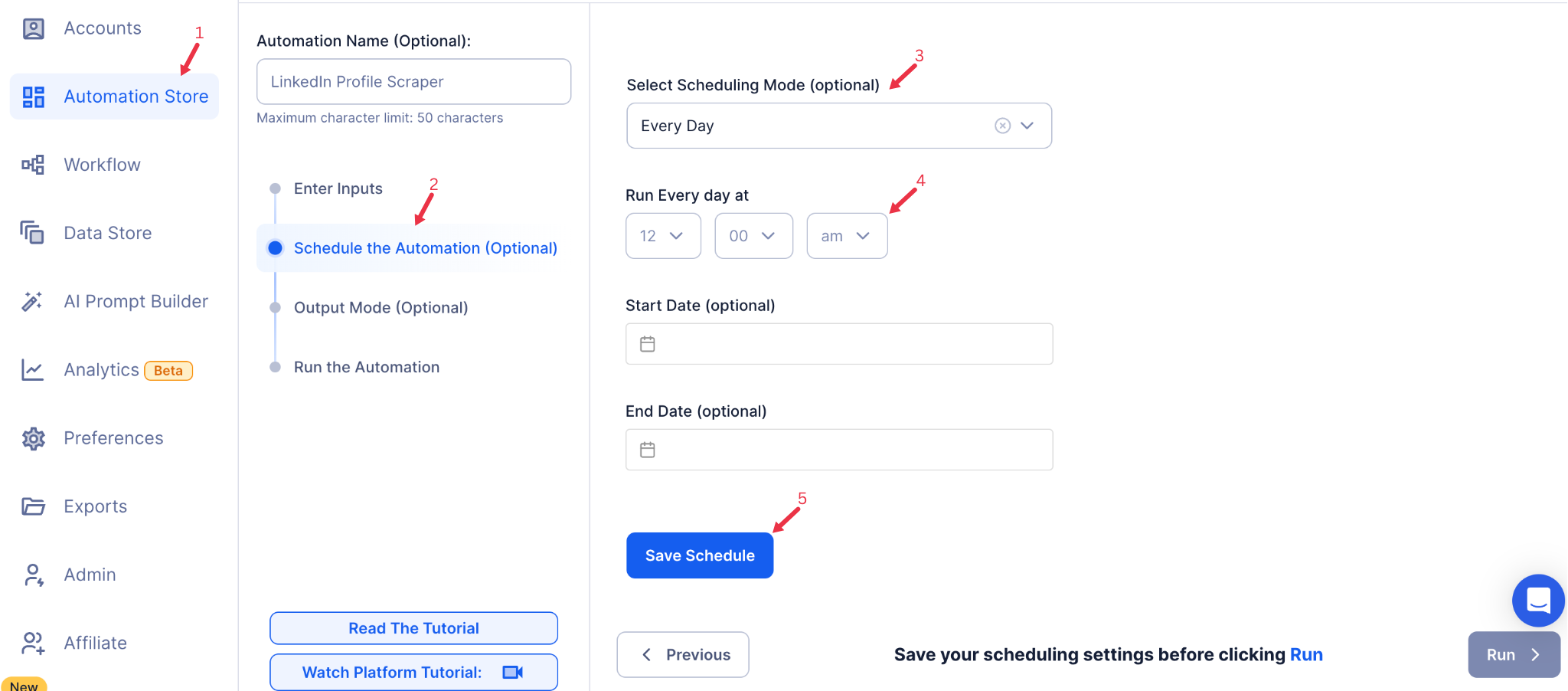
Use TexAu’s scheduling feature if you want to run the automation at specific intervals. Click Schedule to set the start date and time, or configure a Recurrence Frequency for repeated extraction:
- None
- At Regular Intervals (e.g., every day or every week)
- Once
- Every Day
- On Specific Days of the Week (e.g., every Monday and Friday)
- On Specific Days of the Month (e.g., the 5th and 20th)
- On Specific Dates (e.g., March 15)
Scheduling is useful if you need frequent updates on profile posts, ensuring your data is always current.
Step 6: Set an Iteration Delay (Optional)
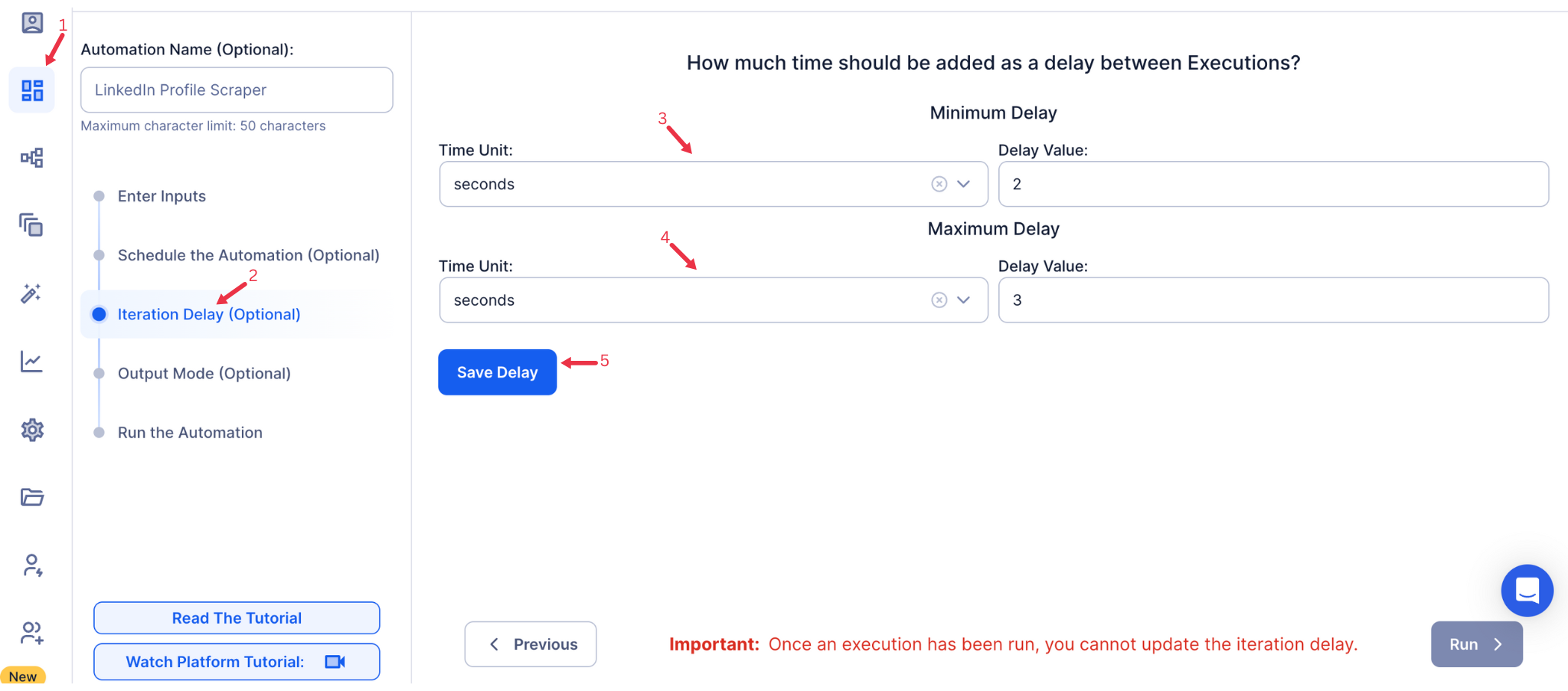
Avoid detection and simulate human-like activity by setting an iteration delay. Choose minimum and maximum time intervals to add randomness between actions. This makes your activity look natural and reduces the chance of being flagged.
- Minimum Delay: Enter the shortest interval (e.g., 10 seconds).
- Maximum Delay: Enter the longest interval (e.g., 20 seconds).
Tip: Random delays keep your automation safe and reliable.
Step 7: Choose Your Output Mode (Optional)
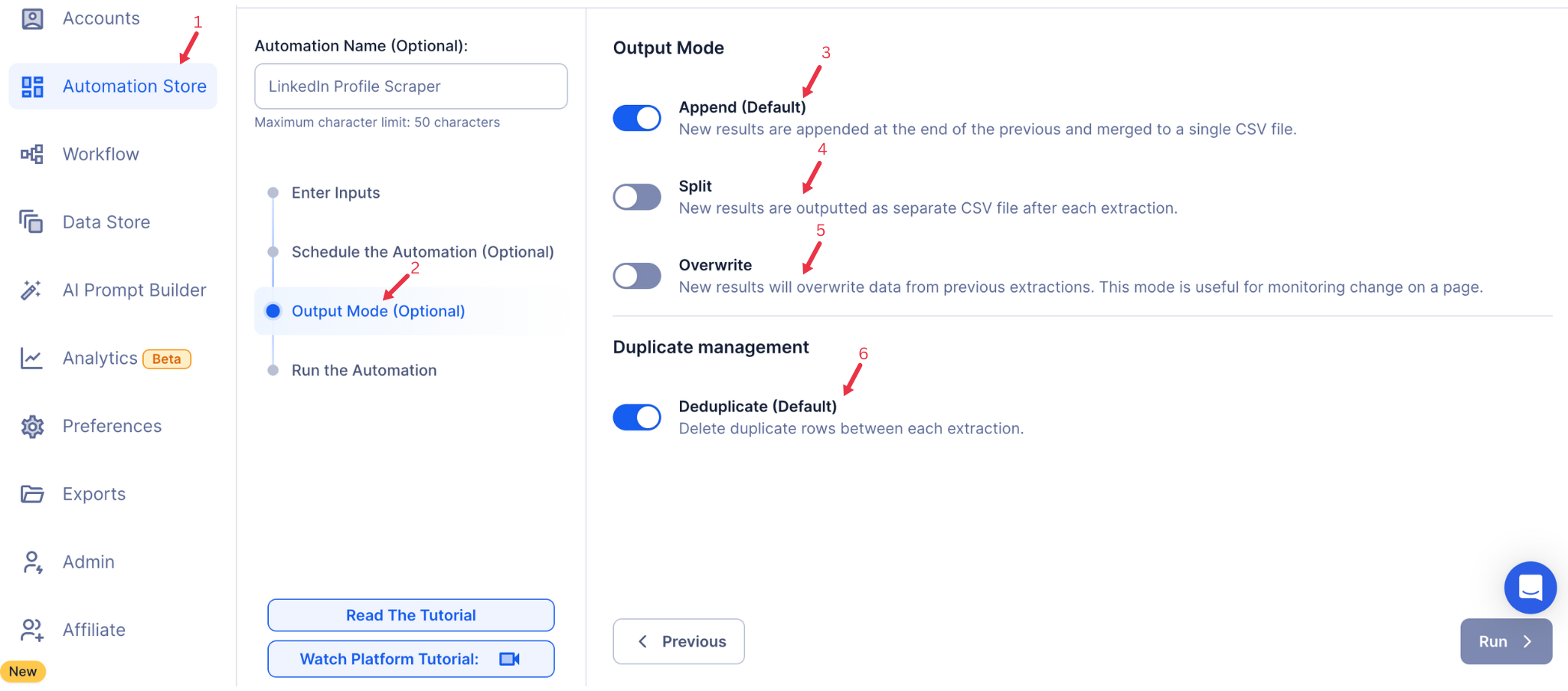
Choose how to save and manage the extracted alumni data. TexAu provides the following options:
- Append (Default): Adds new results to the end of existing data, merging them into a single CSV file.
- Split: Saves new results as separate CSV files for each automation run.
- Overwrite: Replaces previous data with the latest results.
- Duplicate Management: Enable Deduplicate (Default) to remove duplicate rows.
Tip: Google Sheets export makes it easy to collaborate with your team in real time, particularly useful for alumni network management and analysis.
Step 8: Access the Data from the Data Store
After the automation completes, go to the Data Store section in TexAu to access the extracted post data. Locate the LinkedIn Profile Posts Export automation and click See Data to view or download the results.
The LinkedIn Profile Posts Export automation allows you to gather and analyze posts from LinkedIn profiles, helping you track engagement and content trends. With scheduling, bulk input options, and export to Google Sheets or CSV, this tool is valuable for marketers, sales teams, and analysts looking to understand and leverage LinkedIn content.
Run this automation on your own machine.
TexAu V2 Desktop runs every automation locally — your real session, your real IP, unlimited hours, no proxies. One-time $1,999, no subscription, 5 years of updates.