Email Verifier
Verify email addresses in bulk with TexAu’s powerful Email Verifier. Improve deliverability, reduce bounces, and automate validation with API access.
Last updated
Email marketing and cold outreach are powerful growth strategies, but **invalid, outdated, or spam-trap emails** can significantly damage campaign success. High bounce rates, blacklisted domains, and poor sender reputation often stem from unverified email lists.
Email marketing and cold outreach are powerful growth strategies, but invalid, outdated, or spam-trap emails can significantly damage campaign success. High bounce rates, blacklisted domains, and poor sender reputation often stem from unverified email lists.
This is where TexAu’s Email Verifier comes in. It automates the process of email validation, ensuring that every email address in your list is accurate, active, and safe to send to.
Why Email Verification is Essential
Without proper email verification, businesses face:
- Increased bounce rates, leading to lower deliverability.
- Damage to sender reputation, resulting in emails landing in spam.
- Lost revenue opportunities due to reaching inactive contacts.
- Wasted time and money on undeliverable email campaigns.
How TexAu’s Email Verifier Solves These Problems
TexAu provides a high-accuracy, automated solution for verifying and maintaining clean email lists. Its features include:
- Bulk verification to clean thousands of emails at once.
- Real-time validation to prevent fake emails from entering your CRM.
- Spam trap detection to avoid blacklisting.
- Seamless integrations with CRM and marketing tools like HubSpot, Mailchimp, and Google Sheets.
TexAu helps sales, marketing, and recruiting teams maximize their email outreach success by ensuring they only engage with real, verified contacts.
Key Features of TexAu’s Email Verifier
1. Bulk Email Verification – Validate Thousands of Emails at Once
Manually verifying emails is impossible at scale. TexAu allows users to process large email lists in minutes, ensuring that every email address is validated before sending an email campaign.
Example Scenario:
A marketing agency is preparing to launch a large email campaign targeting 5,000+ potential clients. Before using TexAu, their email list contains:
- 10% outdated emails
- 5% disposable emails
- 3% spam traps
After running the list through TexAu’s bulk email verification, they:
- Remove 900 invalid emails to prevent bounces.
- Ensure higher engagement and inbox placement.
- Reduce email sending costs by eliminating useless contacts.
2. High-Accuracy Email Validation – Categorize and Filter Emails
TexAu categorizes emails into five types, helping businesses make informed decisions about which emails to keep or discard:
Valid – The email address exists and is safe to send messages.Invalid – The email doesn’t exist or contains typos.Catch-All – Domains that accept all emails but may not be reliable.Role-Based – Generic addresses like support@ or admin@ that are less likely to engage.Disposable – Temporary emails often used for spam or fraud.
Example Scenario:
A SaaS company scrapes 3,000 emails from LinkedIn but knows some might be fake. TexAu’s verification detects:
- 2,300 valid emails
- 400 role-based emails (support@, sales@, etc.)
- 150 disposable emails
- 150 invalid emails
By removing the invalid, role-based, and disposable emails, the company improves deliverability by 25% and sees higher open and response rates in their outreach.
3. Real-Time Email Validation – Prevent Invalid Emails from Entering CRM
TexAu’s real-time email verification ensures that fake or incorrect emails never enter CRM systems, sign-up forms, or sales databases.
Example Scenario:
A sales team integrates TexAu’s real-time verification into their lead generation process. Now, whenever a prospect submits an email via their website:
- TexAu checks if the email is valid before adding it to the CRM.
- Invalid emails are flagged immediately to prevent wasted outreach efforts.
- Sales reps only engage with verified leads, increasing productivity.
4. Domain & SMTP Validation – Check If the Email’s Domain is Active
TexAu ensures that emails belong to real, active domains by:
- Checking if the domain exists (e.g., @company.com).
- Running an SMTP ping test to confirm whether the inbox receives messages.
Example Scenario:
A recruiter uploads a list of 2,000 candidate emails but suspects some are outdated. After running a domain & SMTP check, TexAu detects that:
- 300 emails have inactive domains.
- Removing these emails ensures a 99% email deliverability rate, improving recruiter response rates.
5. Integration with Email Marketing & CRM Tools – Seamlessly Export Verified Data
TexAu allows users to export clean email lists to: Google Sheets & CSV filesCRM platforms (Salesforce, HubSpot, Zoho, Pipedrive) Email marketing tools (Mailchimp, SendGrid, Outreach.io)
Example Scenario:
A B2B company integrates TexAu with HubSpot and automatically syncs validated email contacts. The result?\
- Higher email engagement
- Reduced spam complaints
- Better CRM data quality
6. Automated Scheduling & Reverification – Keep Email Lists Clean Over Time
Email addresses can become invalid over time due to:\
- Employees leaving companies
- Businesses shutting down
- Domain expirations
TexAu’s automated re-verification ensures email lists stay up-to-date and bounce-free.
Example Scenario:
A startup founder running cold email campaigns schedules monthly re-verifications in TexAu. This:\
- Prevents sending emails to inactive contacts.
- Ensures outreach efforts focus on real, engaged prospects.
- Maintains high domain reputation, avoiding spam filters.
Challenges Addressed by TexAu’s Email Verifier
Spam Traps & Blacklist Risks
The Problem: Sending to Spam Traps Can Get You Blacklisted
Spam traps are fake or inactive email addresses used by ISPs and anti-spam organizations to catch senders who are not properly verifying their lists. Sending emails to spam traps can lead to:
- Your domain getting blacklisted
- Emails landing in spam instead of inboxes
- Reduced email engagement and deliverability
Many businesses unknowingly purchase or collect email addresses that include spam traps. Even legitimate, old email lists can accumulate spam traps over time.
How TexAu Prevents Spam Traps from Harming Your Email Reputation
TexAu’s advanced email verification system detects and flags:
- Spam traps – Fake emails used to catch spammers.
- Blacklisted domains – Ensures you don’t send to flagged addresses.
- Disposable emails – Temporary emails that expire after short periods.
Example Scenario:
A digital marketing agency purchases an email list of 20,000 contacts from a third-party provider. Before using TexAu, they discover:
2,000+ spam trap emails 1,500 blacklisted domains800 disposable emails
Had they sent emails to these addresses, their domain could have been blacklisted, leading to lower deliverability for all future campaigns. After TexAu verification:\
- The agency removes all risky emails.
- Their sender score remains strong.
- Their emails land in inboxes, not spam folders.
Manual Email Validation is Time-Consuming
The Problem: Manually Checking Email Lists is Inefficient
Verifying thousands of email addresses manually is impossible. Traditional methods require:
- Checking each email one by one (which is impractical for large lists).
- Running test emails manually (which can damage sender reputation if too many bounce).
- Cross-referencing domains and SMTP servers (which requires technical expertise).
For sales, marketing, and recruitment teams, spending hours or days cleaning email lists wastes valuable time and resources.
How TexAu Automates Email Verification
TexAu automates email validation, allowing users to:
- Verify thousands of emails in minutes instead of hours.
- Instantly detect invalid, role-based, and disposable emails.
- Schedule automatic list cleaning on a weekly or monthly basis.
Example Scenario:
A recruitment agency regularly scrapes LinkedIn to collect 5,000+ candidate emails per month. Previously, they:
- Spent 3+ hours manually verifying emails.
- Accidentally sent messages to invalid addresses, leading to high bounce rates.
After integrating TexAu:
- The agency verifies all emails automatically.
- Saves 3+ hours per campaign.
- Ensures recruiters only contact valid candidates.
Benefits of Using TexAu’s Email Verifier
TexAu’s automation not only prevents email deliverability issues but also delivers long-term benefits for sales and marketing success.
Increased Email Deliverability – More Emails Land in the Inbox
The biggest advantage of using TexAu is better email deliverability—more emails reach inboxes rather than spam or bouncing.
Example Impact:
Before using TexAu: 15% bounce rate, 50% inbox placement After TexAu verification: 2% bounce rate, 80% inbox placement
- 30% increase in open rates
- More responses and higher engagement
Stronger Sender Reputation – Avoid Blacklists and Spam Filters
A clean email list ensures your domain stays in good standing with ESPs like Gmail, Outlook, and Yahoo.
Example Impact:
A startup founder launches a cold email sequence but sees low response rates. After TexAu validation:
- Their domain reputation improves.
- More emails land in primary inboxes, not spam.
- Open rates increase by 35%.
Time & Cost Savings – Reduce Wasted Resources
Businesses spend thousands of dollars on email campaigns. Sending to invalid or inactive emails is a direct loss.
Example Impact:
A company spends $2,000 per month on email marketing. Before TexAu, 25% of emails bounced or went to invalid contacts—wasting $500.After TexAu validation: Email list is 100% valid. $500 saved per campaign.
Improved Lead Quality & CRM Accuracy – Better Data, Better Results
Sales teams rely on accurate email lists to close deals. Outdated or incorrect data leads to wasted outreach efforts.
Example Impact:
A B2B sales team integrates TexAu with HubSpot.\
- Invalid emails are automatically removed from CRM.
- Sales reps only contact verified, active leads.
- Lead response rates improve by 20%.
Enhanced Email Personalization – Engage Real, Active Users
Personalized email marketing works best when reaching real people, not fake or inactive accounts.
Example Impact:
A marketing team launches a drip campaign to 8,000 contacts. Before TexAu: **20% of emails were invalid, reducing personalization effectiveness.**After TexAu: All contacts were real, leading to 2x higher reply rates.
TexAu’s Email Verifier is a game-changer for businesses that rely on email outreach, marketing, and lead generation. By eliminating invalid contacts, preventing blacklisting, and ensuring high email deliverability, TexAu helps:
- Increase engagement rates
- Improve inbox placement
- Protect sender reputation
- Save time and marketing costs
Use Cases: Who Can Benefit from TexAu’s Email Verifier?
Sales Teams – Filter Out Invalid Emails Before Outreach
Sales teams rely on cold emailing to reach new leads, but invalid or outdated email addresses can increase bounce rates and lower sender reputation, reducing the chances of emails reaching prospects’ inboxes. TexAu helps sales professionals:
- Verify bulk email lists before launching outreach campaigns
- Remove invalid, fake, or outdated email addresses
- Improve email deliverability and response rates
Example:A SaaS sales team is preparing a cold email campaign targeting CTOs at mid-sized tech companies. Before launching, they use TexAu’s Email Verifier to check their 5,000-contact list. 15% of the emails are found to be invalid or disposable—by removing these, they avoid bounce-backs and increase inbox placement, ensuring their messages reach real decision-makers.
Marketing Teams – Improve Newsletter Engagement & Campaign Success
Email marketing is a key channel for nurturing leads, promoting products, and driving conversions. However, sending campaigns to invalid or inactive emails leads to high bounce rates, lower open rates, and wasted marketing budget. TexAu helps marketing teams:
- Clean email lists to improve deliverability and engagement
- Remove risky email addresses that could trigger spam filters
- Increase newsletter and promotional email success rates
Example:A marketing team is launching a new product update email campaign to 100,000 subscribers. Before sending, they use TexAu to verify the list and identify 8,000 invalid or disposable emails. By removing these, they achieve 100% deliverability and a 25% higher open rate, ensuring their message reaches real subscribers.
Recruiters & HR Professionals – Verify Candidate Emails Before Outreach
Recruiters and HR professionals often send job opportunities to potential candidates via email. If a candidate’s email is invalid, outdated, or a temporary address, the recruiter loses a valuable connection. TexAu helps:
- Ensure only valid candidate emails are used
- Reduce bounce rates in recruitment emails
- Improve communication with potential hires
Example:A recruitment agency is hiring senior data engineers for a tech firm. They verify 3,000 candidate emails extracted from LinkedIn. TexAu flags 5% of these as invalid, helping recruiters avoid wasted outreach and focus only on genuine candidates.
Growth Hackers & Startup Founders – Validate Scraped or Extracted Email Lists
Growth hackers and startup founders often extract or scrape email lists for outreach. However, these lists can contain fake, outdated, or risky email addresses that hurt campaign performance. TexAu helps by:
- Cleaning scraped/extracted email lists before outreach
- Ensuring high accuracy in lead generation efforts
- Preventing domain reputation damage from sending to bad emails
Example:A startup founder scrapes 10,000 emails of potential investors from multiple sources. Using TexAu’s Email Verifier, they discover 20% of the emails are invalid, disposable, or spam traps. By removing them, they improve email accuracy, ensuring better investor engagement.
Best Practices for Maximizing TexAu’s Email Verifier
To get the best results from TexAu’s Email Verifier, follow these best practices:
1. Verify Before Sending – Ensure a Clean List for Every Campaign
- Always run email verification before launching an email campaign to prevent bounces.
- Avoid sending to invalid, fake, or spam trap emails that can harm deliverability.
- Example: A sales team verifies their cold email list before outreach and avoids sending emails to 10% of bad contacts, reducing bounce rates significantly.
2. Reverify Monthly – Prevent Data Decay and Keep Lists Fresh
- Email addresses can become invalid over time due to job changes, company shutdowns, or domain expirations.
- Set up automated monthly or quarterly reverifications to keep your lists clean.
- Example: A marketing team revalidates their subscribers’ email list every month, ensuring only active contacts receive newsletters.
3. Export & Sync – Automate List Updates in CRM & Email Tools
- After verifying, export clean email lists to CSV or sync with CRM platforms like HubSpot, Salesforce, or Mailchimp.
- Automate email list updates to ensure only valid contacts are used in campaigns.
- Example: A recruiter exports verified candidate emails into their ATS system, preventing wasted outreach on invalid contacts.
Metrics and Tracking: Measuring Email Verification Success
Bounce Rate Reduction: Track How Email Verification Improves Deliverability
Bounce rate measures how many emails fail to reach inboxes. A high bounce rate lowers email deliverability and increases the risk of being marked as spam. TexAu helps businesses reduce bounces by:
- Removing invalid and expired emails before sending
- Filtering out temporary and disposable emails
- Identifying risky domains that could cause blacklisting
Example:A sales team had an initial bounce rate of 10% on cold outreach. After using TexAu’s Email Verifier, their bounce rate dropped to below 2%, improving inbox placement and engagement.
Response Rate Improvements: Track How Verified Lists Increase Engagement
Using only verified, high-quality email addresses improves the chances of responses. TexAu enables teams to:
- Send emails only to real, active contacts
- Avoid fake or role-based emails that won’t engage
- Improve open and reply rates by ensuring email deliverability
Example:A startup used TexAu to clean their investor outreach email list, removing invalid contacts. Their response rate increased by 15%, leading to more investor meetings.
Tips for Maximizing Results with TexAu’s Email Verifier
1. Run Verification Before Outreach
- Avoid sending to invalid or fake emails.
- Maintain sender reputation and ensure inbox placement.
- Example: A SaaS company verifies its enterprise leads list before outreach, improving open rates by 25%.
2. Reverify Monthly
- Email data decays over time—regular verification keeps lists fresh.
- Prevent bounces caused by job changes or domain shutdowns.
- Example: A recruiter verifies candidate emails every quarter, ensuring only active job seekers receive messages.
3. Export to CRM & Email Tools for Seamless Integration
- Sync verified lists with CRM and email platforms to avoid duplicate efforts.
- Automate list updates and campaign segmentation.
- Example: A sales team exports verified contacts to HubSpot, automating lead follow-ups.
TexAu’s Email Verifier is a must-have tool for sales teams, marketers, recruiters, and startup founders looking to improve email deliverability, reduce bounce rates, and enhance engagement.
By automating email verification, maintaining list hygiene, and integrating with CRM/email tools, businesses can ensure highly effective email campaigns while protecting their sender reputation.
- Eliminate bad emails before sending
- Improve inbox placement and engagement
- Save time and effort with automation
Conclusion: Improve Your Email Campaigns with TexAu’s Email Verifier
TexAu’s Email Verifier ensures that every email sent is delivered, engaged with, and effective. Whether you’re a sales rep, marketer, recruiter, or startup founder, this tool will:
- Reduce bounce rates
- Protect your sender reputation
- Improve email marketing ROI
Start using TexAu today and achieve higher email success rates!
The Email Verifier automation helps you verify email addresses for accuracy and deliverability. This tool is ideal for sales managers, marketers, recruiters, and growth hackers looking to enhance email campaign performance, reduce bounce rates, and maintain a clean email database. With TexAu, you can process bulk email verifications, schedule automation, and export results to Google Sheets or CSV. You can run the automation on your own machine for added flexibility.
Step 1: Log in to the TexAu App and Connect LinkedIn
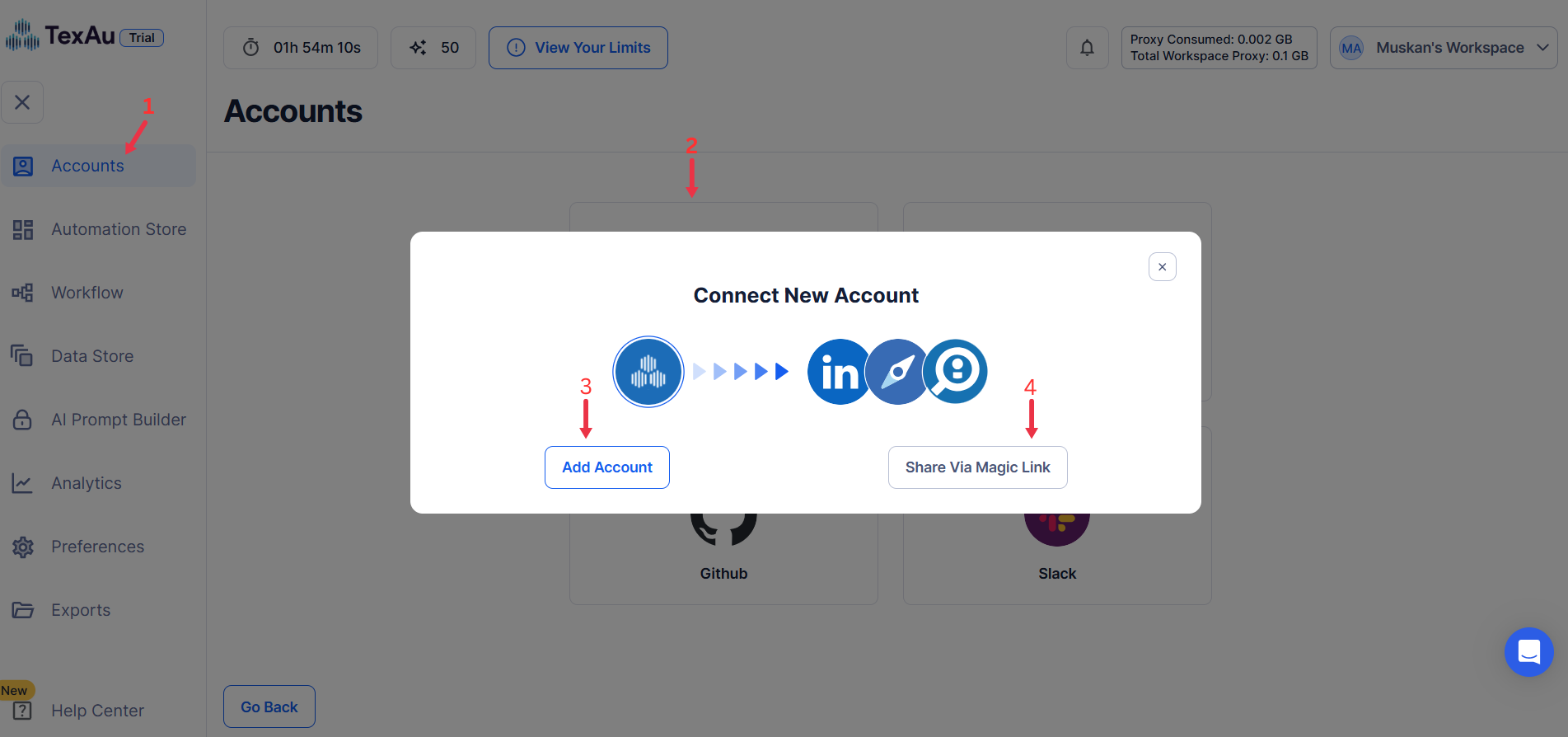
Connect your LinkedIn account to ensure TexAu can access relevant information. Click Add Account and select LinkedIn. TexAu offers two secure connection methods:
- Magic Link: Sends a secure login link to your email, providing quick access without managing cookies.
- Add Account Using Browser Extension: Log in through TexAu’s browser extension for seamless integration and direct access.
Tip: Use Magic Link for a fast and straightforward connection without additional steps.
Step 2: Locate the Automation
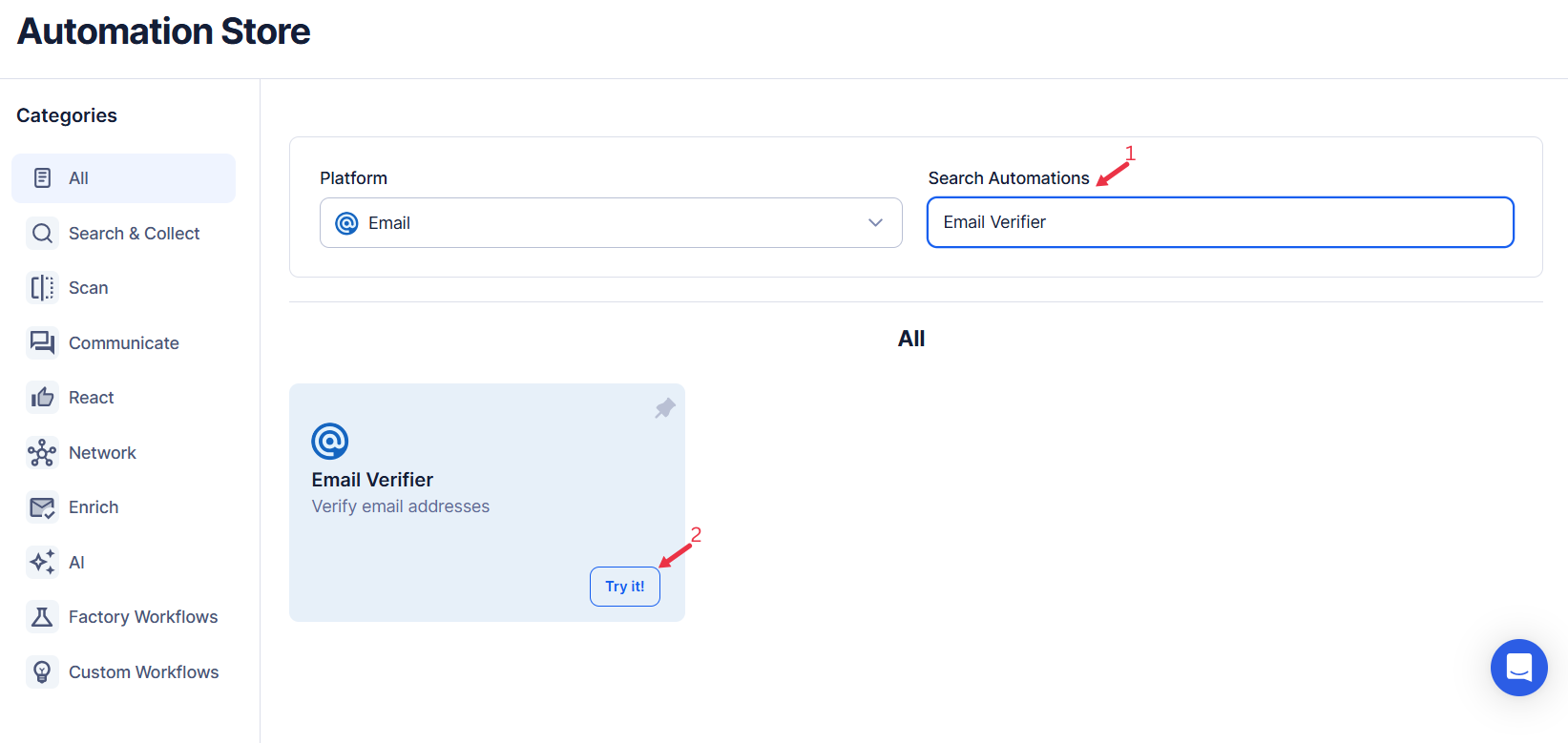
Log in to your TexAu account at the TexAu V2 Desktop app. Navigate to the Automation Store and enter "email-verifier" in the search bar to locate this tool, which helps you discover websites for a list of companies.
Step 3: Select Your Input Source
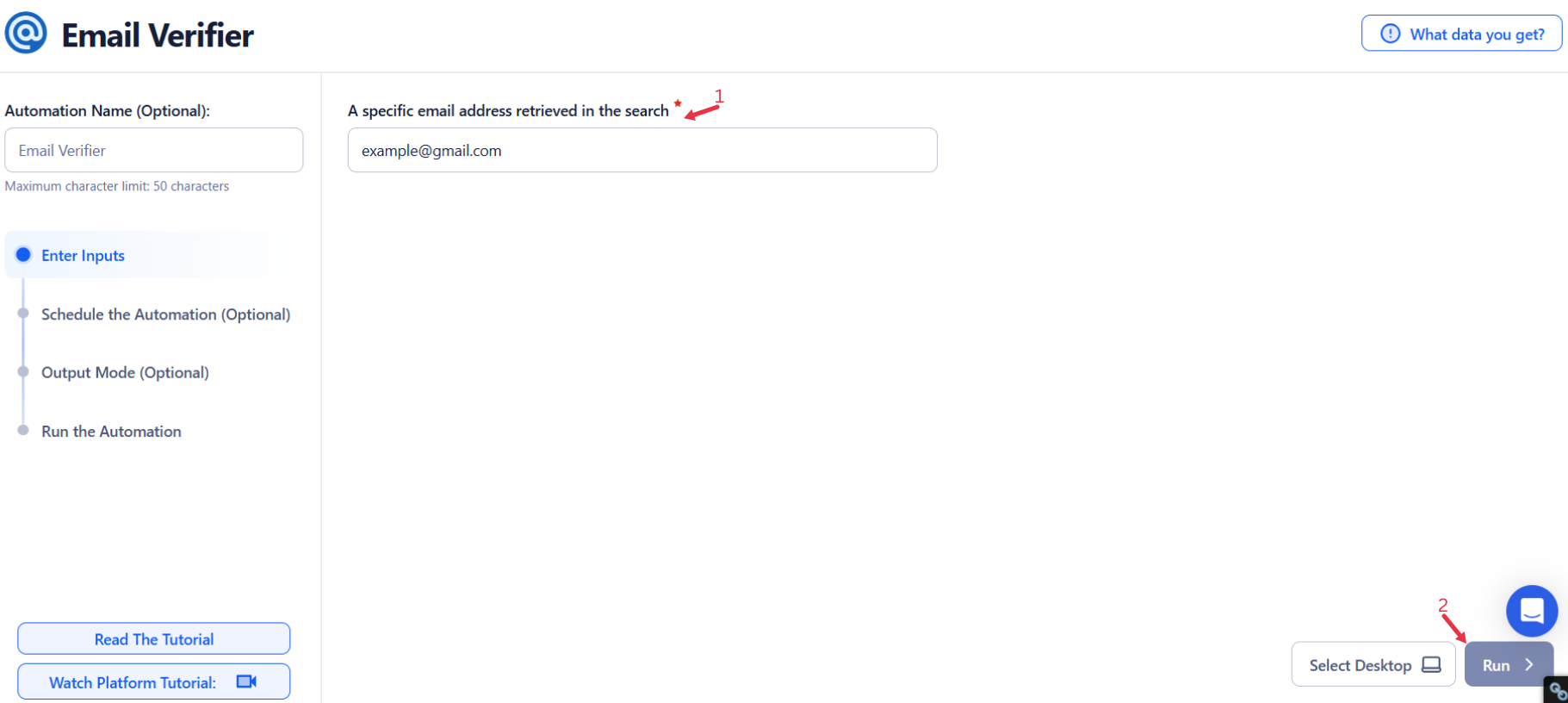
TexAu’s Email Verifier automation enables you to validate email addresses to ensure they are valid and deliverable.
Single Input
- Email: Enter the specific email address you want to verify.
Google Sheets
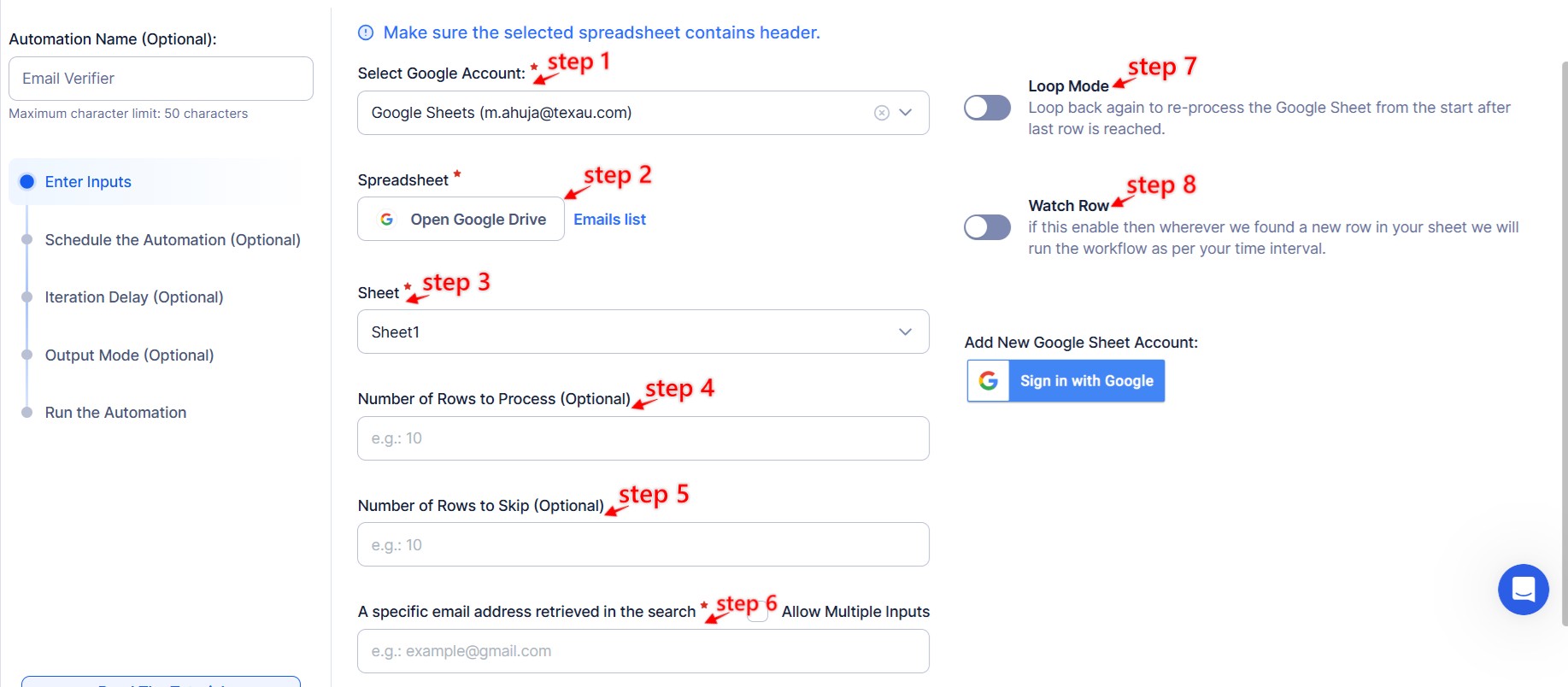
Connect Google Account:
- Click Select Google Account to choose your connected account or add a new account using Add New Google Sheet Account.
Select the Spreadsheet:
- Click Open Google Drive to locate the Google Sheet containing email addresses.
- Choose the spreadsheet and the specific sheet where your data is stored.
Adjust Processing Options:
- Number of Rows to Process (Optional): Specify the number of rows to process.
- Number of Rows to Skip (Optional): Specify rows to skip if needed.
Provide Input Details:
- Email: Ensure the column in the sheet contains valid email addresses.
Watch Row (Optional)
With Watch Row, automation is fully optimized by detecting new Google Sheet rows at set intervals. As soon as data appears, the automation runs seamlessly.
To configure, choose a scan frequency and set the start and end dates.
Watch Row Schedule:
- None
- At Regular Intervals (e.g., every 15 minutes or every hour)
- Once
- Every Day
- On Specific Days of the Week (e.g., every Monday and Thursday)
- On Specific Days of the Month (e.g., the 8th and 21st)
- On Specific Dates (e.g., September 14)
The system checks for new entries every 15 minutes and stops scanning after five days, unless updated.
Process a CSV File
Upload CSV File:
- Click Upload CSV File and select the file containing email addresses.
- TexAu will preview its content for verification.
Adjust Processing Settings:
- Number of Rows to Process (Optional): Define the number of rows to process.
- Number of Rows to Skip (Optional): Specify rows to skip if necessary.
Provide Input Details:
- Email: Ensure the correct column contains valid email addresses.

Step 4: Run the automation on TexAu Desktop
- Open the automation setup and select Desktop Mode.
- Click Choose a Desktop to Run this Automation.
- From the platform, select your connected desktop (status will show as "Connected").
- Click “Use This” after selecting the desktop to run the automation on your local system.
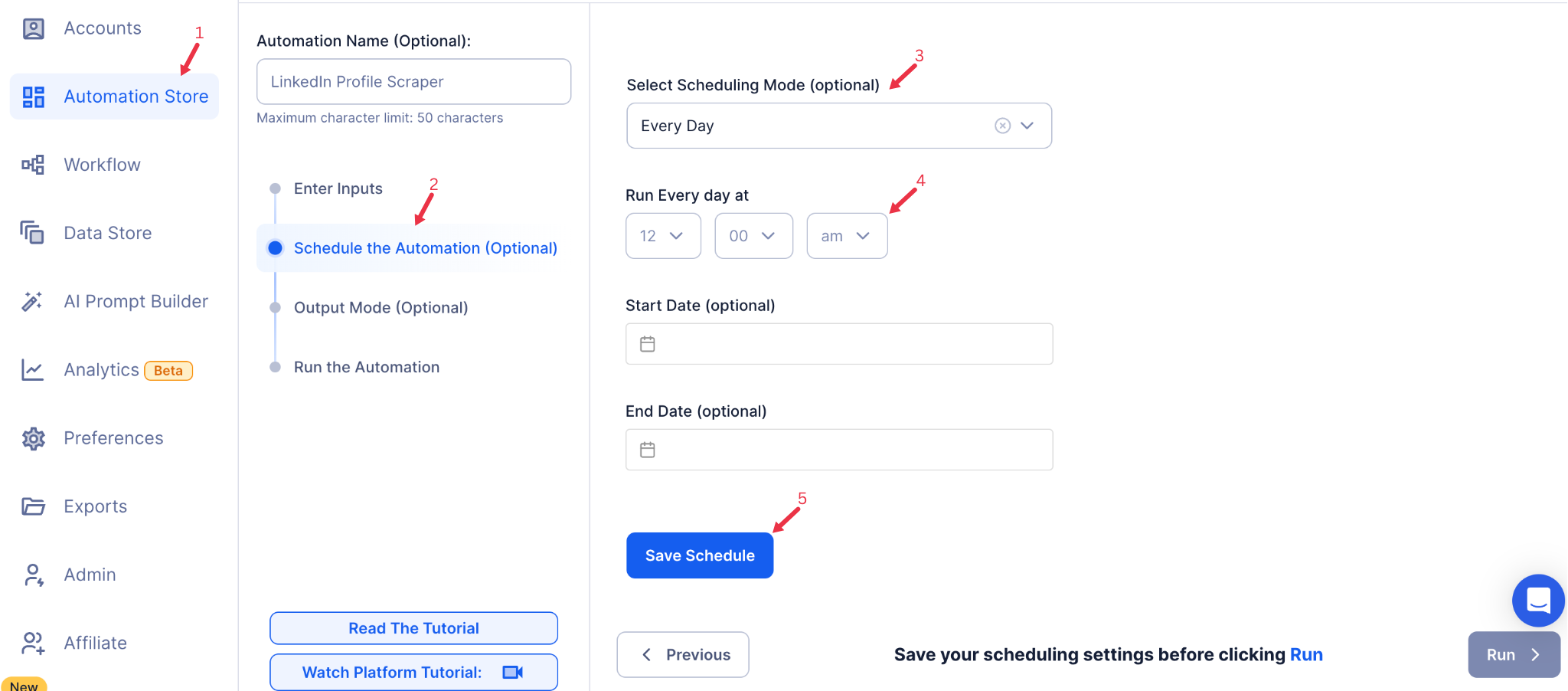
Step 5: Schedule the Automation (Optional)
Schedule the automation to run at specific times or intervals for ongoing email verification. Click Schedule to configure the timing and recurrence options:
- None
- At Regular Intervals (e.g., every 6 hours)
- Once
- Every Day
- On Specific Days of the Week (e.g., Mondays and Thursdays)
- On Specific Days of the Month (e.g., the 10th and 20th)
- On Specific Dates (e.g., March 15)
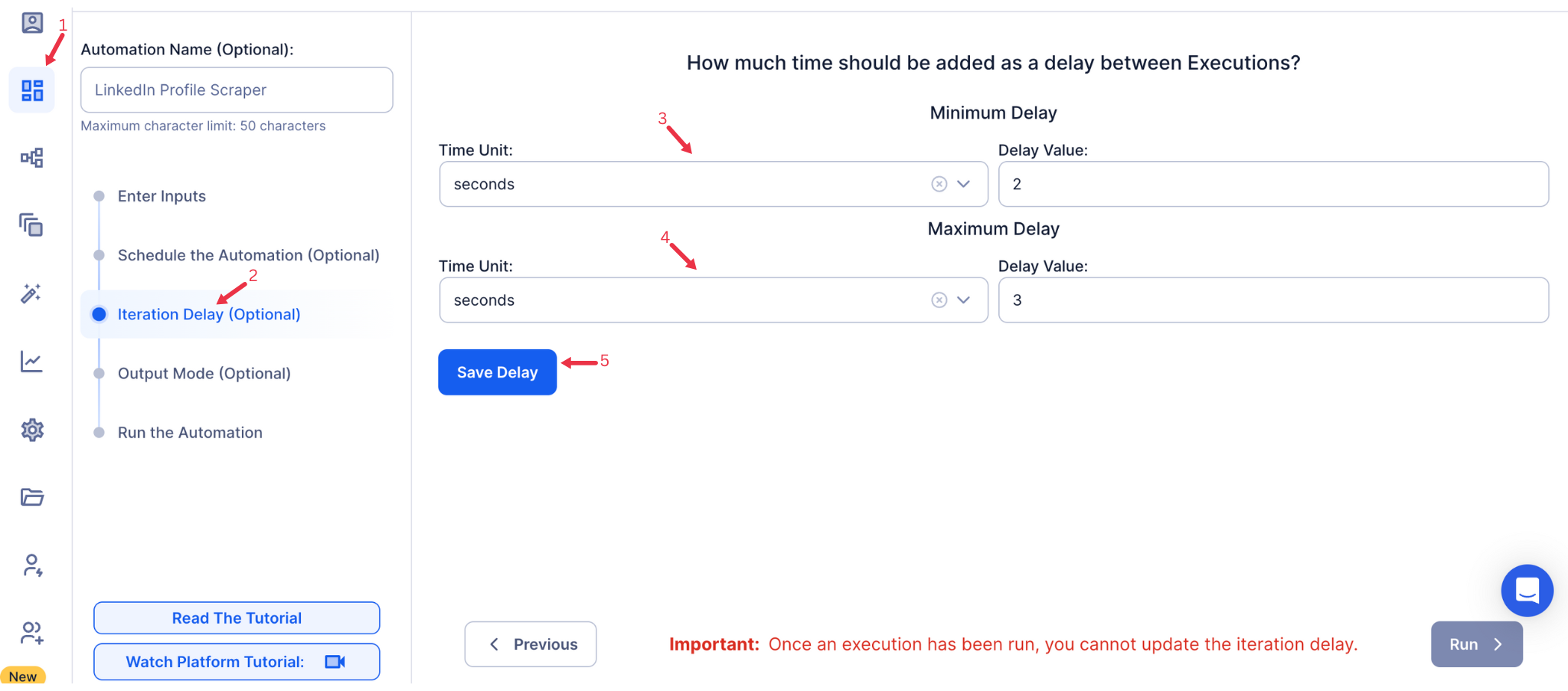
Step 6: Set an Iteration Delay (Optional)
Avoid detection and simulate human-like activity by setting an iteration delay. Choose minimum and maximum time intervals to add randomness between actions. This makes your activity look natural and reduces the chance of being flagged.
- Minimum Delay: Enter the shortest interval (e.g., 10 seconds).
- Maximum Delay: Enter the longest interval (e.g., 20 seconds).
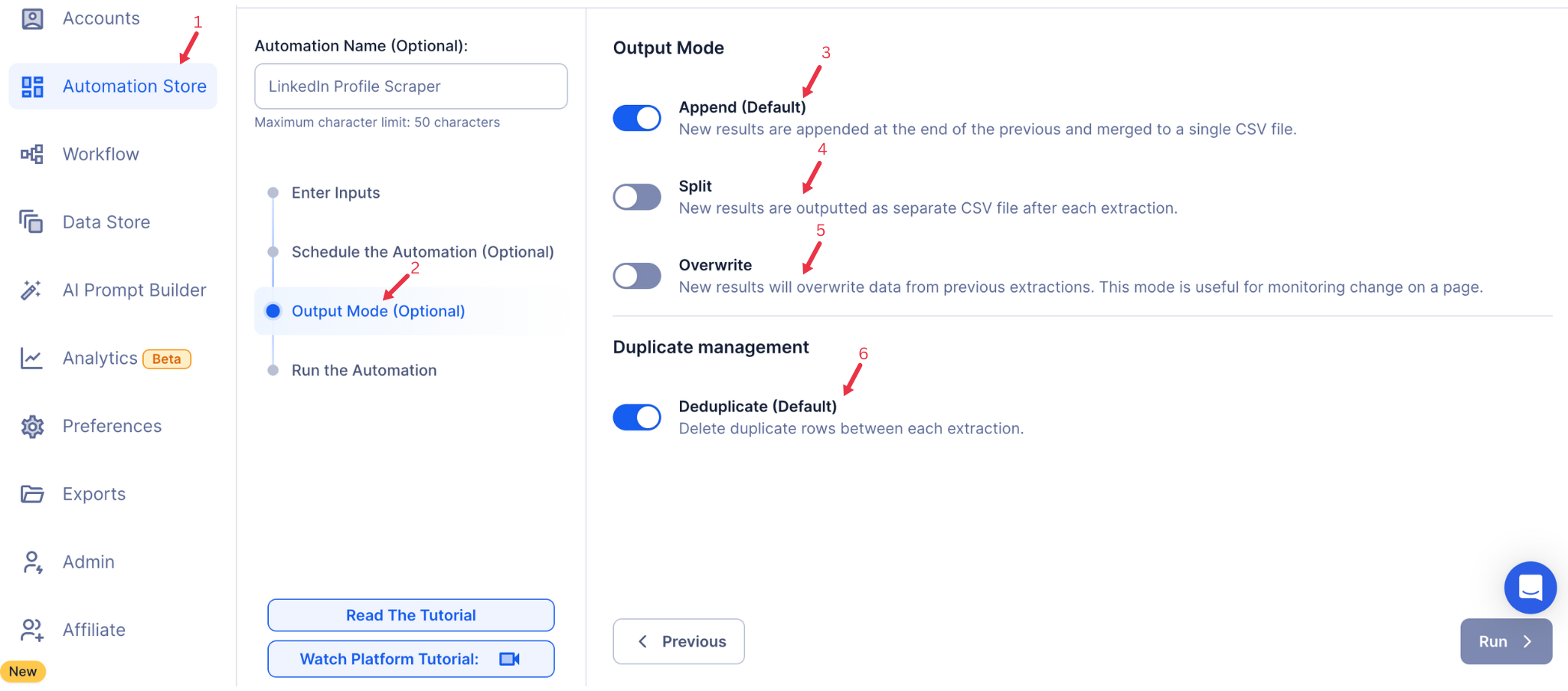
Step 7: Choose Your Output Mode (Optional)
Choose how to save and manage the extracted alumni data. TexAu provides the following options:
- Append (Default): Adds new results to the end of existing data, merging them into a single CSV file.
- Split: Saves new results as separate CSV files for each automation run.
- Overwrite: Replaces previous data with the latest results.
- Duplicate Management: Enable Deduplicate (Default) to remove duplicate rows.
Step 8: Access the Data from the Data Store
Once the automation completes, go to the Data Store section in TexAu to review the verified email data. Locate the "Email Verifier" automation and click See Data to view or download the results.

The Email Verifier automation ensures your email list is accurate and up-to-date, reducing bounce rates and improving campaign success rates. With TexAu’s customizable input options, scheduling capabilities, and seamless data export, you can scale your email verification processes effortlessly and focus on impactful outreach.
Run this automation on your own machine.
TexAu V2 Desktop runs every automation locally — your real session, your real IP, unlimited hours, no proxies. One-time $1,999, no subscription, 5 years of updates.