LinkedIn Event Search Export
TexAu lets you extract LinkedIn event search results and attendee lists in seconds. Automate your outreach with clean, structured data - no manual work.
Last updated
LinkedIn has become the go-to platform for professionals seeking networking, learning, and business opportunities. As a hub for professional events, conferences, and industry-specific gatherings, it offers unparalleled access to opportunities that can drive growth, learning, and collaboration.
LinkedIn has become the go-to platform for professionals seeking networking, learning, and business opportunities. As a hub for professional events, conferences, and industry-specific gatherings, it offers unparalleled access to opportunities that can drive growth, learning, and collaboration.
However, manually researching these events, organizing the data, and integrating it into strategic workflows can be daunting. This is where TexAu’s LinkedIn Event Search Export tool comes in. By automating event discovery and data extraction, it enables professionals to focus on leveraging insights rather than spending hours gathering information.
Importance of Exporting Event Data
Exporting event data from LinkedIn is critical for several reasons:
- Market Research: Understand industry trends and identify popular topics, event formats, and audience preferences.
-
- Example: Analyze recurring themes in sustainability events to align your content strategy.
- Lead Generation: Discover prospective clients or partners attending industry-specific events.
-
- Example: Target CEOs attending AI conferences to pitch your innovative tech solutions.
- Strategic Planning: Use event insights to design successful webinars, conferences, or promotional campaigns.
-
- Example: Plan your event around emerging trends discovered from LinkedIn data.
Key Features: What Makes TexAu Stand Out
Comprehensive Event Data Extraction
TexAu’s LinkedIn Event Search Export tool captures key details about events, such as:
- Event name, date, time, and location (physical or virtual).
- Organizer details and event description.
- URL for quick access and additional insights.
Example:
Suppose you’re exploring the Artificial Intelligence (AI) domain. You can compile a list of upcoming AI-focused webinars and conferences, including their organizers, timing, and URLs. This list becomes a powerful resource for planning your outreach and attending high-value events.
Customizable Filters for Precise Searches
Advanced filters allow you to refine event searches based on:
- Keywords.
- Industries.
- Locations.
- Event types (e.g., online or in-person).
Example:
A healthcare startup based in Europe can focus on events like medical technology summits in their region. This ensures relevance, better networking, and improved ROI from event participation. For marketers who want to refine their LinkedIn event search, LinkedIn Group Search Export allows users to extract valuable data from relevant LinkedIn groups where events are frequently discussed.
Bulk Event Search and Export
Export data for multiple events simultaneously to save time and effort. The tool simplifies workflows for professionals managing extensive campaigns or conducting in-depth research.
Example:
A digital marketing agency can gather data for all upcoming webinars related to social media strategies for the next quarter. This helps plan targeted campaigns and identify collaboration opportunities.
Flexible Export Formats
Export event data in formats like CSV or Excel, making it easier to analyze or integrate with CRMs, project management tools, or marketing automation platforms.
Example:
A SaaS company can export event data into HubSpot to track event-driven leads or into Asana for campaign planning.
Real-Time Updates for Accurate Insights
Stay ahead with the most up-to-date event information. The tool ensures your data reflects any recent changes or new additions.
Example:
An events coordinator can set up automatic updates to track changes in the schedules of high-priority conferences, ensuring accurate planning and follow-ups.
Challenges Addressed by TexAu
Manual Event Research
Finding and organizing events on LinkedIn manually can be a time-consuming and tedious process. Sifting through LinkedIn’s event search, analyzing the relevancy of events, and consolidating all the information for planning purposes often takes hours of effort. With TexAu’s LinkedIn Event Search Export, this entire process is automated, streamlining event discovery into an efficient workflow. For professionals wanting to discover shared connections before attending events, LinkedIn Mutual Connections Export provides insights into mutual industry contacts.
By automating event discovery, professionals can:
- Save significant time that would otherwise be spent scrolling through LinkedIn’s event pages.
- Focus on more strategic tasks, such as planning outreach campaigns or engaging with prospective clients.
- Avoid missing important events that align with their professional objectives.
Scenario:
Imagine you are a marketing manager tasked with identifying events related to digital marketing trends. Manually researching such events across industries and geographies could take several days. TexAu’s tool allows you to set filters for relevant keywords, industries, and locations, and then extract all event data in minutes. This saved time can now be invested in crafting a targeted campaign to connect with attendees.
Data Disorganization: Structure Your Event Data Seamlessly
One of the major challenges of manual event discovery is the lack of organization in how the data is presented. Event details—such as descriptions, timings, organizer information, and registration URLs—are often scattered, making it difficult to consolidate and analyze them effectively. TexAu addresses this issue by consolidating all event details into structured, exportable formats like CSV or Excel.
By organizing event data into a centralized format, users can:
- Easily access, sort, and analyze data to identify trends and opportunities.
- Share data with teams for collaboration on outreach or planning.
- Integrate event data into CRM or project management tools for seamless workflow management.
Scenario:
A B2B sales team identifies 50 events that match their target audience’s interests. Instead of manually compiling this information into a usable format, they use TexAu to export structured event data in one click. The team then imports this data into a CRM, segmenting it based on event type or audience size to plan their lead generation campaigns effectively.
Missed Opportunities: Stay on Top of Relevant Events
In the fast-paced digital world, opportunities often slip through the cracks due to incomplete or delayed event discovery. TexAu ensures no relevant events are overlooked by providing comprehensive and up-to-date data. This tool allows you to capture details for all relevant events within your industry or niche, ensuring that you’re always in the loop.
With TexAu, you can:
- Regularly update your event database to include new or modified listings.
- Use advanced filters to identify niche events that might not appear in a general LinkedIn search.
- Stay ahead of competitors by acting on event insights quickly.
Scenario:
An HR professional searching for career fairs to recruit software developers can use TexAu to uncover small, niche events that don’t rank high in LinkedIn’s search results. By discovering and engaging with these opportunities early, the recruiter can build a strong talent pipeline before competitors even find the event.
Benefits: Why Choose LinkedIn Event Search Export?
Enhanced Networking Opportunities
Networking is one of the core reasons professionals attend LinkedIn events. The platform brings together industry leaders, potential clients, and partners in a way that few other platforms can. With TexAu’s LinkedIn Event Search Export, you can discover events that align with your goals, making it easier to connect with the right people.
Example:
A fintech startup planning to raise funds can use TexAu to identify venture capital meetups and financial innovation summits. By attending these events, the founders can directly engage with investors, showcase their ideas, and build relationships that lead to funding opportunities.
Additional Tip:
Prioritize events with influential speakers or attendees in your industry. Use the exported data to create a list of target attendees and plan personalized networking strategies.
Improved Lead Generation
LinkedIn events are an excellent source of leads, particularly for marketers and sales professionals. TexAu simplifies this process by providing detailed information about events and their attendees, enabling you to craft targeted outreach campaigns. To improve company-targeted event searches, LinkedIn Company Search Export extracts relevant business data for potential B2B engagement.
Example:
A company specializing in eco-friendly packaging solutions can target attendees of sustainability-focused conferences. By exporting event data, they can identify prospects who are likely to resonate with their products. Personalized messages sent to these attendees can lead to higher engagement rates and better conversion outcomes.
Additional Tip:
Use the exported event URLs to track registration pages and attendee engagement. Tailor your outreach messaging based on the interests or topics highlighted in the event descriptions.
Strategic Event Planning
Planning your own event becomes much easier when you have access to insights from LinkedIn’s extensive event database. TexAu allows you to identify trends in event topics, formats, and audience preferences, which you can use to design impactful events.
Example:
If you notice a trend of hybrid events gaining popularity within your industry, you can adopt this format to maximize attendance and reach. Analyze exported data to identify the most successful hybrid events and replicate elements such as scheduling, content themes, or promotional strategies.
Additional Tip:
Use insights from event descriptions and attendee demographics to create a unique value proposition for your event. For instance, if most attendees prefer actionable takeaways, structure your content around workshops or hands-on sessions.
Time Efficiency
The manual process of searching, organizing, and analyzing event data can take hours or even days. TexAu automates these tasks, enabling you to focus on strategic decision-making rather than repetitive work. For event organizers monitoring audience engagement with event posts, LinkedIn Post Likers Export helps identify and target individuals who have interacted with event-related content.
Example:
A marketing agency that frequently attends industry events can export details of 100+ relevant events in just a few minutes. Instead of spending days on manual research, the team can dedicate their time to creating outreach materials, scheduling client meetings, or preparing pitches.
Additional Tip:
Automate event searches on a recurring schedule to ensure you always have the latest information without additional effort.
Data-Driven Decision Making
Successful marketing, sales, and networking strategies rely on accurate and actionable data. With TexAu, you can refine your approach based on detailed event insights, improving targeting, planning, and execution across your campaigns.
Example:
By analyzing exported data, a SaaS company notices that events with smaller, niche audiences tend to generate more meaningful leads compared to large, general events. They shift their focus to participating in niche webinars and meetups, resulting in a better ROI.
Additional Tip:
Combine event data with performance metrics from previous campaigns to identify patterns and refine your strategies over time.
TexAu’s LinkedIn Event Search Export empowers professionals to make smarter, faster, and more effective decisions around event participation and planning. By automating the discovery process, consolidating data, and providing actionable insights, the tool saves time and enhances productivity.
Whether you’re a marketer seeking new leads, a recruiter sourcing top talent, or a business owner planning strategic networking, TexAu provides the resources to maximize your efforts. Embrace the power of automated event data management today and unlock unparalleled opportunities for growth and success!
Use Cases: Who Can Benefit?
Marketers: Sponsorship and Campaign Promotion Opportunities
Marketers play a crucial role in identifying events that align with their brand’s goals. TexAu’s LinkedIn Event Search Export tool helps marketers discover events where their brand can gain visibility among target audiences. By analyzing event data, marketers can identify high-value sponsorships or plan campaigns targeting specific event attendees.
Example:
A software brand specializing in project management tools uses the tool to identify tech conferences attended by senior decision-makers in the IT industry. By sponsoring these events, the brand boosts visibility and positions itself as a thought leader in its domain. Additionally, the marketing team can extract attendee lists to craft personalized post-event follow-ups, driving engagement and nurturing potential leads.
Scenario:
A digital marketing agency plans to promote a new social media tool. By focusing on digital marketing webinars and content creation workshops, the agency creates campaigns targeting attendees already interested in the niche, improving conversion rates.
Recruiters: Talent Acquisition at Professional Events
Recruiters often look for industry events, such as career fairs and professional meetups, to find top-tier candidates. TexAu enables recruiters to streamline this process by extracting event details, including organizers and descriptions, making it easy to spot opportunities with a high density of talent. To extract candidate data from event interactions, LinkedIn Recruiter Search Export helps recruiters identify professionals attending or discussing relevant events.
Example:
A recruiter for a gaming company uses the tool to identify game development expos and coding bootcamp events. These events provide access to a talent pool of skilled professionals. By attending or partnering with these events, the recruiter can directly engage with prospective candidates, reducing the time-to-hire.
Scenario:
A healthcare organization searching for qualified nurses and medical professionals focuses on medical career expos in urban areas. They use TexAu to identify relevant events, ensuring their presence at gatherings rich in potential candidates.
Business Owners: Networking and Business Expansion
For business owners, attending LinkedIn events provides a chance to showcase products or services, explore partnerships, and connect with potential clients. TexAu simplifies this process by compiling event data that aligns with their industry or target audience.
Example:
A B2B SaaS founder exports data from TexAu to identify trade shows focused on software solutions for small businesses. At the event, they showcase their software, network with attendees, and build partnerships that open doors to new markets.
Scenario:
A small manufacturing business looking to expand its distribution partners targets supply chain and logistics summits. By using TexAu to uncover relevant events, they position themselves in front of potential partners and investors, leading to increased distribution reach.
Event Organizers: Refining Event Planning Strategies
Event organizers can use TexAu to analyze successful events and uncover insights that help them improve their own planning and promotional efforts. By extracting data on event topics, formats, and attendee demographics, organizers can replicate best practices and attract a larger audience.
Example:
An event planner working for a professional association studies LinkedIn data to identify popular event formats such as virtual panel discussions and hybrid networking sessions. By adopting these formats, they improve attendee satisfaction and increase registrations for their events.
Scenario:
A tech event organizer notices a trend in short-form webinars gaining popularity. By analyzing event descriptions and engagement rates, they design a series of 30-minute sessions on trending topics, resulting in a 25% increase in attendance compared to previous events.
Best Practices: Maximizing the Tool’s Potential
Filter for Relevance
Using TexAu’s advanced filters ensures your event searches are precise and aligned with your goals. You can refine your searches based on keywords, industries, locations, or event types to find the most relevant opportunities.
Tip:
If your objective is to connect with professionals in renewable energy, filter events by keywords like “sustainability,” “green energy,” or “climate tech.” Narrow your search further by focusing on regions with growing renewable energy markets, such as Europe or North America.
Engage with Organizers
Reaching out to event hosts or organizers can open doors to collaborations, speaking opportunities, or sponsorship deals. Establishing a relationship with organizers not only enhances your visibility but also positions you as a trusted industry partner.
Tip:
After identifying relevant events, send personalized messages to the organizers. For example, propose a speaking slot at a conference or explore co-hosting an event to leverage both audiences. This proactive engagement can significantly boost your presence in the industry.
Regularly Update Searches
The professional event landscape evolves rapidly, with new events being created and details changing frequently. Scheduling periodic searches ensures you stay informed about the latest opportunities without manually checking LinkedIn every time.
Tip:
Set monthly reminders to run TexAu’s export tool and refresh your event database. For instance, a sales manager targeting quarterly expos can regularly update their list to include the most current events, ensuring no opportunity is missed.
Metrics and Tracking: Measuring Success with Event Data
Event Popularity Metrics
Analyzing metrics such as attendee counts and engagement levels helps prioritize events with the most networking potential. By focusing on high-attendance events, you can maximize your reach and connect with a broader audience.
Example:
A marketing team targeting technology buyers identifies a tech expo with 10,000 attendees. They prioritize participation in this event over smaller gatherings, ensuring their efforts reach a larger audience of decision-makers. For analyzing published insights about past events, LinkedIn Profile Articles Export allows users to extract LinkedIn articles related to industry topics and events.
Additional Tip:
Combine attendee metrics with industry relevance. A niche event with 1,000 highly targeted attendees may yield better results than a generic event with 10,000 participants.
Conversion Rates
Tracking conversion rates is essential to measure the success of your event participation. By analyzing how many leads or connections resulted from attending or targeting a specific event, you can refine your approach for future opportunities.
Example:
A B2B consulting firm attends a hybrid leadership summit. After exporting attendee data, they engage in follow-up campaigns and generate 20 qualified leads. By comparing the costs and outcomes of this campaign, they calculate a 5x ROI, confirming the event’s value.
Additional Tip:
Segment your leads based on event type or audience demographics and track which segments convert the most. This insight can guide your future event choices.
Trend Monitoring
Understanding emerging trends in event formats, topics, and audience preferences helps businesses stay ahead of the curve. TexAu enables you to track shifts, such as the rise of hybrid events or increasing demand for virtual conferences.
Example:
An education tech company notices a growing number of virtual events in the education sector. By adapting their outreach to prioritize these events, they align with audience preferences, driving more meaningful engagement.
Additional Tip:
Use trend insights to plan your own events. For example, if short-form, high-value content is trending, design your webinars to align with this format.
Tips for Maximizing Results: Post-Export Strategies
Engage Organizers and Attendees
Building relationships with event organizers and participants creates long-term value. After exporting event data, use it to connect with organizers and key attendees through personalized messages.
Tip:
Follow up with attendees by referencing the event in your message. For instance, thank them for their insights during a panel discussion and propose a one-on-one meeting to explore collaboration opportunities.
Target High-Value Events
Not all events are created equal. Prioritize events with large or industry-relevant audiences to ensure you’re investing your time and resources effectively.
Tip:
Focus on events featuring industry leaders as speakers or panelists. These events often attract high-quality attendees who can significantly impact your networking or sales efforts.
Leverage Post-Event Data
Event participation doesn’t end when the event concludes. Use follow-up strategies to maintain connections and nurture relationships formed during the event.
Tip:
Send personalized thank-you emails or LinkedIn messages to the people you met. Share insights or takeaways from the event to keep the conversation going and position yourself as a valuable contact.
TexAu’s LinkedIn Event Search Export is a robust tool that empowers marketers, recruiters, business owners, and event organizers to take full advantage of LinkedIn’s professional event ecosystem. By following these detailed use cases, best practices, and metrics, you can ensure maximum ROI and long-term success from your event-related efforts.
Conclusion: Transform Event Data into Actionable Insights
LinkedIn Event Search Export by TexAu is a game-changer for professionals looking to optimize networking, lead generation, and event planning. Automating data extraction and organization empowers users to make informed, strategic decisions.
Start leveraging TexAu today to transform how you approach LinkedIn event data. Save time, uncover opportunities, and drive meaningful engagement with minimal effort!
The LinkedIn Event Search Export automation allows you to gather data from LinkedIn events based on specific keywords or topics. This automation is ideal for marketers, sales teams, and growth hackers who want to track industry events, monitor engagement, or analyze event trends on LinkedIn. This guide will help you set up and run this automation, exporting results to Google Sheets or CSV for easy analysis.
Step 1: Log in to TexAu and Connect LinkedIn
Log in to your TexAu account at the TexAu V2 Desktop app.
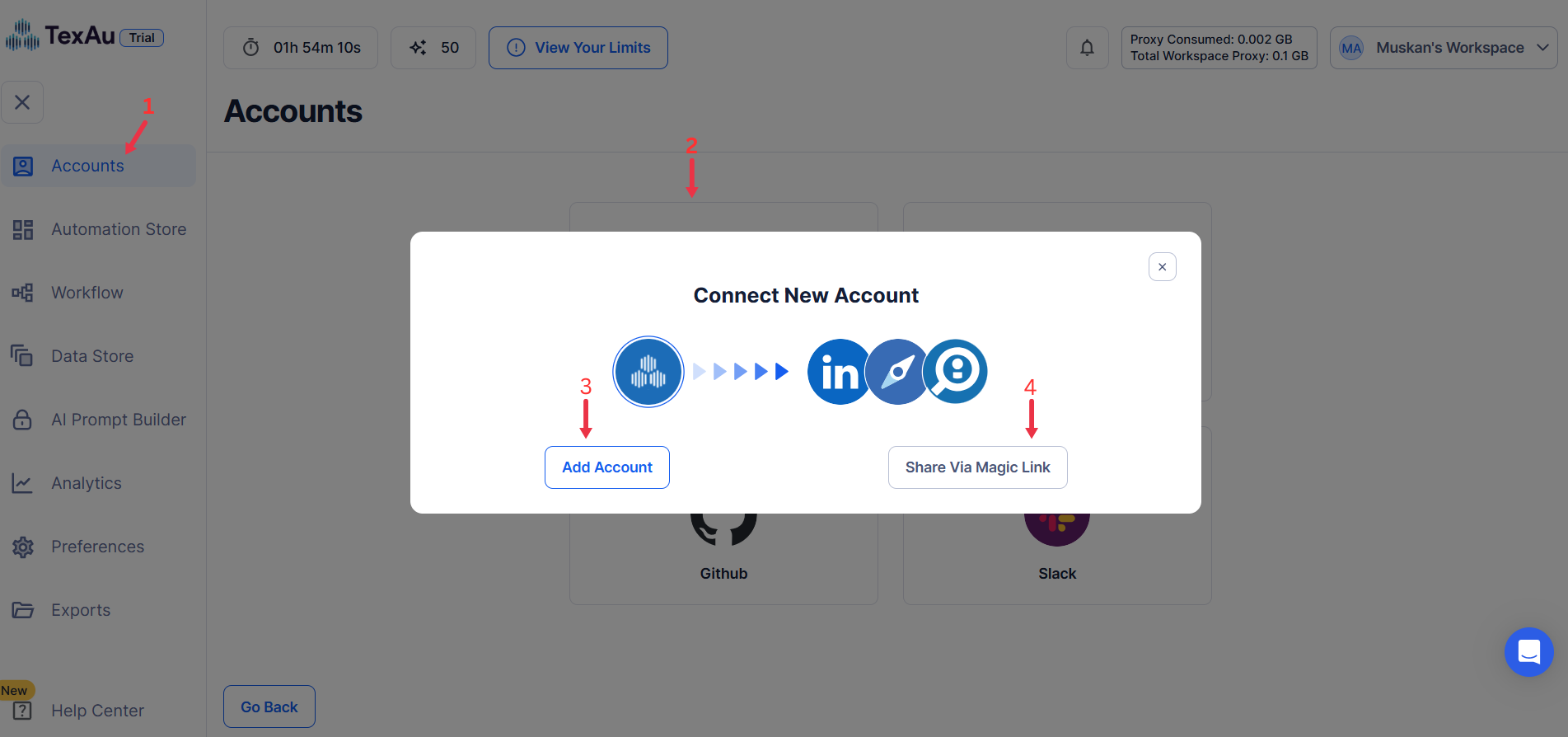
Go to Accounts and connect your LinkedIn account. You can choose one of these methods:
- Share via Magic Link: Share the link, copy it to your browser, and follow the steps to integrate your LinkedIn account securely.
- Add Account: Sync cookies and browser data with TexAu for seamless integration.
Tip: Use Magic Link for an easy and secure connection.
Step 2: Run it on your machine
Decide how you want to run the automation:
- Runs automation on your local device using your IP address.
Tip: Running locally uses your own IP and browser session, which is the safest way to automate an account you care about.
Step 3: Search for the Particular LinkedIn Automation
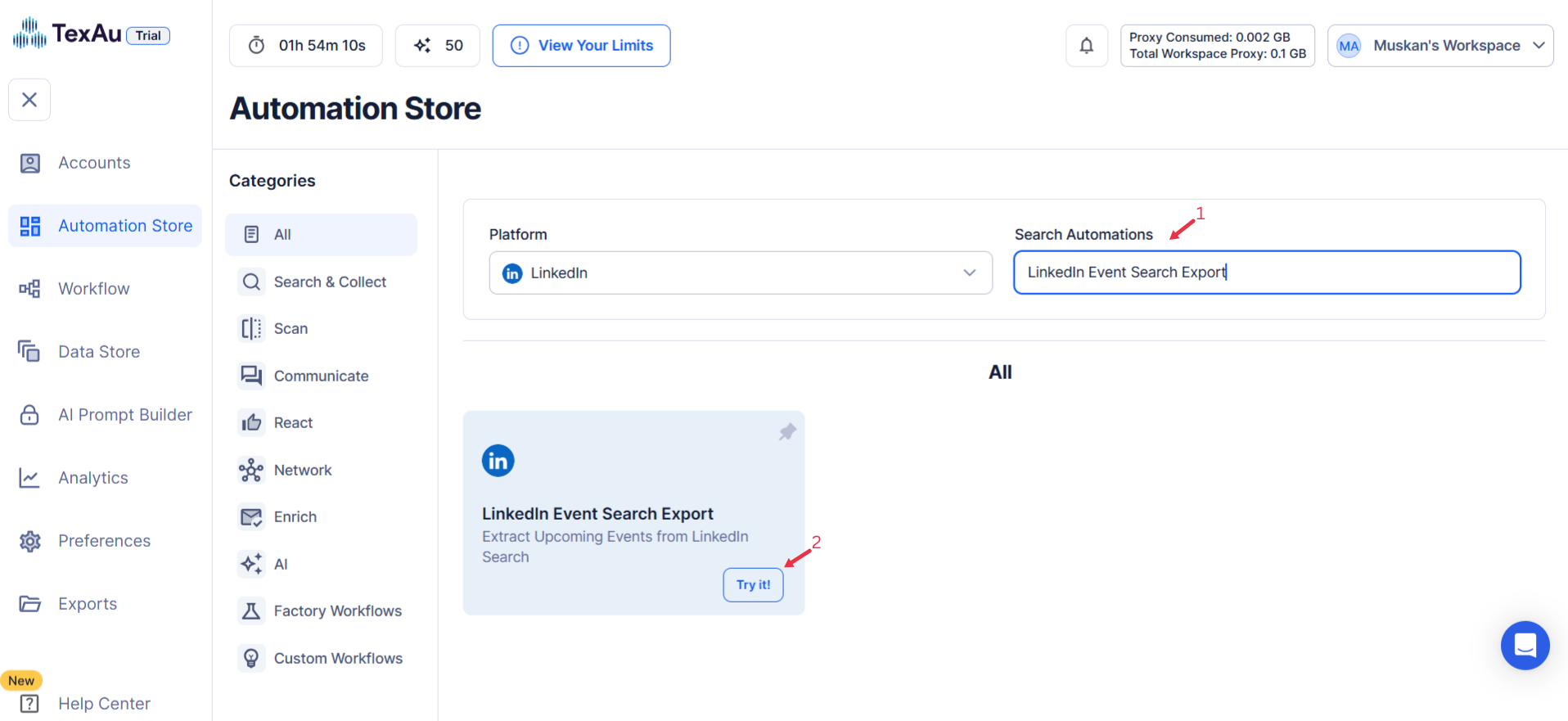
- Navigate to the Automation Store on TexAu.
- Use the search bar to find LinkedIn Event Search Export automation.
Step 4: Select Your Input Source
Define the input source to specify LinkedIn events for the LinkedIn Event Search Export automation. TexAu provides multiple options to suit the needs of founders, sales managers, marketers, and growth hackers. Here's how to configure each:
Manually Enter a Single Input
This option allows you to extract details from a specific LinkedIn event. Follow these steps:
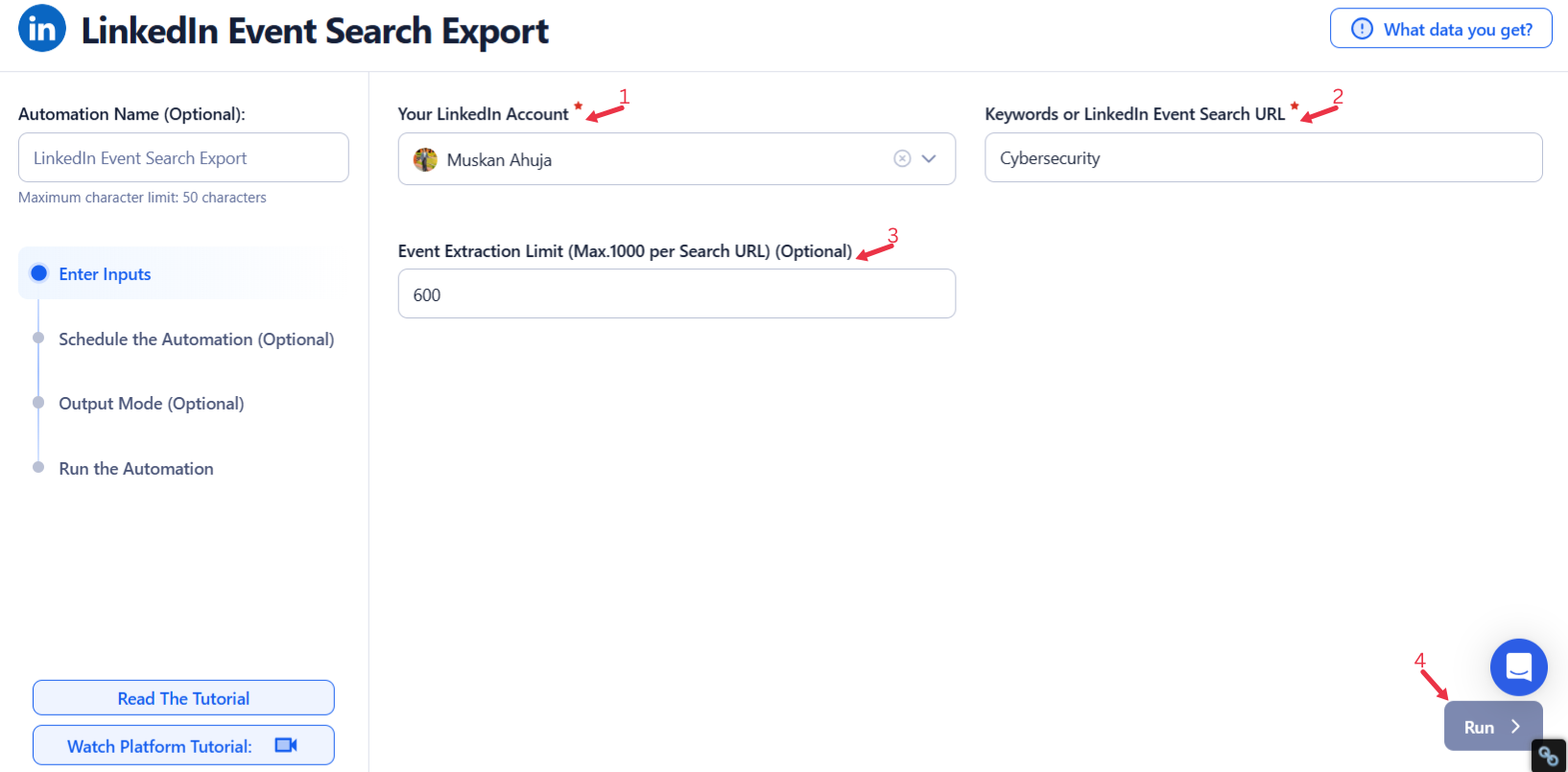
- Event Search: Enter a LinkedIn Event Search URL or a keyword (e.g., “CyberSecurity”) in the input field.
- Extract Limit (Optional): Set the maximum number of events to extract (up to 1,000 per search URL).
- Click Run in the lower-right corner to initiate the automation.
Use Google Sheets for Bulk Input
This option is ideal for extracting data from multiple LinkedIn event searches efficiently. Follow these steps:
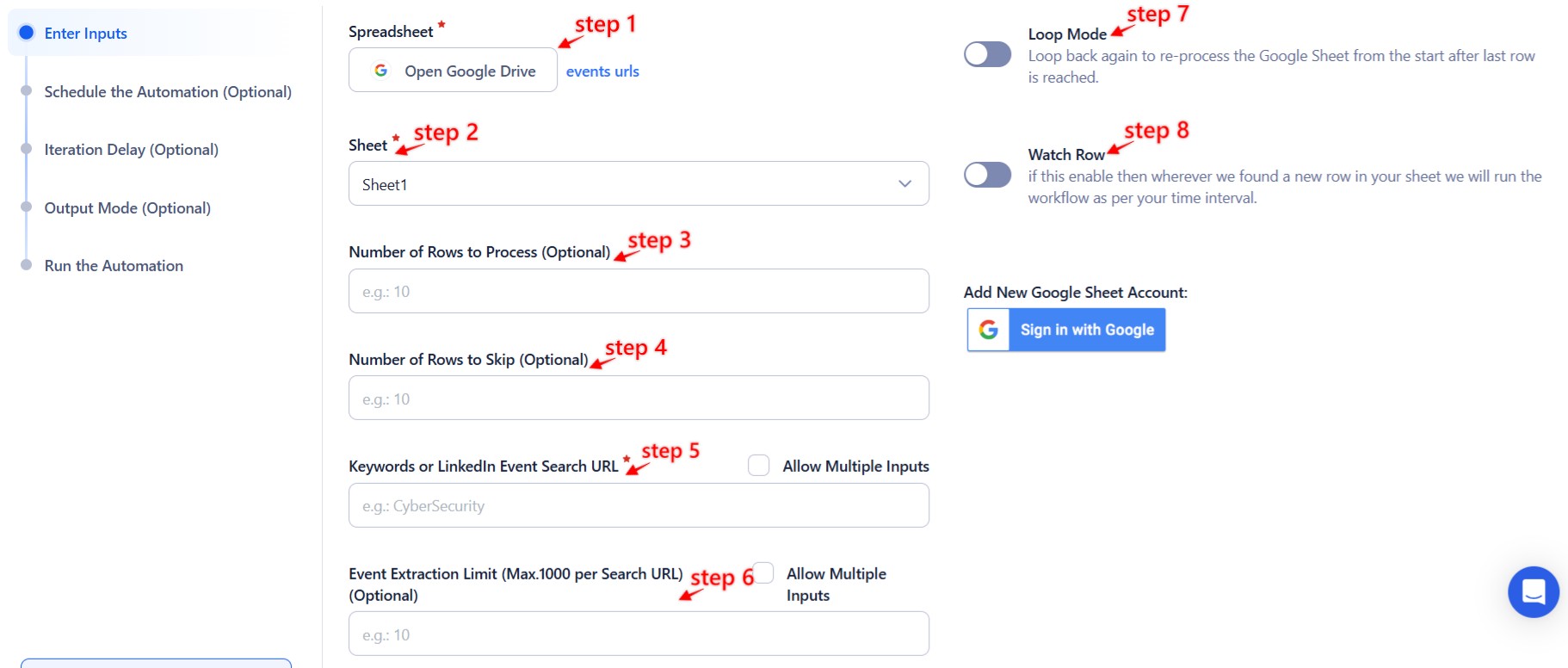
- Click Select Google Account to choose your Google account or click on Add New Google Sheet Account to link additional accounts.
- Click Accounts to select LinkedIn as the platform.
- Click Open Google Drive to locate the Google Sheet containing event search URLs or keywords.
- Select the spreadsheet and the specific sheet containing event search URLs or keywords.
- Configure additional options:
- Number of Rows to Process (Optional): Define the number of rows you want to process from the sheet.
- Number of Rows to Skip (Optional): Specify rows to skip at the beginning of the sheet.
- Extract Limit (Optional): Set the maximum number of events to extract (up to 1,000 per search URL).
- Optional Advanced Feature: Enable Loop Mode to re-process the Google Sheet from the beginning once all rows are completed. This is useful for recurring updates or newly added searches.
- Click Run in the lower-right corner to start the automation.
Optional Advanced Feature:
- Loop Mode: Enable Loop Mode to re-process the Google Sheet from the beginning once all rows are completed. This is useful for tasks that require recurring updates.
Watch Row (Optional)
Watch Row feature helps you run workflows automatically when new Google Sheet rows are added. It continuously scans for updates and executes linked workflows accordingly.
Configure Watch Row by selecting an update frequency and defining a time frame.
Watch Row Schedule
- None
- Scheduling Intervals (e.g., every 15 minutes, every hour)
- One-Time Execution
- Daily Execution
- Weekly Recurrence (e.g., every Tuesday and Saturday)
- Monthly Specific Dates (e.g., 5th and 20th)
- Custom Fixed Dates (e.g., June 10)
By default, Watch Row runs every 15 minutes and continues for five days unless modified.
With Watch Row, TexAu keeps workflows updated dynamically.
Process a CSV File
This option allows you to extract LinkedIn events from a static file. Follow these steps:
- Click Upload CSV File and browse to locate the file containing LinkedIn event search URLs or keywords.
- Once uploaded, TexAu will display the file name and preview its content. Verify the data to confirm the correct file is selected.
- Configure additional options:
- Number of Rows to Process (Optional): Specify the number of rows to process from the CSV file.
- Number of Rows to Skip (Optional): Define rows to skip at the beginning of the file.
- Extract Limit (Optional): Set the maximum number of events to extract (up to 1,000 per search URL).
- Optional Advanced Feature: Enable Loop Mode to re-process the CSV file from the beginning once all rows are completed. This is useful for recurring updates or processing newly added searches.
- Click Run in the lower-right corner to initiate the automation.
Screenshot Suggestion:
- Show the manual input fields for “Event Search” with an example value (e.g., “CyberSecurity”).
- Display the Google Sheets selection screen, emphasizing the setup for LinkedIn event search URLs or keywords.
- Include a preview of a CSV upload, highlighting the file name and event search URLs or keywords.
This ensures efficient LinkedIn event data extraction, whether for targeted events or bulk processing.

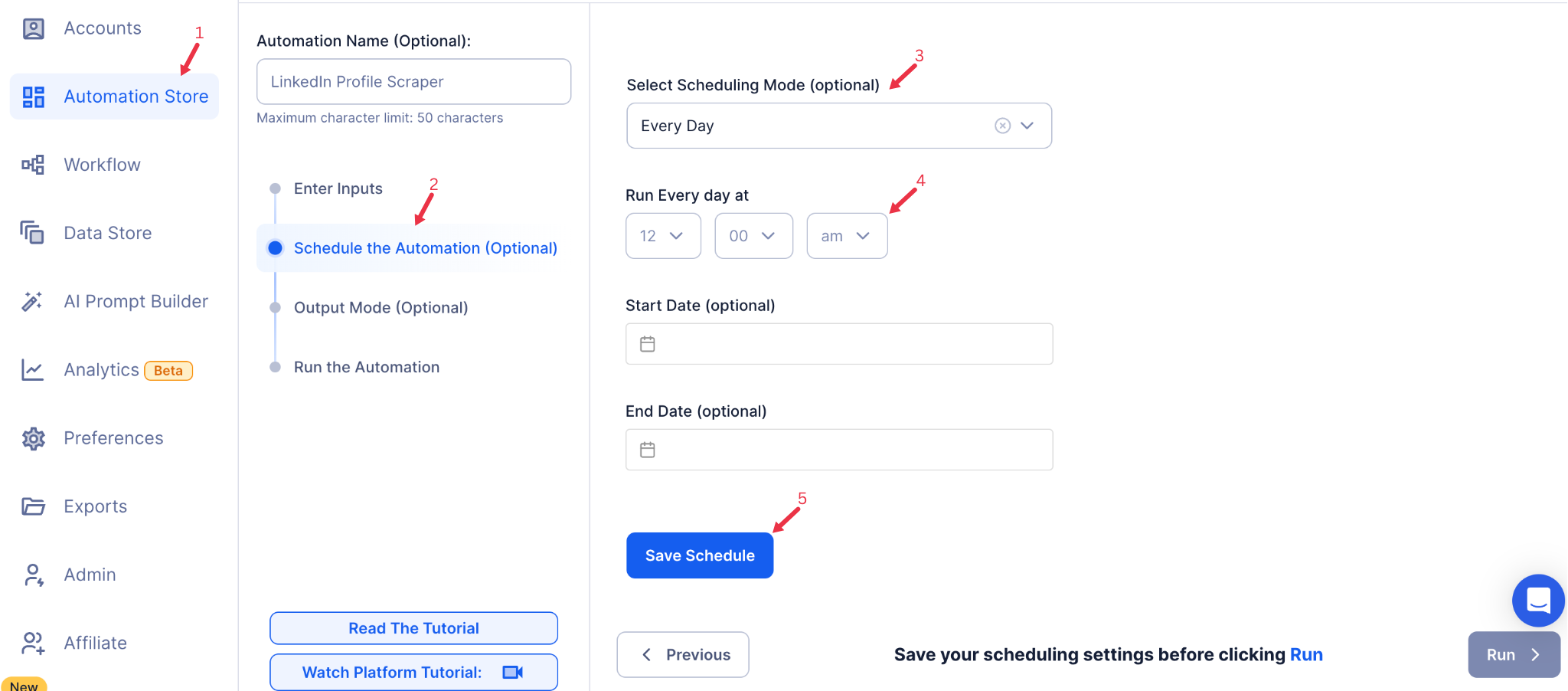
Step 5: Schedule the Automation (Optional)
To run the automation at specific times or intervals, use TexAu’s scheduling feature. Click Schedule to set the date and time for the automation, or configure a Recurrence Frequency to repeat it automatically:
- At Regular Intervals (e.g., every 4 hours or every day)
- Once
- Every Day
- On Specific Days of the Week (e.g., Mondays and Thursdays)
- On Specific Days of the Month (e.g., the 10th and 25th)
- On Specific Dates (e.g., December 1)
Setting a recurring schedule is useful if you’re continuously tracking LinkedIn events over time to capture the latest additions and changes.
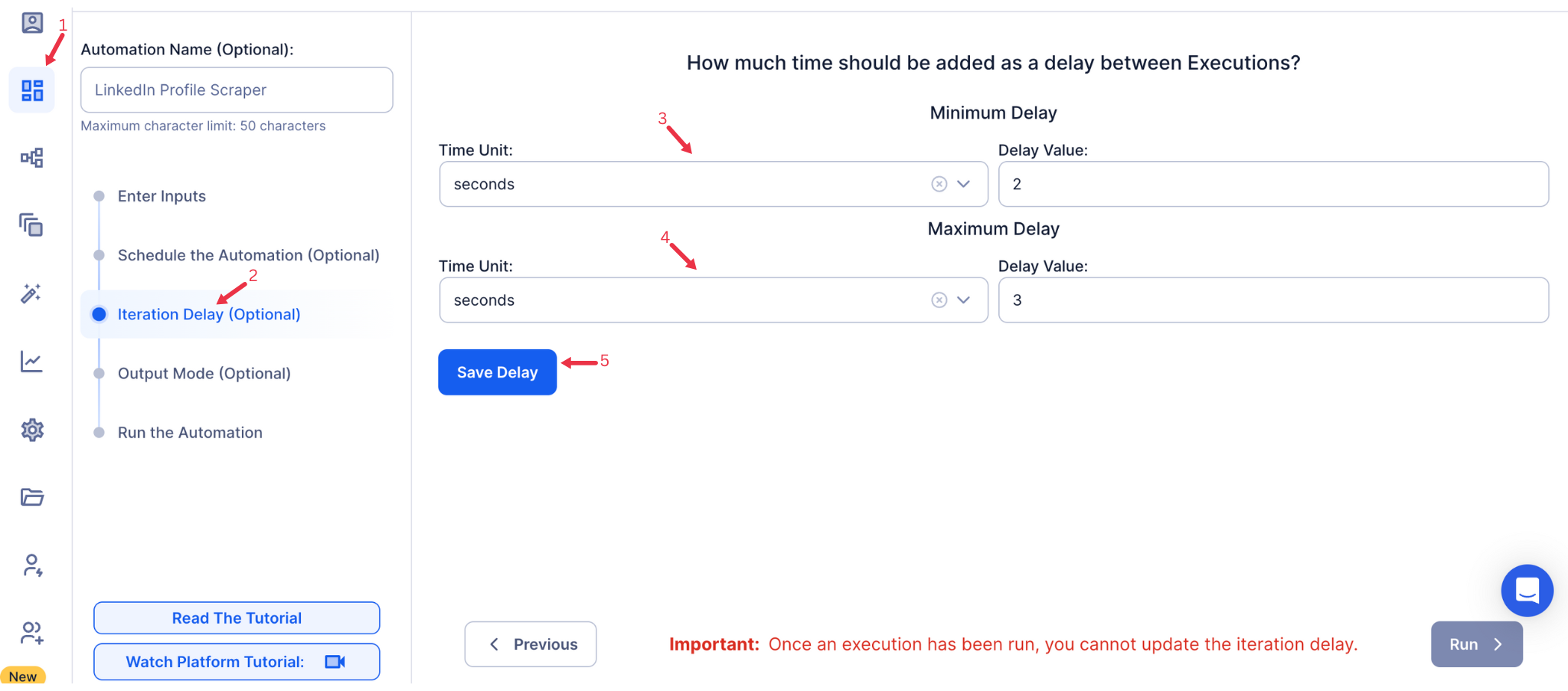
Step 6: Set an Iteration Delay (Optional)
Avoid detection and simulate human-like activity by setting an iteration delay. Choose minimum and maximum time intervals to add randomness between actions. This makes your activity look natural and reduces the chance of being flagged.
- Minimum Delay: Enter the shortest interval (e.g., 10 seconds).
- Maximum Delay: Enter the longest interval (e.g., 20 seconds).
Tip: Random delays keep your automation safe and reliable.
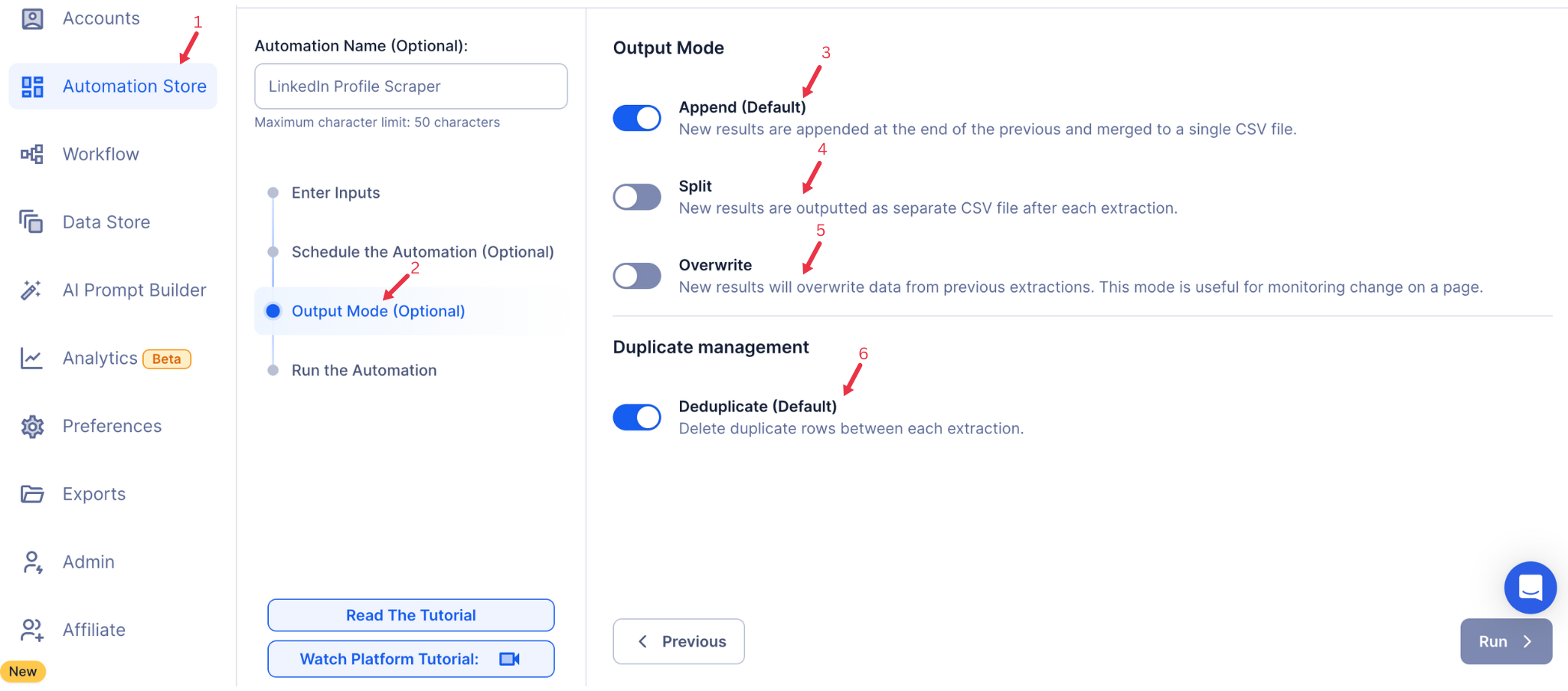
Step 7: Choose Your Output Mode (Optional)
In Output Mode, select how you’d like to save and export the extracted data. Choose between Google Sheets or CSV file for easier analysis and sharing.
- Export Options: Choose between Google Sheets or CSV file as your output destination. Connect your Google account if you select Google Sheets for direct export to Google Drive.
- Output Management:
- Append (Default): Adds each new set of extracted data to the end of previous entries, helpful for tracking events over time.
- Split: Each run creates a separate file, ideal if you want distinct datasets for each extraction.
- Overwrite: Replaces previous data with the latest results, useful if you only need the most current events.
- Duplicate Management: Enable Deduplicate to remove duplicate entries between extractions, ensuring a clean and organized dataset.
Step 8: Access the Data from the Data Store
Once the automation completes, head to the Data Store in TexAu to access your extracted data. Locate your LinkedIn Event Search Export automation and click See Data to view or download the results.
The LinkedIn Event Search Export automation simplifies the process of tracking and analyzing LinkedIn events based on keywords and filters. With options for scheduled runs, flexible input sources, and easy export to Google Sheets or CSV, TexAu provides marketers, growth hackers, and sales teams with a powerful way to stay on top of industry events and engagement trends on LinkedIn.
Run this automation on your own machine.
TexAu V2 Desktop runs every automation locally — your real session, your real IP, unlimited hours, no proxies. One-time $1,999, no subscription, 5 years of updates.