Reddit Domain Search Export
Discover Reddit posts mentioning your domains with the Reddit Domain Search Export tool. Automate tracking, schedule tasks, and export data to Google Sheets or CSV for detailed analysis.
Last updated
The **Reddit Domain Search Export** automation allows you to find and export Reddit posts that mention a specific domain. This is an excellent tool for marketers, growth hackers, and business owners to monitor brand mentions, analyze sentiment, or track competitor activity on Reddit. Follow this gui
Step By Step Guide
The Reddit Domain Search Export automation allows you to find and export Reddit posts that mention a specific domain. This is an excellent tool for marketers, growth hackers, and business owners to monitor brand mentions, analyze sentiment, or track competitor activity on Reddit. Follow this guide to set up the automation, export results to Google Sheets or CSV, and run it on your own machine.
Step 1: Log in to TexAu and Search a Specific Automation
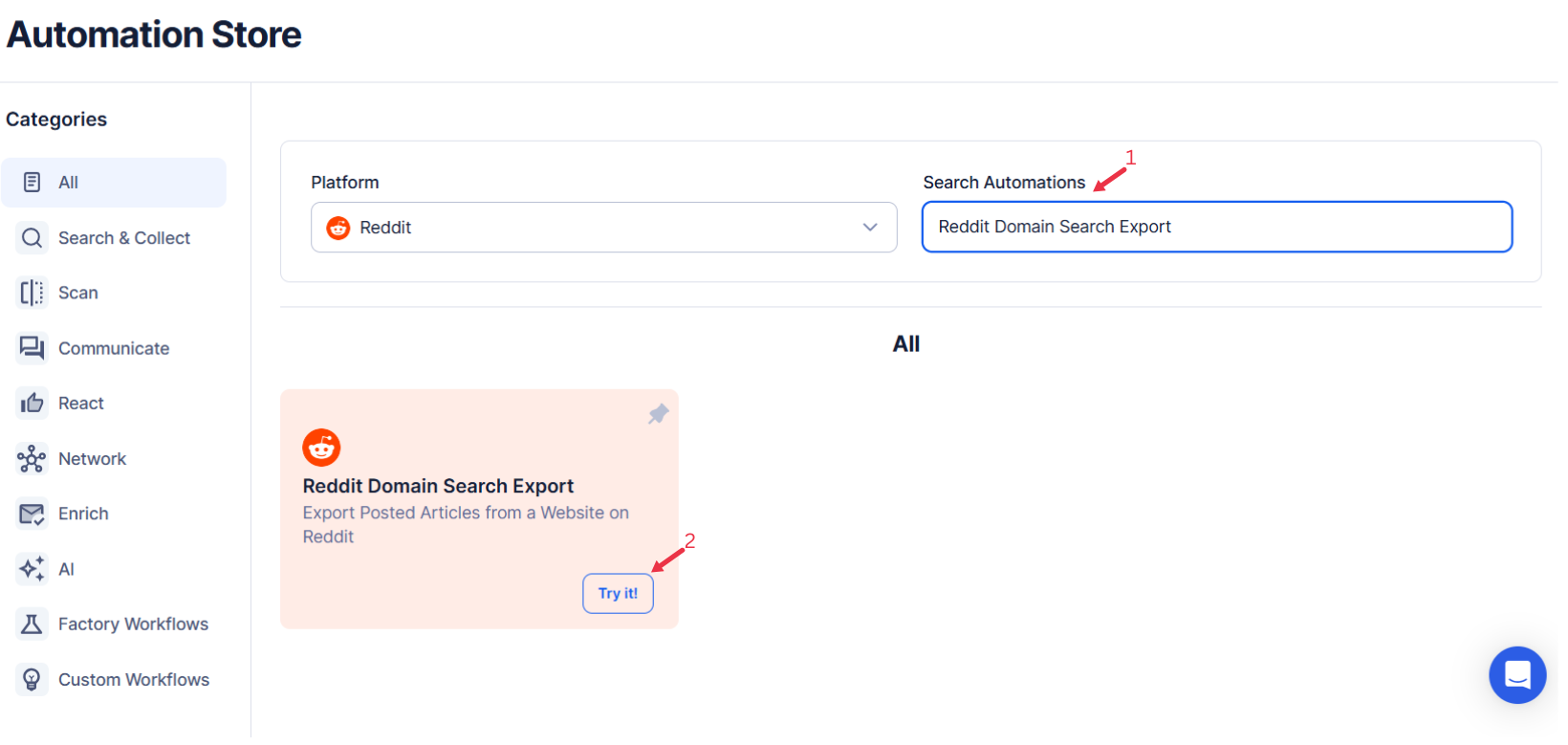
Log in to your TexAu account at the TexAu V2 Desktop app. Navigate to the Automation Store on TexAu. Use the search bar to find Reddit Domain Search Export automation.
Step 2: Select Your Input Source
Reddit Domain Search Export automation helps users search for all occurrences of a specific domain link on Reddit. It is useful for domain analysis, tracking mentions, or studying competitors.
Choose how to specify the domains you want to search for in Reddit posts. TexAu offers the following input options:
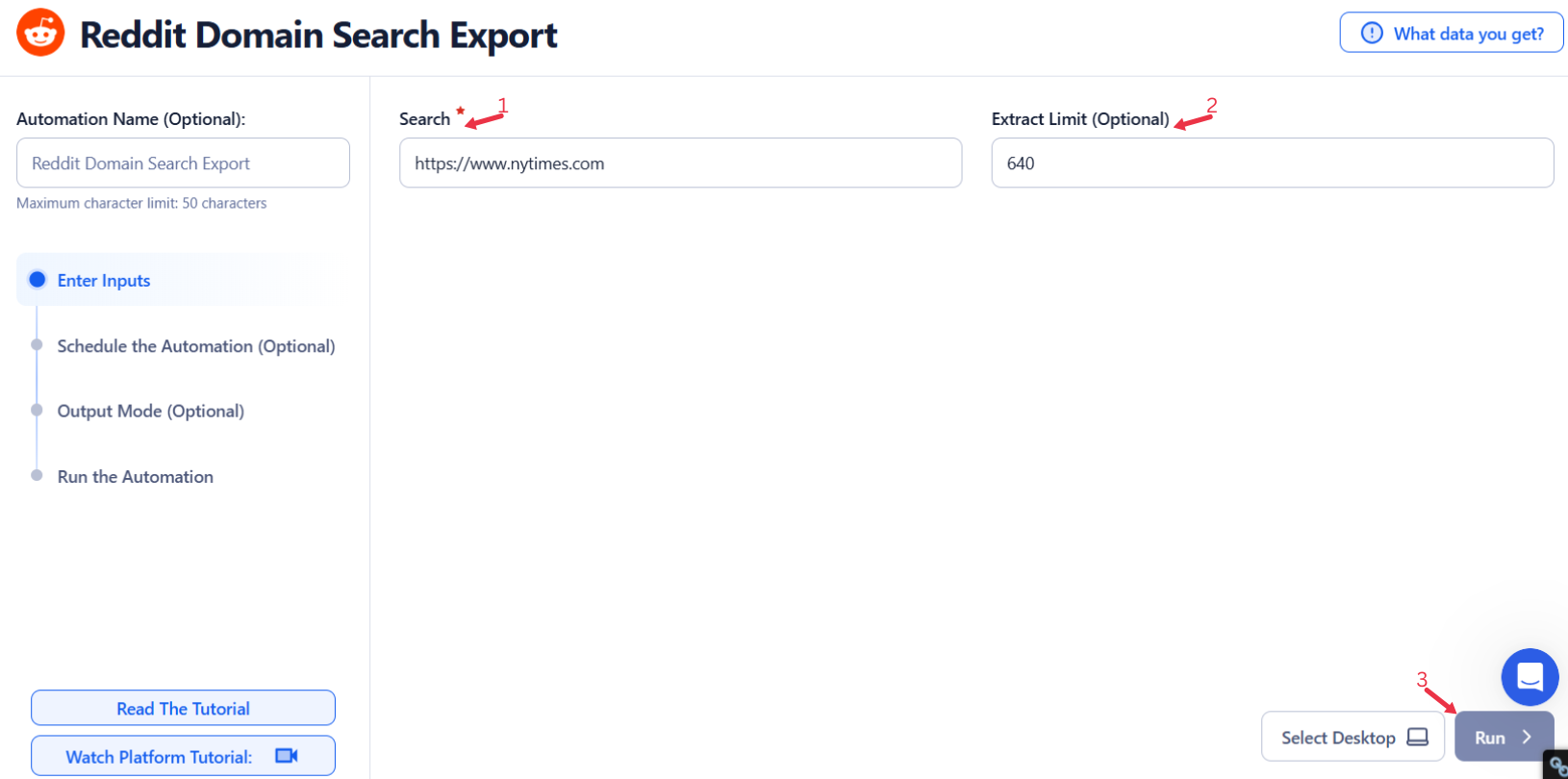
Single Input
Use this option to search for a single domain on Reddit.
- Search: Enter the specific domain URL (e.g., https://www.texau.com) you want to search for mentions on Reddit.
- Extract Limit (Optional): Define the maximum number of posts to extract (default is 1000).
- Account (Optional): Integrate third-party APIs for enhanced data processing, if needed.
Google Sheets
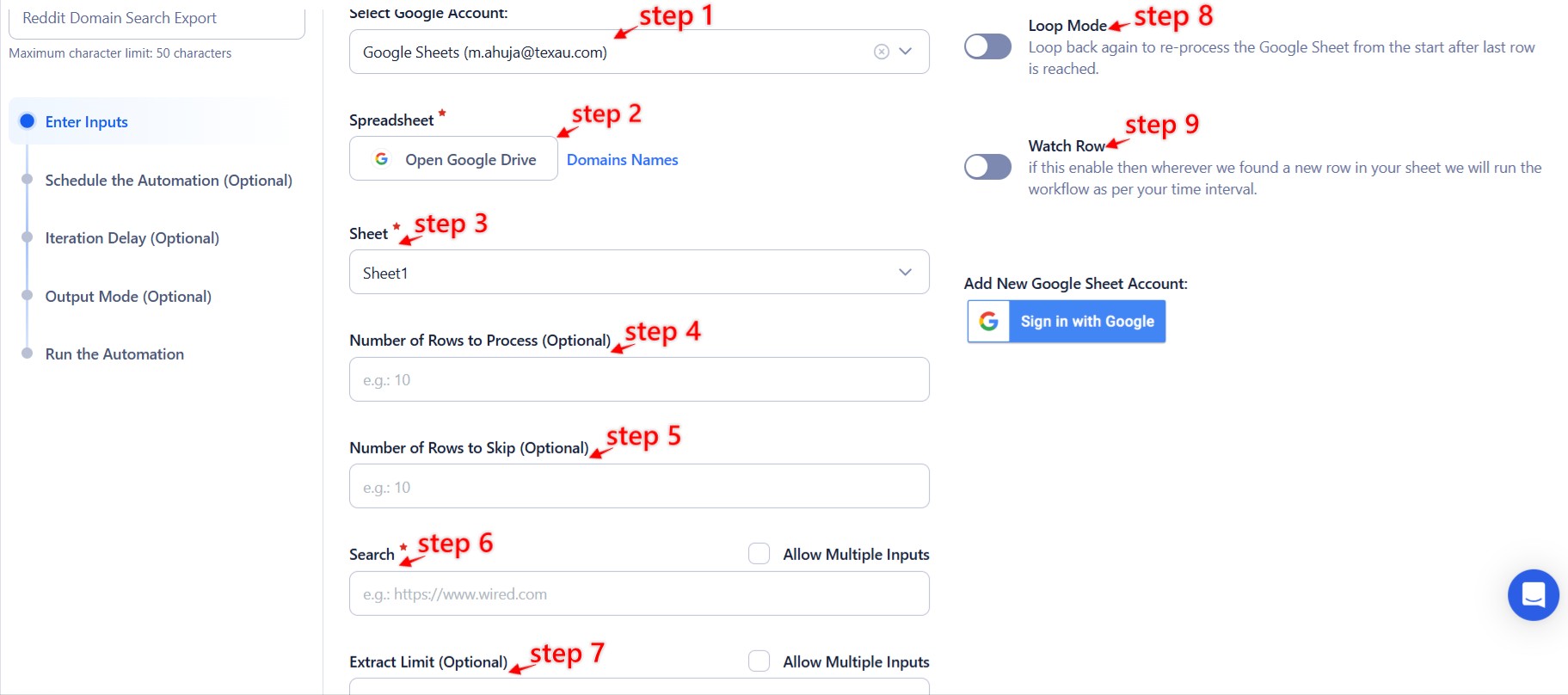
Use this option to manage bulk domain searches efficiently.
Connect your Google account
- Click Select Google Account to choose an existing account, or click Add New Google Sheet Account to connect a new one.
Provide input details
- Spreadsheet: Use the Open Google Drive option to select your Google Sheet containing domain URLs.
- Sheet: Specify the sheet name where the data is stored.
Adjust processing settings
- Number of Rows to Process (Optional): Specify the number of rows you want to process.
- Number of Rows to Skip (Optional): Indicate how many rows should be skipped from the top of the sheet.
- Search: Ensure the correct column contains the domain URLs.
- Extract Limit (Optional): Define the post extraction limit for each domain URL.
Optional Advanced Feature:
- Loop Mode: Enable Loop Mode to re-process the Google Sheet from the beginning once all rows are completed. This is useful for tasks that require recurring updates.
Watch Row (Optional)
Watch Row feature ensures workflows run automatically when new data is detected in Google Sheets.
Configure Watch Row by defining an update interval and selecting an execution timeframe.
Watch Row Schedule
- None
- Scheduling Intervals (e.g., every 15 minutes, every hour)
- One-Time Execution
- Daily Execution
- Weekly Recurrence (e.g., every Monday and Sunday)
- Monthly Specific Dates (e.g., 12th and 28th)
- Custom Fixed Dates (e.g., November 9)
By default, Watch Row checks every 15 minutes and continues for five days unless modified.
With Watch Row, TexAu automates real-time workflow execution.
Process a CSV File
This option allows you to search for domain occurrences on Reddit from a static CSV file.
- Upload the file
- Click Upload CSV File and select the file containing domain URLs.
- TexAu will display the file name and preview its content for verification.
- Adjust processing settings
- Number of Rows to Process (Optional): Specify how many rows should be processed.
- Number of Rows to Skip (Optional): Indicate the number of rows to skip if needed.
- Provide input details
- Search: Ensure the appropriate column contains the domain URLs.
- Extract Limit (Optional): Define the post extraction limit for each URL.

Step 3: Run the automation on TexAu Desktop
- Open the automation setup and select Desktop Mode.
- Click Choose a Desktop to Run this Automation.
- From the platform, select your connected desktop (status will show as "Connected").
- Click “Use This” after selecting the desktop to run the automation on your local system.
Step 4: Schedule the Automation (Optional)
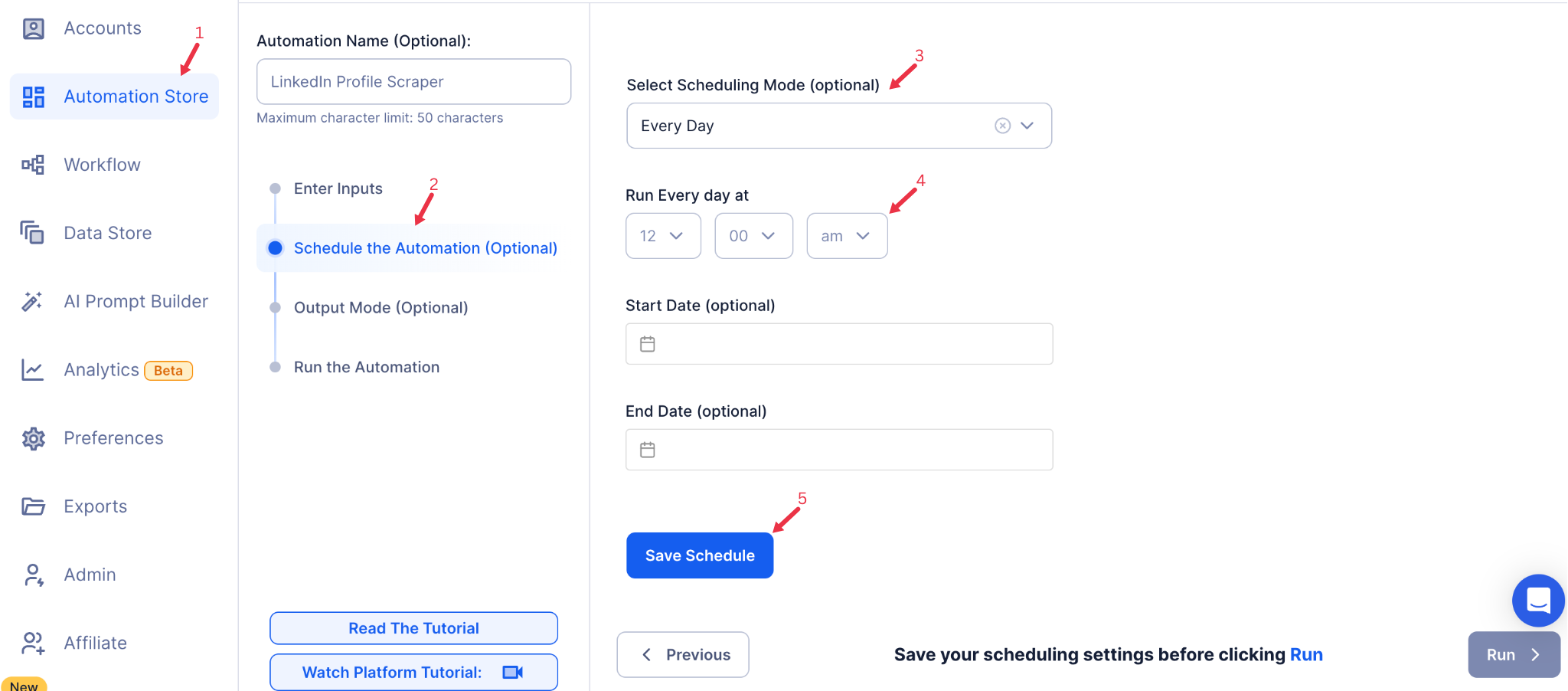
Set up a schedule to monitor Reddit for domain mentions automatically. Click Schedule to configure the timing and recurrence of the automation:
- None
- At Regular Intervals (e.g., every 6 hours)
- Once
- Every Day
- On Specific Days of the Week (e.g., every Monday and Friday)
- On Specific Days of the Month (e.g., the 10th and 25th)
- On Specific Dates (e.g., December 15)
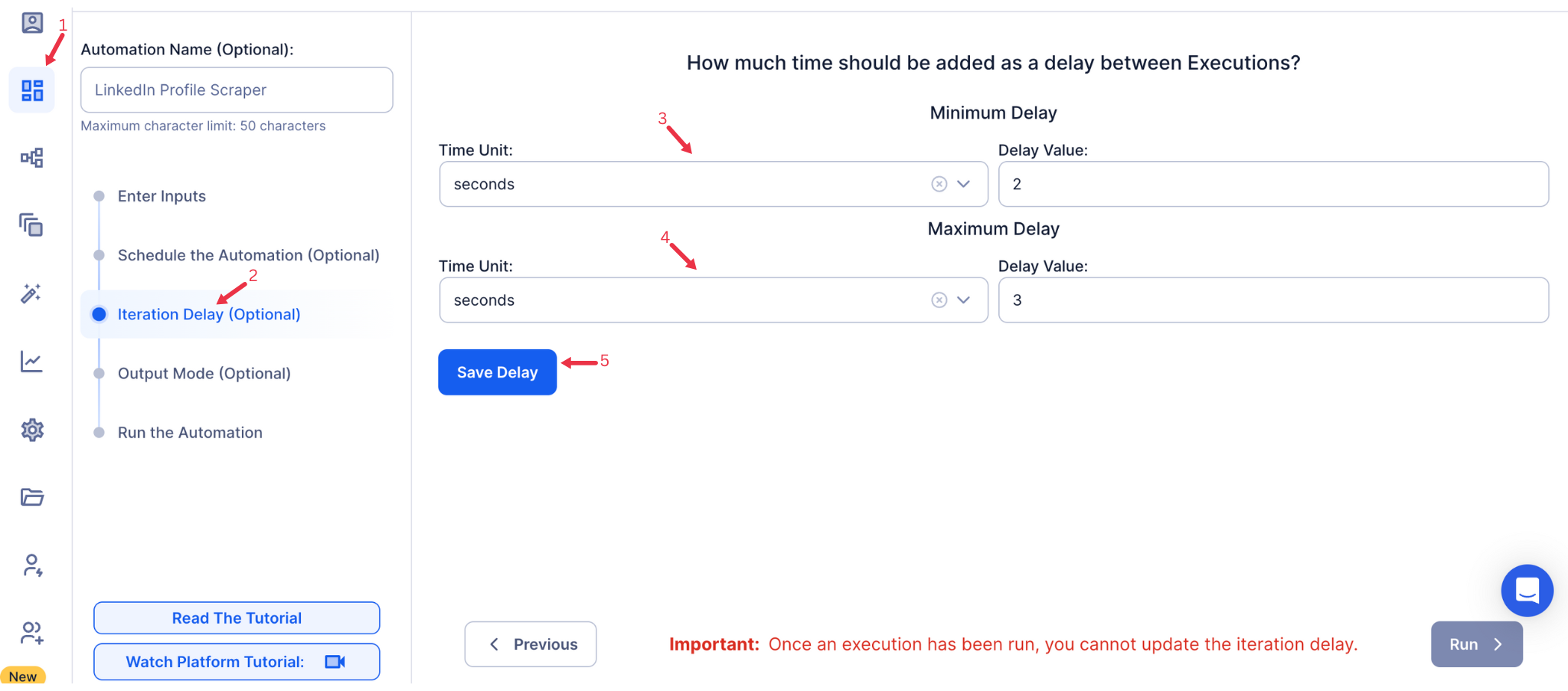
Step 5: Set an Iteration Delay (Optional)
Avoid detection and simulate human-like activity by setting an iteration delay. Choose minimum and maximum time intervals to add randomness between actions. This makes your activity look natural and reduces the chance of being flagged.
- Minimum Delay: Enter the shortest interval (e.g., 10 seconds).
- Maximum Delay: Enter the longest interval (e.g., 20 seconds).
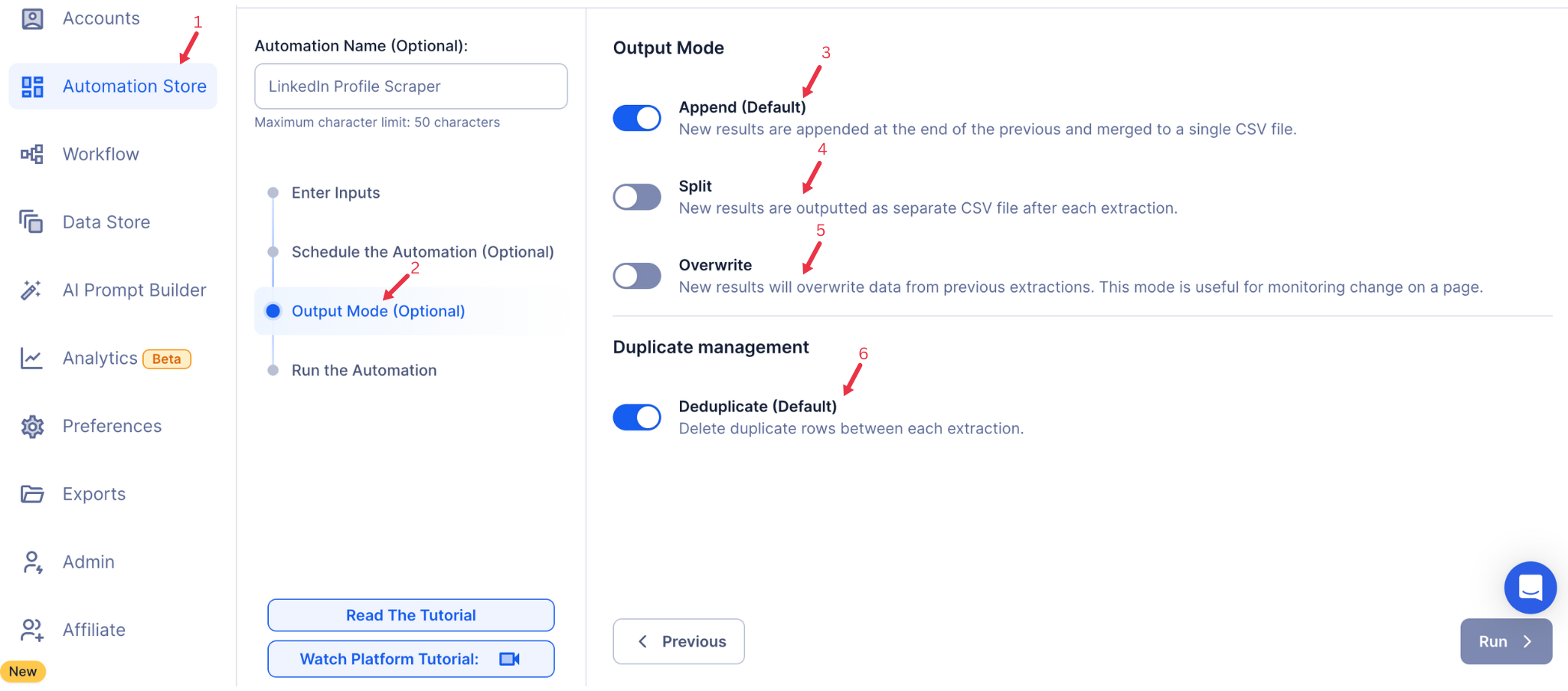
Step 6: Choose Your Output Mode (Optional)
Choose how to save and manage the extracted alumni data. TexAu provides the following options:
- Append (Default): Adds new results to the end of existing data, merging them into a single CSV file.
- Split: Saves new results as separate CSV files for each automation run.
- Overwrite: Replaces previous data with the latest results.
- Duplicate Management: Enable Deduplicate (Default) to remove duplicate rows.
Step 7: Access the Data from the Data Store
After the automation completes, go to the Data Store section in TexAu to view your results. Locate the Reddit Domain Search Export entry and click See Data to analyze or download the extracted information.

The Reddit Domain Search Export automation simplifies monitoring brand mentions, analyzing competitor activity, and gathering sentiment data from Reddit. With advanced features like scheduling, input customization, and seamless data export to Google Sheets or CSV, this tool helps marketers, growth hackers, and businesses make data-driven decisions and stay ahead in their industry.
Run this automation on your own machine.
TexAu V2 Desktop runs every automation locally — your real session, your real IP, unlimited hours, no proxies. One-time $1,999, no subscription, 5 years of updates.