Twitter Direct Messages Export
Take control of your Twitter DMs! Extract and save specific message threads to keep your conversations handy and secure.
Last updated
Twitter Direct Messages (DMs) play a vital role in **Twitter interactions**, offering a private channel for communication tailored to both personal and professional purposes. From networking and customer support to **DMs with clients** and collaborations, they facilitate meaningful connections acros
Twitter Direct Messages (DMs) play a vital role in Twitter interactions, offering a private channel for communication tailored to both personal and professional purposes. From networking and customer support to DMs with clients and collaborations, they facilitate meaningful connections across the social network. However, managing and analyzing private Twitter DMs can be a daunting task, especially as the volume grows over time. Sorting through endless threads to find specific messages or extract actionable insights is both time-consuming and inefficient.
Manually organizing or retrieving Twitter messages is not only labor-intensive but also prone to errors. Reliance on screenshots, copying texts, or using unreliable third-party tools can lead to incomplete records or even data loss. These challenges intensify when managing multiple Twitter profiles or handling high message volumes.
TexAu Twitter Direct Messages Export simplifies this process by offering an automated, streamlined solution for conversation management. With features like bulk export, specific filters, and automation safe practices, this tool enables users to extract conversations efficiently. By leveraging TexAu, social media managers, growth hackers, and professionals can maintain accurate records, gain actionable insights, and optimize their communication strategies on this messaging service platform.
Why Exporting Twitter Direct Messages Matters
Maintaining a Record of Conversations
Exporting Twitter Direct Messages (DMs) ensures that critical conversations are preserved for future reference, making it invaluable for both personal and professional purposes. By maintaining an organized archive of Twitter interactions, businesses and individuals can revisit past discussions to extract key details, avoid misunderstandings, and ensure continuity in their engagements.
For example, a digital marketing agency might use DMs with clients to coordinate campaign details. By exporting these conversations, the agency ensures that agreements, expectations, and feedback are easily accessible. This practice enhances transparency, reduces the chances of miscommunication, and fosters trust in client relationships.
An e-commerce business could similarly benefit by exporting DMs with followers to track specific issues like refund requests or shipping inquiries. Having these records readily available helps improve conversation management by resolving disputes efficiently and referring back to historical data for better decision-making.
Analyzing Message Trends
Analyzing exported Twitter messages uncovers patterns in communication and audience behavior. Businesses can review recurring topics or questions to identify pain points and implement targeted improvements.
For instance, a SaaS company might analyze exported DMs to find frequent inquiries about a specific feature. This insight could prompt them to update their type of message templates, enhance features, or create detailed tutorials to address common customer concerns proactively.
Similarly, influencers analyzing DMs can gain insights into meaningful connections and trends in collaboration inquiries. By identifying frequently requested themes or outreach from certain types of brands, influencers can refine their social media strategy and align their profiles for better partnerships.
Archiving for Compliance and Reporting
In industries like finance, healthcare, or law, exporting DMs ensures compliance with regulations. These advanced messaging features safeguard businesses during audits or legal proceedings by maintaining a secure archive.
For instance, a financial advisory firm might export DMs with clients discussing investment strategies or risk assessments. This record-keeping not only ensures regulatory compliance but also provides a point of reference for disputes.
Additionally, professionals can leverage exported DMs for communication tracking and reporting purposes. A marketing agency might compile customer feedback from exported DMs during a product launch, using the data for audience analysis in campaign reports. These insights validate their strategies and inform future decisions, ensuring continued success in their social media trends management.
By maintaining an accurate archive of Twitter DMs, users ensure secure communication records, compliance with regulations, and actionable insights that enhance engagement strategies.
Key Features of TexAu Twitter Direct Messages Export
Bulk Message Export
One of the most valuable features of TexAu is its ability to export large volumes of Twitter messages effortlessly. This capability eliminates the need for manual tasks like copying messages or taking screenshots, saving significant time for users. For example, social media managers handling hundreds of client inquiries can export all relevant type of messages in a single operation, enabling them to focus on conversation management and analysis instead of data collection. By streamlining DMs with clients, this feature ensures efficient data handling for high-volume interactions, strengthening meaningful connections with their audience.
Filter-Based Export
TexAu enables advanced filtering of messages based on specific criteria, such as date ranges, keywords, or user profiles. This ensures only relevant conversations are extracted, reducing clutter and enhancing operational efficiency. For instance, an e-commerce business can filter Twitter DMs containing order-related keywords, streamlining communication tracking and enabling them to analyze customer queries and feedback effectively. This level of customization ensures meaningful connections with Twitter users while keeping exported data highly relevant.
Multi-Account Compatibility
Managing multiple Twitter profiles can be challenging, especially for organizations handling numerous accounts. TexAu’s multi-account compatibility simplifies this by allowing users to manage and export DMs with clients from different profiles using a single platform. For instance, a social media manager working across multiple brands can seamlessly extract and analyze private Twitter DMs without the hassle of switching accounts. This capability makes TexAu a powerful tool for social media managers seeking to streamline operations and ensure consistent Twitter interactions across all accounts.
Data Formats
TexAu supports exporting messages in accessible formats such as CSV and JSON, ensuring ease of integration with other tools. These formats make it simpler for social media managers and analysts to process data further. For instance, a business analyst could import CSV files into a messaging service platform or data visualization tool to analyze Twitter interactions and optimize audience analysis. By offering export formats suited for advanced analytics, TexAu enhances efficiency in communication tracking and delivers actionable insights to improve engagement.
Challenges of Manual DM Management
Time-Intensive Process
Manually saving or archiving Twitter Direct Messages (DMs) is a labor-intensive and inefficient task. The process often involves scrolling through extensive message threads, copying content, or taking screenshots—methods that are far from ideal for handling large volumes of data. For instance, a startup founder documenting conversations with multiple investors might need to dedicate several hours just to collect and organize messages. This time-consuming activity not only disrupts productivity but also diverts focus from critical tasks, such as business development or client engagement.
Consider an organization managing customer inquiries through Twitter DMs. Without an efficient export automation, the team could spend excessive time manually archiving interactions, which could otherwise be allocated to improving customer service or developing solutions for recurring issues.
Limited Accessibility
Twitter’s native interface provides minimal functionality for efficiently managing and retrieving older DMs. As the volume of messages grows, locating specific conversations becomes increasingly challenging. For example, a freelancer looking for an old client discussion from a year ago may need to sift through hundreds of messages, wasting valuable time. This lack of accessibility can hinder timely decision-making, especially when immediate access to historical communication is required.
Organizations managing multiple accounts face even greater difficulty, as switching between profiles to locate relevant messages adds a layer of complexity.
Risk of Data Loss
Without proper archiving mechanisms, important conversations are at constant risk of being lost. Deleted accounts, accidental deletions, or unforeseen platform glitches can result in the permanent loss of valuable data. For instance, a customer support team relying on DMs to gather critical feedback could lose key insights if messages are not regularly backed up.
Similarly, brands using Twitter as a primary customer interaction platform might lose a competitive edge if they fail to archive and analyze customer feedback effectively. By relying on manual methods, users expose themselves to potential data loss, which can lead to missed opportunities and operational setbacks.
TexAu’s automated DM export addresses these challenges by providing a reliable and efficient solution for managing Twitter DMs.
Use Cases for Exporting Twitter Direct Messages
For Businesses
Businesses can use TexAu to archive client communications, ensuring that all interactions are documented for future reference. For instance, a consultancy firm might export DMs containing project discussions to maintain a detailed record of agreements and deliverables. This archive can serve as a reference in case of disputes or for reviewing project scope.
Analyzing customer queries is another key use case. For example, a SaaS company can identify common customer pain points by reviewing exported DMs, enabling them to improve their support systems and product offerings.
For Influencers
Influencers often use Twitter DMs for brand collaborations and sponsorship discussions. Exporting these conversations ensures that agreements and details are preserved, reducing the risk of misunderstandings. For instance, an influencer negotiating with multiple brands can organize and review these messages more efficiently using TexAu.
Additionally, influencers can use exported DMs to manage fan interactions. For example, they might create a promotional campaign based on recurring themes in fan messages, such as requests for specific content or feedback on past posts.
For Professionals
Professionals can leverage TexAu to track networking efforts and potential opportunities. For example, a job seeker might export DMs with recruiters to maintain a record of application progress and follow-ups.
Archiving professional conversations also helps in maintaining a record of important discussions. For instance, a freelance writer can export DMs containing client briefs and feedback, ensuring that all details are accessible when needed.
Maintaining Data Security and Privacy
Safeguarding Sensitive Information
Exporting DMs involves handling potentially sensitive data. TexAu prioritizes security by ensuring that exported data is encrypted and stored securely. For example, a healthcare organization archiving patient inquiries can trust TexAu to handle the data responsibly, ensuring compliance with privacy regulations such as HIPAA.
Compliance with Regulations
TexAu’s secure export features align with industry regulations, ensuring that businesses can use the automation without compromising compliance. For instance, a financial advisor can archive client communications while adhering to data protection laws.
By addressing data security concerns, TexAu ensures that users can confidently manage and analyze their Twitter DMs.
Optimizing Communication Strategies with Exported Data
Exported direct messages (DMs) from platforms like Twitter or LinkedIn offer valuable insights into how audiences engage with content, the tone of interactions, and their preferences. This data serves as a powerful automation for businesses, influencers, and professionals aiming to refine their communication strategies.
Analyzing Audience Behavior
Analyzing audience behavior through exported DMs enables organizations to recognize key patterns, preferences, and areas of concern. For instance, a nonprofit organization can leverage exported DMs to detect recurring themes in donor inquiries. If messages consistently ask about donation processes or specific charity events, the nonprofit can adjust its outreach strategies to proactively address these common questions. By doing so, they not only streamline communication but also enhance the donor experience, making the interaction feel more personalized and responsive.
For example, the charity might create a set of frequently asked questions (FAQs) that specifically address the most common donor concerns. They could also automate responses to standard inquiries, allowing them to focus more on engaging with high-value donors. This approach can build trust and increase donor retention, as the organization demonstrates a deep understanding of its audience’s needs.
Identifying Recurring Topics
Another key advantage of analyzing exported DMs is the ability to identify recurring topics or questions. This allows businesses to address common concerns more efficiently and improve their product or service offerings.
Take a tech company, for example, that exports DMs to examine customer inquiries. They might discover a significant number of messages asking about a specific feature of their product that users struggle to understand or use effectively. Based on this feedback, the company could decide to create comprehensive tutorials, how-to guides, or video demos that address these common concerns. This would not only help customers navigate the product more easily but also reduce the number of support tickets and direct inquiries, ultimately improving customer satisfaction.
Another example can be seen in the hospitality industry, where hotels can analyze direct messages from potential guests. By identifying recurring questions about room availability, amenities, or cancellation policies, they can optimize their communication channels by providing automatic responses to common queries or refining their website’s FAQ section.
Refining Communication Strategies
Analyzing trends in exported DMs can provide valuable insights into the tone and style of communication that resonates best with an audience. Social media managers, for example, may notice that their followers respond more positively to casual and friendly messaging rather than formal language.
A social media manager for a fashion brand could analyze DMs from followers and identify a strong preference for lighthearted, conversational tones. Armed with this insight, they might adjust their messaging strategy across their brand’s social media profiles to include more personalized, fun, and informal communication. This shift could result in higher engagement rates, such as increased likes, shares, and comments, as followers feel a stronger emotional connection with the brand.
For instance, a gaming company could discover that users are more likely to engage with messages that express humor or excitement about new features. Based on this, they could fine-tune their messaging strategy to maintain a playful and enthusiastic tone, enhancing the overall experience for their audience.
Best Practices for Using TexAu Twitter DM Export
TexAu offers an efficient and automated solution for exporting DMs, and applying best practices can help users get the most out of this automation.
Set Clear Goals
Before exporting DMs, it's important to define clear goals for the data extraction. Having a specific purpose in mind ensures that users can better structure their analysis and make informed decisions based on the results.
For businesses, exporting DMs may serve a functional purpose such as archiving client communications for compliance or record-keeping. For example, an e-commerce brand might use TexAu to create a backup of all customer inquiries related to orders, which could then be cross-referenced with internal databases to resolve any discrepancies or issues related to fulfillment or returns. Similarly, influencers or brand ambassadors may use exported DMs to organize conversations related to sponsorship deals and collaborations, helping them stay on top of important negotiations and ensuring no messages slip through the cracks.
By setting clear goals, users can ensure that the exported data serves a strategic purpose and provides valuable insights that can be acted upon in a timely and effective manner.
Regular Exports
Regularly exporting DMs ensures that the data stays up-to-date and remains valuable for analysis. Scheduled exports allow users to maintain accurate records over time, which can be essential for long-term decision-making.
For example, a customer service team might set up monthly exports of all customer DMs. This frequency ensures that the customer support team has access to the most recent interactions, allowing them to address any emerging issues quickly. Regular exports also allow businesses to assess the effectiveness of their customer service protocols, including response times, satisfaction levels, and recurring issues.
Similarly, a content creator working with multiple brands might export DMs every week to track communication progress on ongoing campaigns. This regular export would ensure they never miss a follow-up or lose track of important details, leading to more successful brand collaborations.
Review Exported Data
Reviewing the exported DMs regularly helps users spot trends, identify potential improvements, and refine their communication strategies. It’s not enough to just export the data—users need to proactively analyze it for actionable insights.
For instance, a marketing team could regularly review the DMs from social media followers to identify patterns in feedback or questions. If they notice an uptick in inquiries related to a new product launch, they could quickly update their marketing materials to address these questions and concerns proactively, potentially preventing customer frustration.
Similarly, an HR consultant might review DMs from potential candidates to assess whether their outreach strategy is effective. They could spot patterns in the types of questions candidates ask, such as inquiries about salary, benefits, or company culture, which would allow them to refine their initial communication to provide more detailed and relevant information.
Case Studies and Success Stories
Business Use Case
A digital marketing agency that provides social media management services for clients across different industries found great value in using TexAu to export DMs from multiple client accounts. By systematically analyzing the exported DMs, the agency was able to identify several key areas for improvement in its clients' social media campaigns. For example, they discovered that a particular client’s followers were consistently asking about specific features of their service that weren’t communicated in their posts.
Armed with this data, the agency helped the client adjust their social media strategy to highlight these features more prominently, which led to a 15% increase in customer satisfaction and a noticeable spike in engagement on related posts. This case highlights the importance of regularly exporting and analyzing DMs to uncover insights that can directly impact customer satisfaction and campaign performance.
Influencer Use Case
A fitness influencer used TexAu to export DMs from brand sponsors and potential collaboration partners. By organizing and analyzing the DMs, the influencer identified key trends in sponsor requests, such as a growing demand for influencer content that showcases fitness-related products in action. This insight allowed the influencer to streamline the communication process, ensuring that all sponsor discussions were aligned with the latest trends in the industry.
Furthermore, by understanding the types of sponsorships that were most popular among brands, the influencer was able to negotiate higher-value collaborations, increasing their income potential while maintaining a more efficient workflow. This use case emphasizes how influencers can use DMs to optimize collaborations and improve their workflow.
Professional Use Case
An HR consultant specializing in talent acquisition used TexAu to export DMs from networking conversations and potential candidates. The exported data helped the consultant stay organized and follow up with candidates on time. By reviewing trends in the DMs, the consultant was able to identify which candidates were most engaged and tailor their communication accordingly, resulting in higher response rates.
The consultant also used this data to identify common candidate concerns about job roles, salaries, and company culture, which enabled them to address these concerns proactively in future outreach. This organized approach not only helped the consultant secure new clients but also allowed them to manage follow-ups more effectively, leading to a more efficient and productive recruitment process.
Conclusion
TexAu’s Twitter Direct Messages Export automation revolutionizes DM management by automating the process of exporting, organizing, and analyzing conversations. Whether for archiving important discussions, gaining actionable insights, or improving communication strategies, TexAu offers a secure and efficient solution. By leveraging this automation, users can focus on building stronger relationships and achieving their goals with confidence and ease.
The Twitter Direct Messages Export automation in TexAu simplifies exporting direct message conversations from your Twitter account. This tool is essential for sales professionals, marketers, founders, and growth hackers who need to analyze customer interactions, maintain records, or gather insights from conversations. Follow this detailed guide to configure and run the automation.
Step 1: Connect to Twitter with TexAu
Log in to your TexAu account at the TexAu V2 Desktop app. Connect your Twitter account. Click Add Account and select Twitter. TexAu provides secure methods for account integration:
- Share Via Magic Link: Receive a secure email link to authenticate your account without manual input.
- Add Account via Browser Extension: Use TexAu’s extension to link your account seamlessly.
Tip: Use the Magic Link for a quick and hassle-free setup without worrying about entering cookies manually..

Step 2: Run it on your machine
Select your preferred execution mode for the automation:
- Run the automation on your local device using your IP address to simulate manual posting.
Tip: Running locally uses your own IP and browser session, which is the safest way to automate an account you care about.
Step 3: Locate the Automation
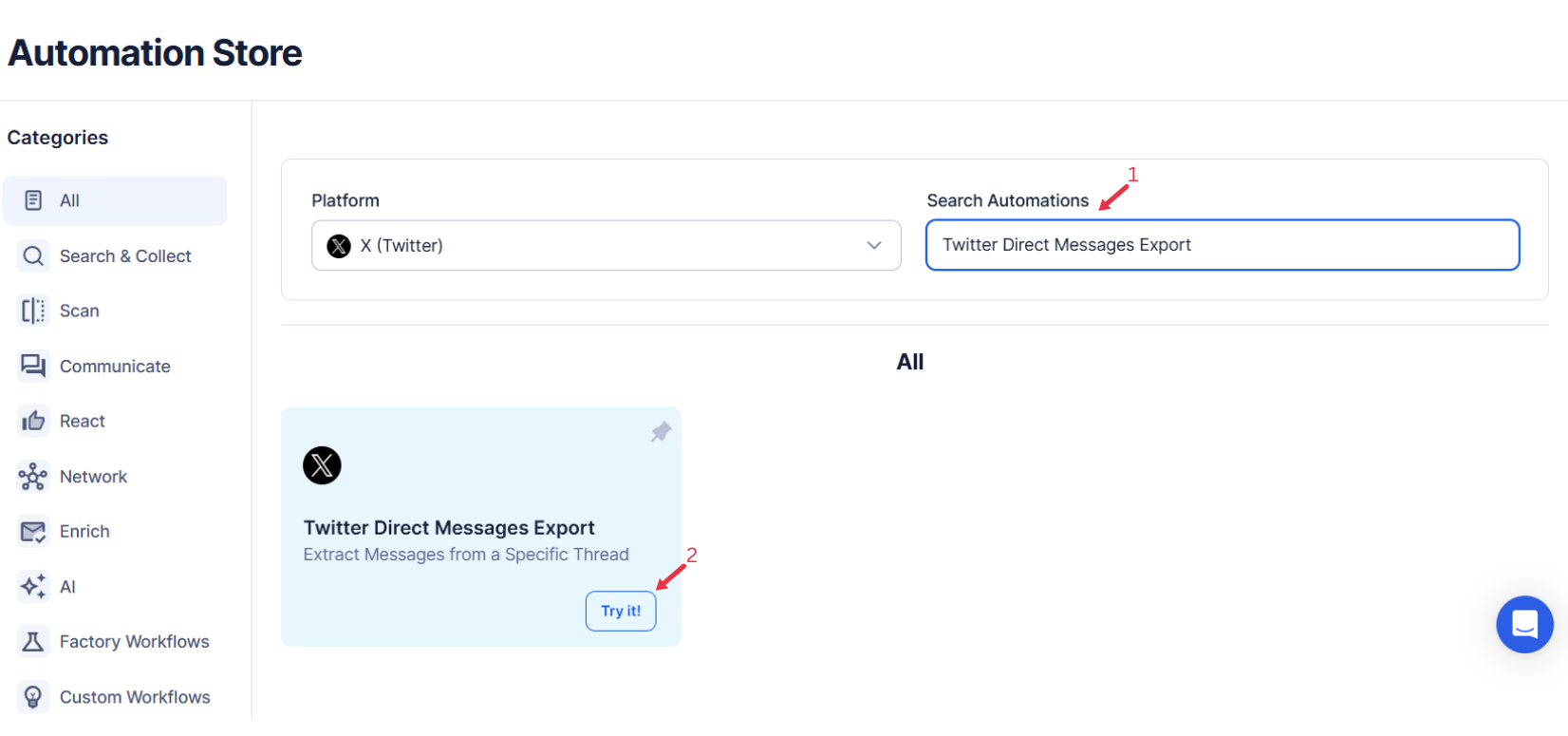
Navigate to the Automation Store, search for Twitter Direct Messages Export , and click the automation to open its configuration page.
Step 4: Select Your Input Source
TexAu enables you to export your Twitter Direct Messages easily and efficiently. You can choose between different input methods to manage your exports based on your requirements.
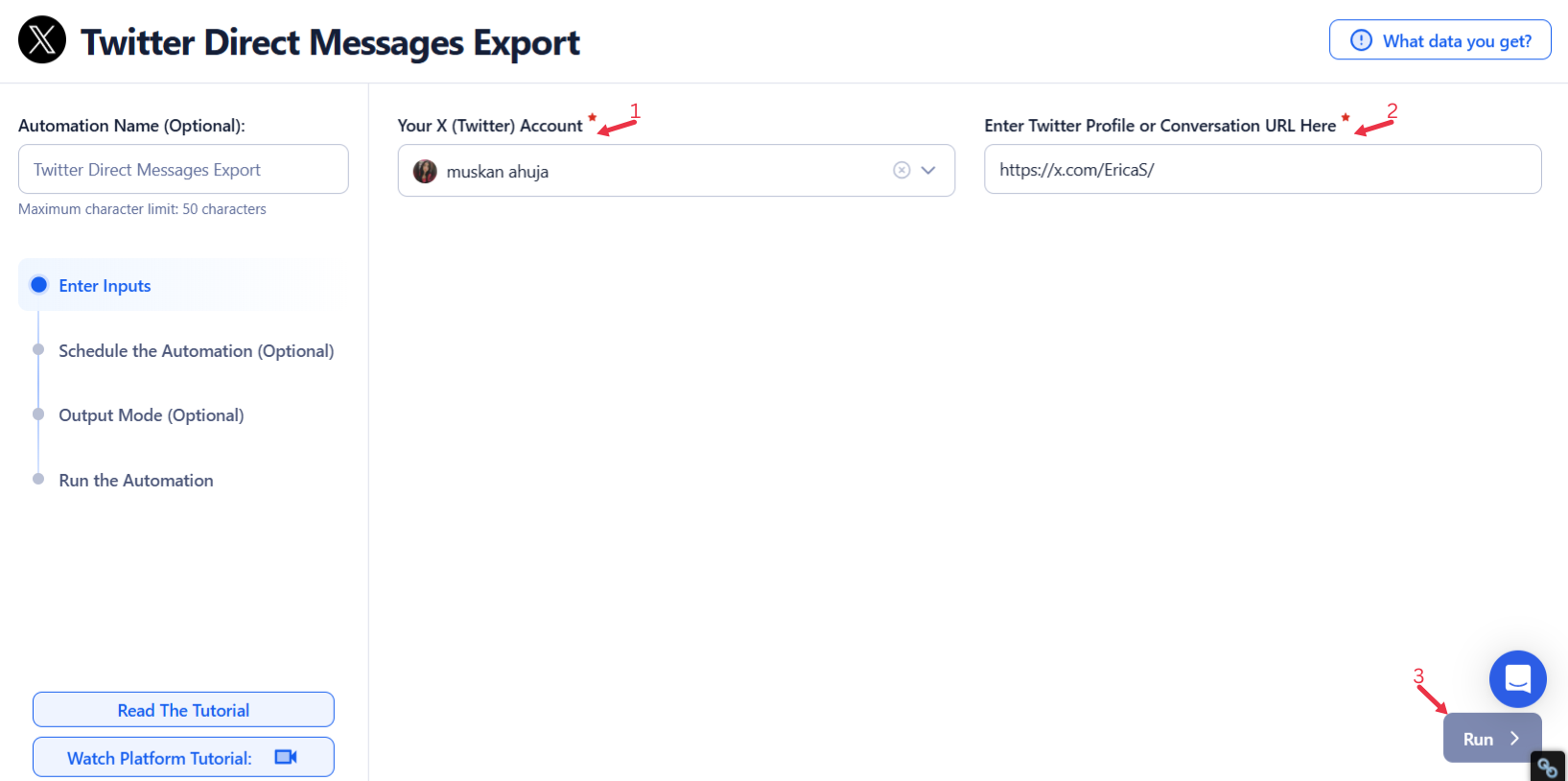
Single Input
Use this option to export messages from a single Twitter conversation.
- Account: Select the Twitter account from which messages will be exported.
Profile URL: Enter the URL of the Twitter profile or conversation to export.
Google Sheets
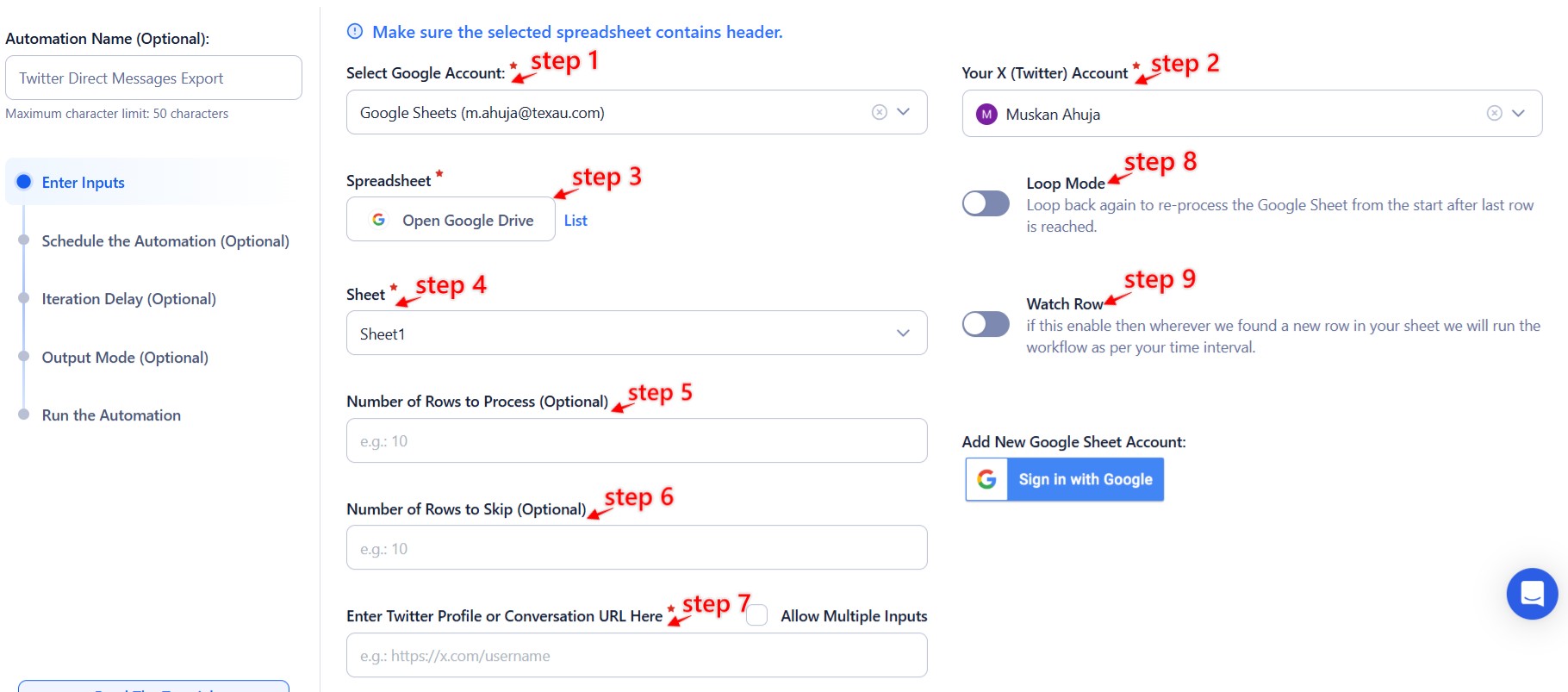
This option is perfect for exporting messages from multiple conversations listed in a Google Sheet.
- Connect your Google account
- Click Select Google Account to choose your account or add a new one using Add New Google Sheet Account.
- Select your spreadsheet
- Click Open Google Drive to locate your Google Sheet containing the profile URLs.
- Select the spreadsheet and the specific sheet where your data is stored.
- Adjust processing options
- Number of Rows to Process (Optional): Define how many rows to process from your sheet.
- Number of Rows to Skip (Optional): Specify rows to skip, if necessary.
- Provide input details
- Profile URL: Ensure the column in your sheet contains valid Twitter profile or conversation URLs.
Loop Mode (Optional)
- Turn on Loop Mode to reprocess the sheet from the start after all rows are completed.
Watch Row (Optional)
The Watch Row feature allows Google Sheets to be checked automatically for new rows at set intervals. When new data is found, the workflow runs.
To configure it, specify how often the system should check and define start and end dates.
Watch Row Schedule:
- None
- At Regular Intervals (e.g., every 15 minutes or every hour)
- Once
- Every Day
- On Specific Days of the Week (e.g., every Tuesday and Friday)
- On Specific Days of the Month (e.g., the 12th and 30th)
- On Specific Dates (e.g., November 8)
The system runs checks every 15 minutes by default and stops monitoring after five days, unless modified.
Process a CSV File
This option is ideal for exporting messages from a static list stored in a CSV file.
- Upload the file
- Click Upload CSV File and select the file containing the conversation URLs.
- TexAu will preview its content for verification.
- Adjust processing settings
- Number of Rows to Process (Optional): Define how many rows to process from the CSV file.
- Number of Rows to Skip (Optional): Specify rows to skip, if required.
- Provide input details
- Profile URL: Ensure the correct column contains valid Twitter conversation URLs.
Tip: Use Google Sheets for dynamic or regularly updated lists and CSV files for static data.

Step 5: Schedule the Automation (Optional)
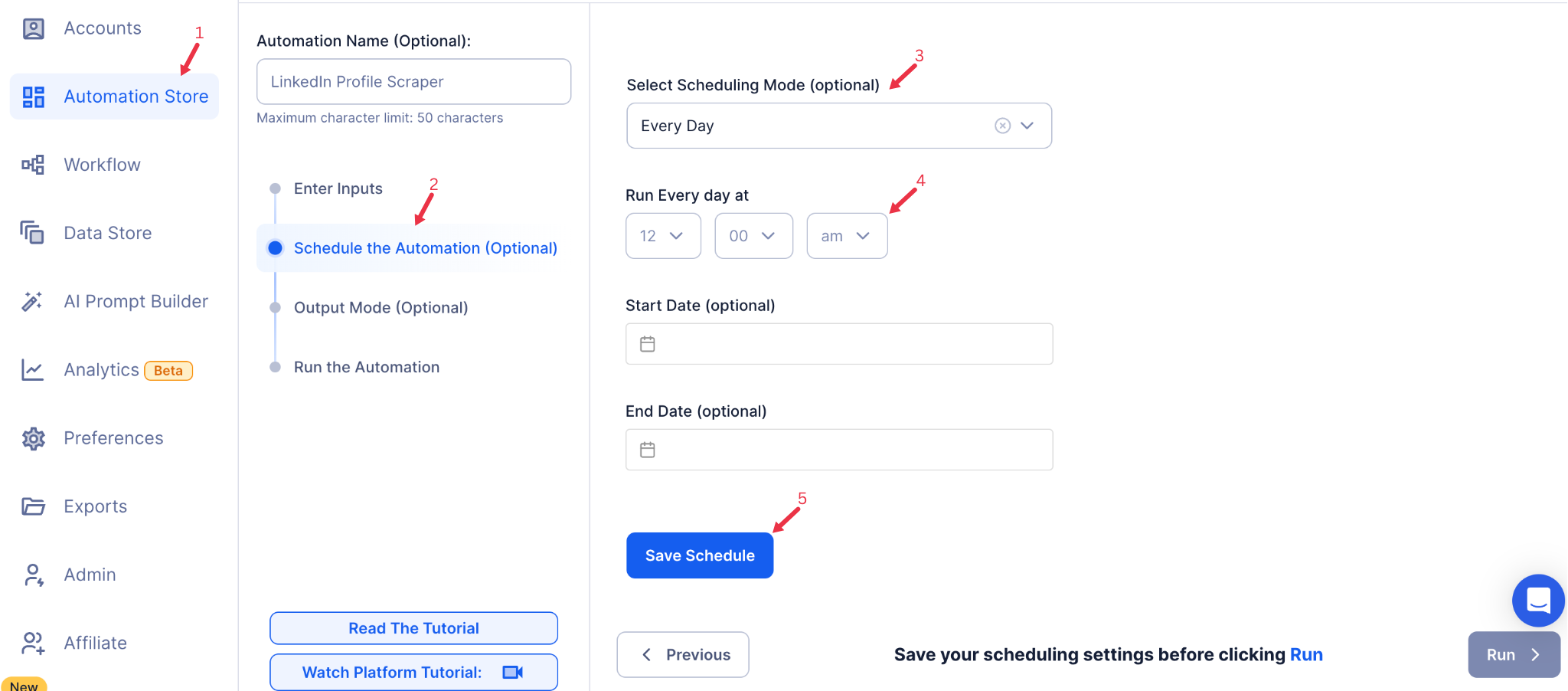
Run the automation on a schedule to keep your exported messages updated. Click Schedule and select a frequency:
- None: Run the task manually.
- At Regular Intervals: Choose a repeat frequency (e.g., every 6 hours).
- Once: Run the task at a specific date and time.
- Every Day: Schedule daily exports for updated data.
- On Specific Days of the Week: Set particular days (e.g., Mondays and Thursdays).
- On Specific Dates: Pick specific calendar dates for the export.
Tip: Scheduling is useful for maintaining an updated archive of direct message data.
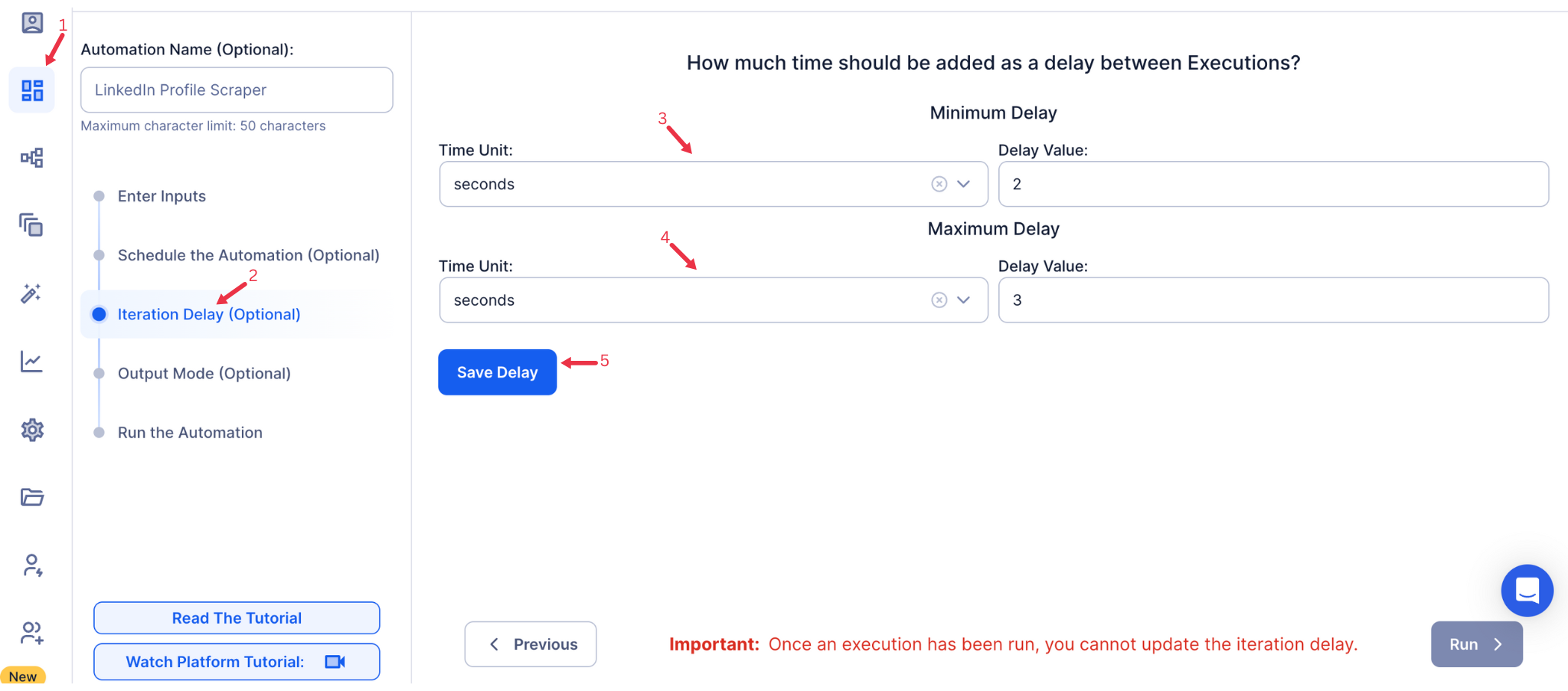
Step 6: Set an Iteration Delay (Optional)
Avoid detection and simulate human-like activity by setting an iteration delay. Choose minimum and maximum time intervals to add randomness between actions. This makes your activity look natural and reduces the chance of being flagged.
- Minimum Delay: Enter the shortest interval (e.g., 10 seconds).
- Maximum Delay: Enter the longest interval (e.g., 20 seconds).
Tip: Random delays keep your automation safe and reliable.
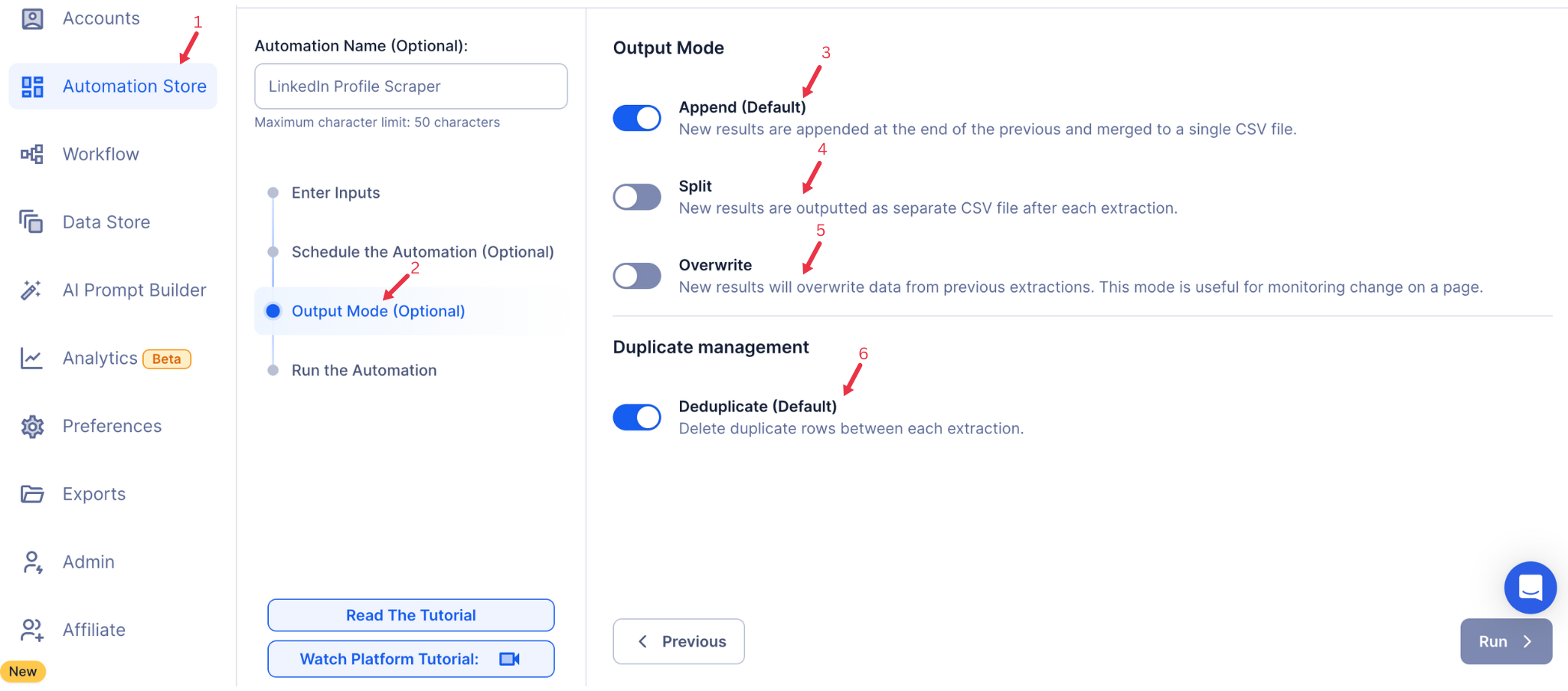
Step 7: Choose Your Output Mode (Optional)
Choose how to save and manage the extracted alumni data. TexAu provides the following options:
- Append (Default): Adds new results to the end of existing data, merging them into a single CSV file.
- Split: Saves new results as separate CSV files for each automation run.
- Overwrite: Replaces previous data with the latest results.
- Duplicate Management: Enable Deduplicate (Default) to remove duplicate rows.
Tip: Google Sheets export makes it easy to collaborate with your team in real time, particularly useful for alumni network management and analysis.
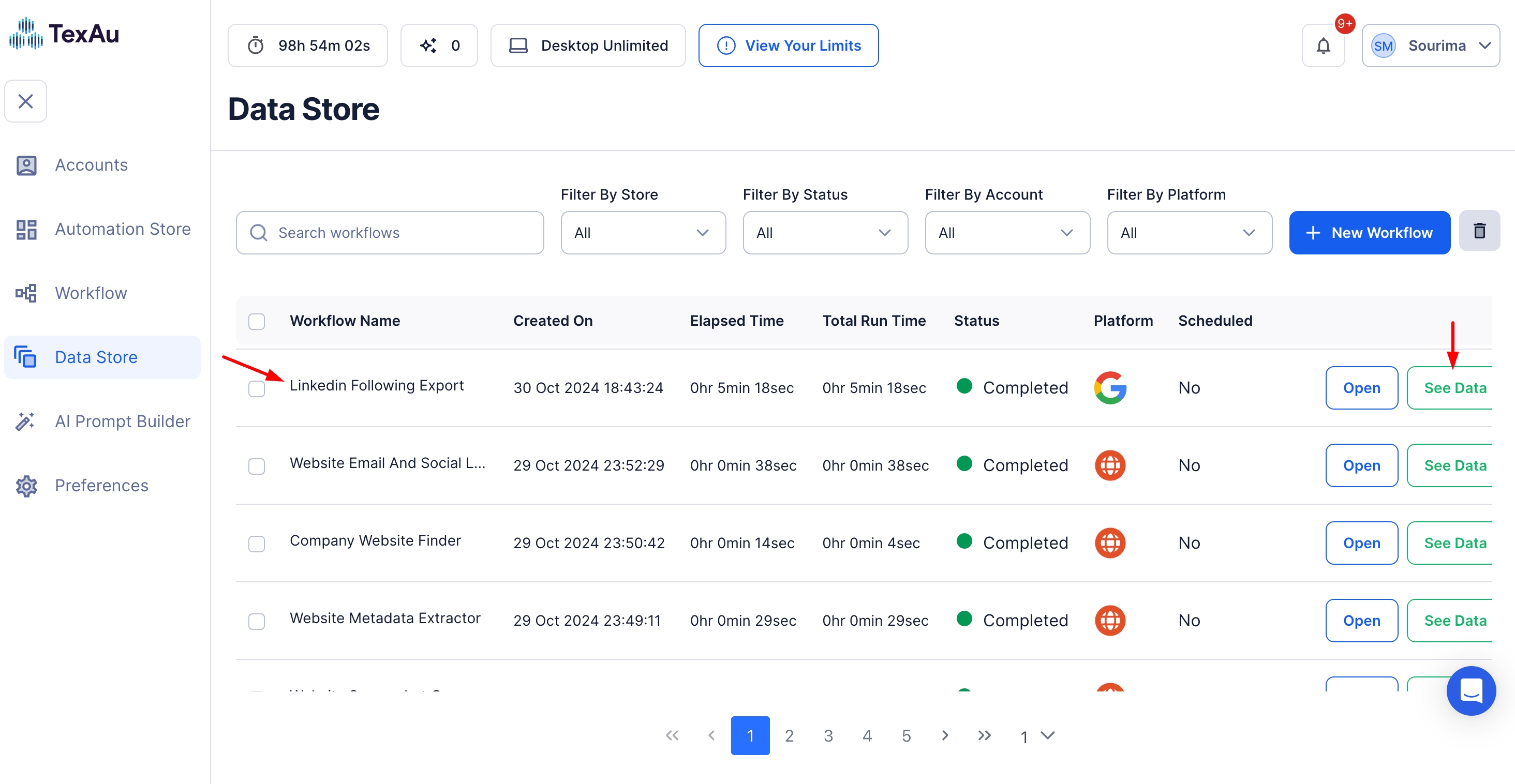
Step 8: Access the Data from the Data Store
Once the automation completes, go to the Data Store section in TexAu. Locate the Twitter Direct Messages Export automation and click See Data to view or download the results.
The Twitter Direct Messages Export automation is a powerful tool for streamlining communication analysis, building insights, and keeping records. With TexAu’s scheduling, input customization, and seamless data export features, founders, marketers, and sales teams can optimize their Twitter engagement and achieve better results.
Run this automation on your own machine.
TexAu V2 Desktop runs every automation locally — your real session, your real IP, unlimited hours, no proxies. One-time $1,999, no subscription, 5 years of updates.